Service Level Agreements (SLAs) are crucial for measuring performance and ensuring customer satisfaction. However, what happens when an SLA’s calculation, possibly applied to thousands of issues, needs to be corrected or updated? The Time to SLA app offers a powerful solution to this daunting problem: recalculation.
This feature tackles situations where existing SLA data requires adjustments, ensuring your information always remains reliable.
🤔 Why is it essential?
After installing Time to SLA and defining your SLAs, the app begins calculating SLA times as issues progress. Here's where recalculation comes in handy:
-
New SLA Configurations on Existing Issues: When a new SLA is defined, you might want to apply it to issues created before the definition was established. Without recalculation, these issues would lack the SLA data, leading to incomplete SLA tracking.
-
SLA Configuration Changes: If you adjust the configurations of existing SLAs, these changes need to be reflected in all issues to maintain accuracy. Recalculation ensures that your modified SLAs are applied retroactively. Otherwise, the inaccuracies would affect your SLA performance metrics and reporting.
💡 Example: Imagine a software development team that initially sets an SLA to resolve critical bugs within 48 hours. After analyzing their workflow and customer feedback, they decide to pause SLA calculation if a ticket requires inputs from the customer to avoid any unfair or unexpected SLA breaches. After implementing this change, recalculation allows them to update existing tickets accordingly.
⏲️ How to use recalculation
The Recalculation screen in TTS provides a straightforward interface to update and correct SLA data. Here you can simply select which SLAs you want to recalculate or use the Jira Query Language (JQL) to specify. If you don't want to update completed SLAs, there is an option for that as well.
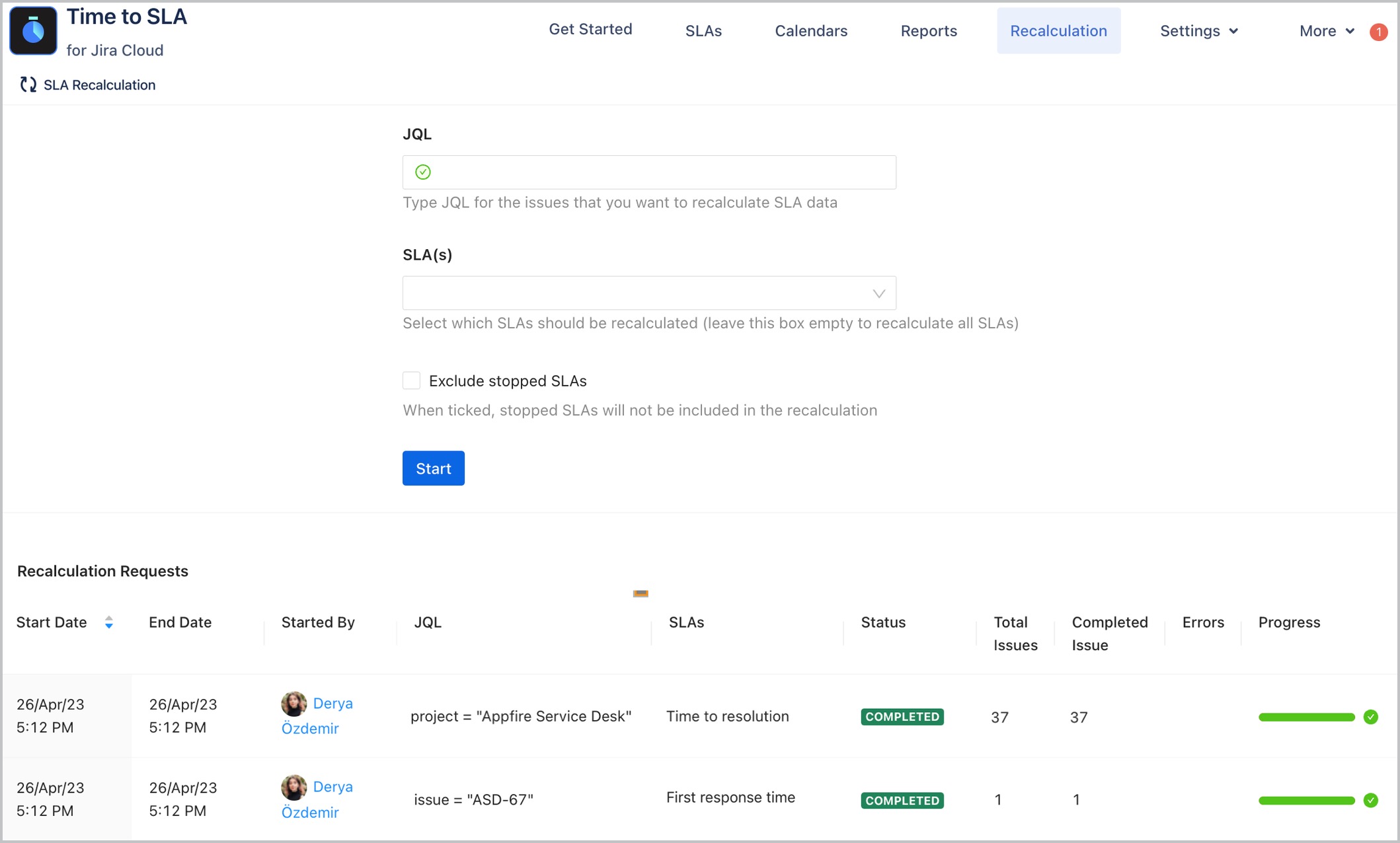
All in all, the recalculation feature is designed to maintain the accuracy and integrity of your SLA data, helping your teams maintain high standards of service delivery and customer satisfaction. What’s more, our team at Appfire has recently made significant improvements to the recalculation feature, making it faster and more robust than ever before.
Don't let inaccurate SLAs hold you back–try Time to SLA for Jira today, and request a free demo along the way. Also, don't forget to visit our documentation to discover a treasure trove of real-world use cases.

