Efficient time management and accurate work logging are crucial for project success and team productivity. For managers overseeing complex projects and diverse teams, an automated work log is not just a luxury but a necessity. This article will guide you through the process of setting up an automated work log using the Time in Status.

What is worklog in Jira?
Worklog in Jira is a detailed record of the time spent on an issue by a user. It is essential for tracking the amount of effort and time invested in tasks and projects, providing valuable insights for project management, resource allocation, and performance evaluation. Worklog helps with planning, tracking progress, managing tasks, assigning workflows, organizing team workflow, and prioritizing projects so that they can be completed on time.
Time in Status Automated Worklogs
Time in Status streamlines the process of logging work hours by automating the tracking of issue status changes and transitions within Jira. It offers flexibility in recording hours and generating reports related to different statuses. This significantly decreases the manual effort needed to log work hours, allowing team members to dedicate more time to their core tasks.
This add-on is perfect for teams that rely on Jira issue statuses to monitor progress and require automated work hour logging based on these statuses.
How to Log Work Automatically in Jira?
Logging work automatically in Jira can streamline your project management processes. Time in Status can help achieve this by automating the work log entries. It allows you to automate daily work logs, making it unnecessary to log hours of work for each team member every day.
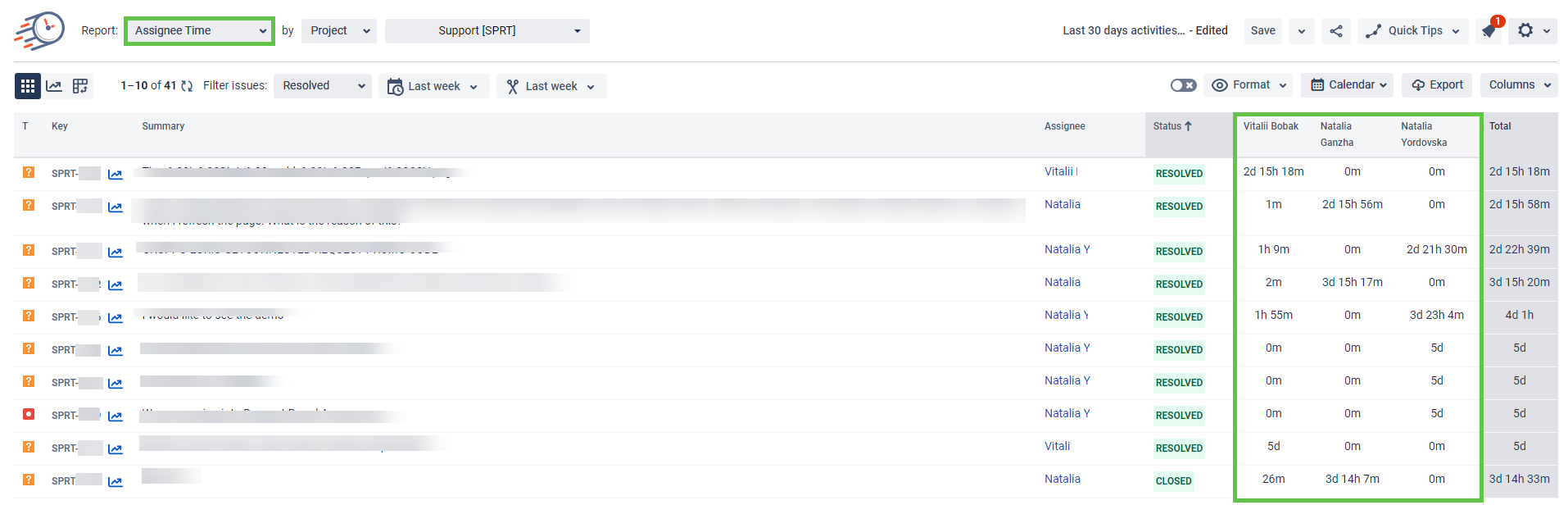
The Assignee Report provides a detailed breakdown of time spent on issues by each team member, allowing you to monitor productivity and identify any bottlenecks.
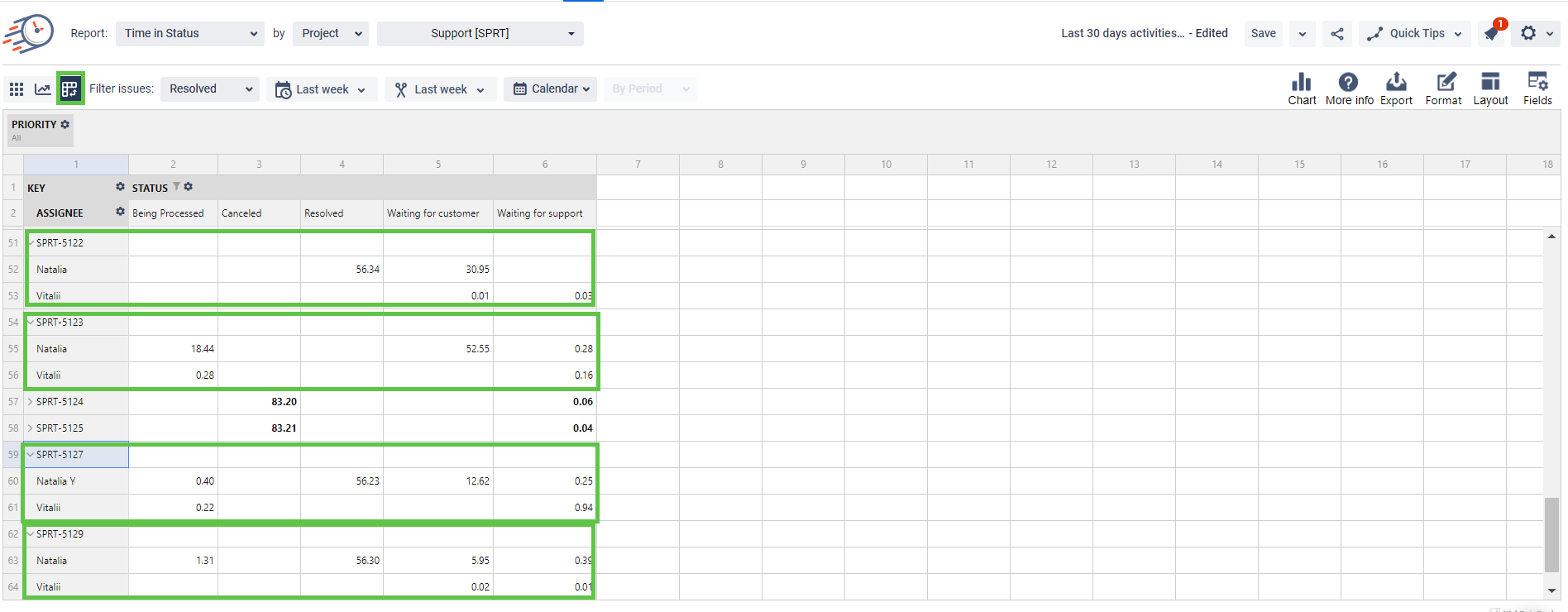
With the Pivot table view, you can create a custom report, group tasks, and see how much time they spent in the status while they were assigned to a specific Assignee.
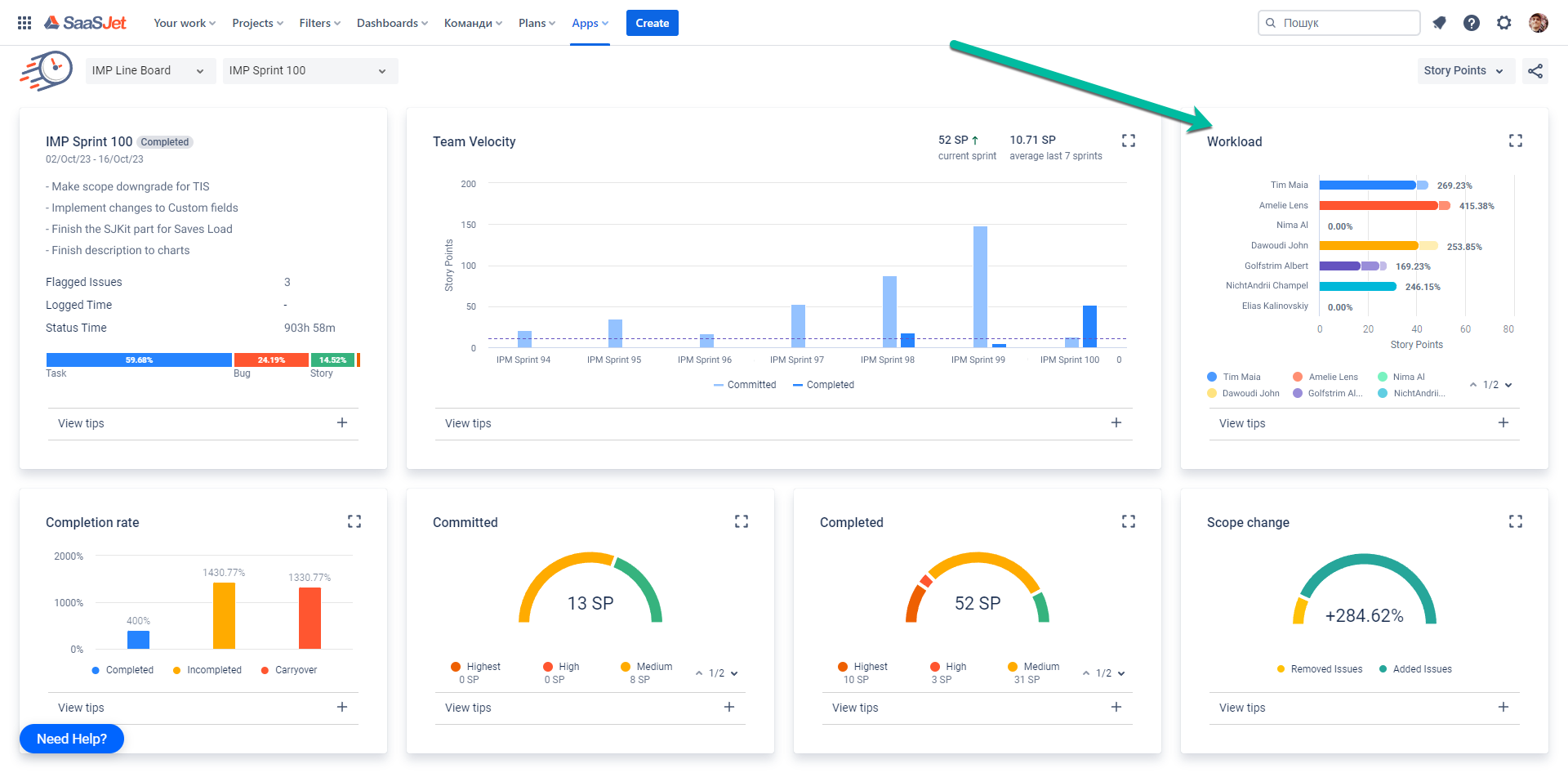
For Scrum teams, there's also a Sprint Report feature. The Workload section allows you to check whether the work is proportionally distributed in the team.
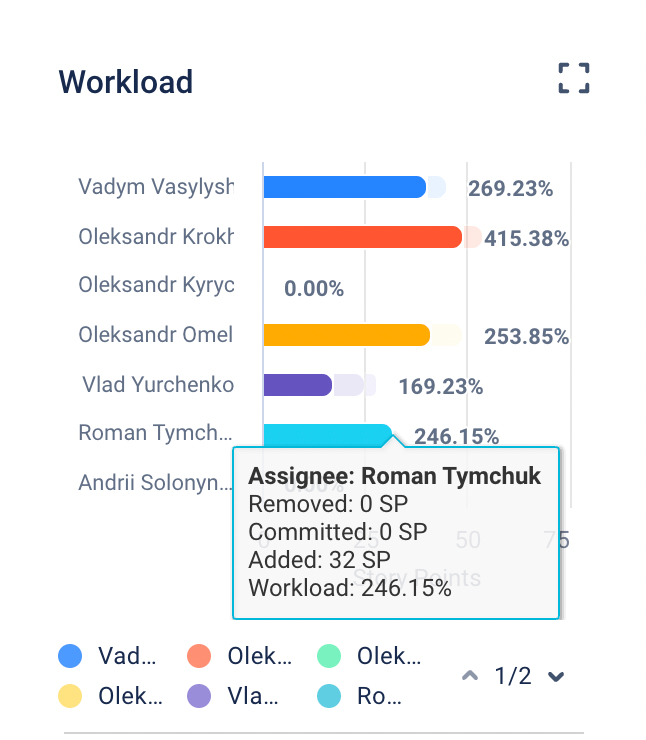
The Workload selection allows you to check whether the work is proportionally distributed in the team.
Time in Status Calendars
To get precise report, you also need to exclude non-working time in Jira. Because for a typical team working regular business hours, there can be a significant difference between calendar and actively working time for an issue.
For example, a bug is picked up on Friday and completed the following Thursday. From a 24/7 calendar perspective, that's six elapsed days.
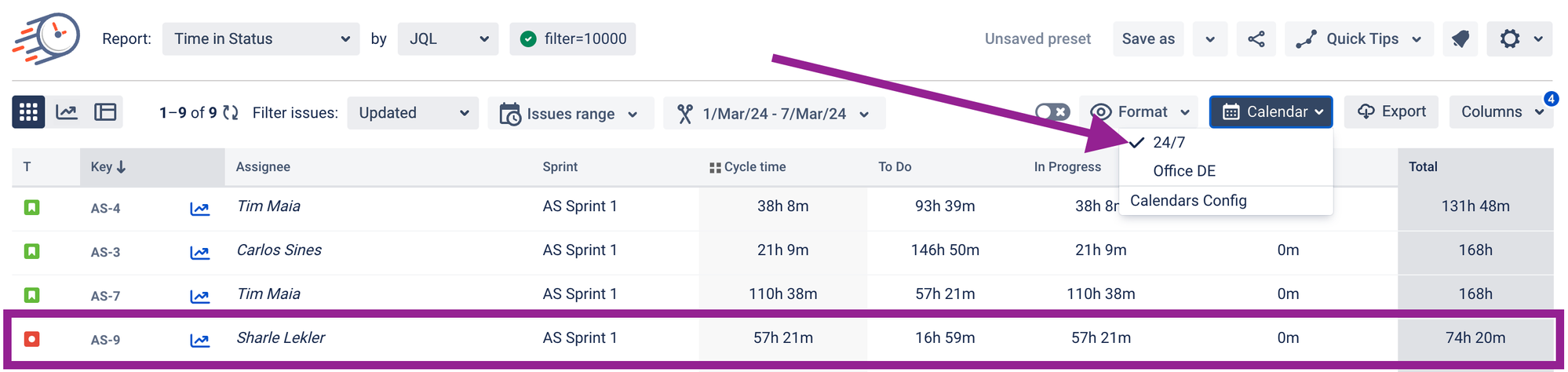
However, looking at working days tells a different story. If the team only works Monday through Friday, then there were only four working days between the start and completion of that bug.
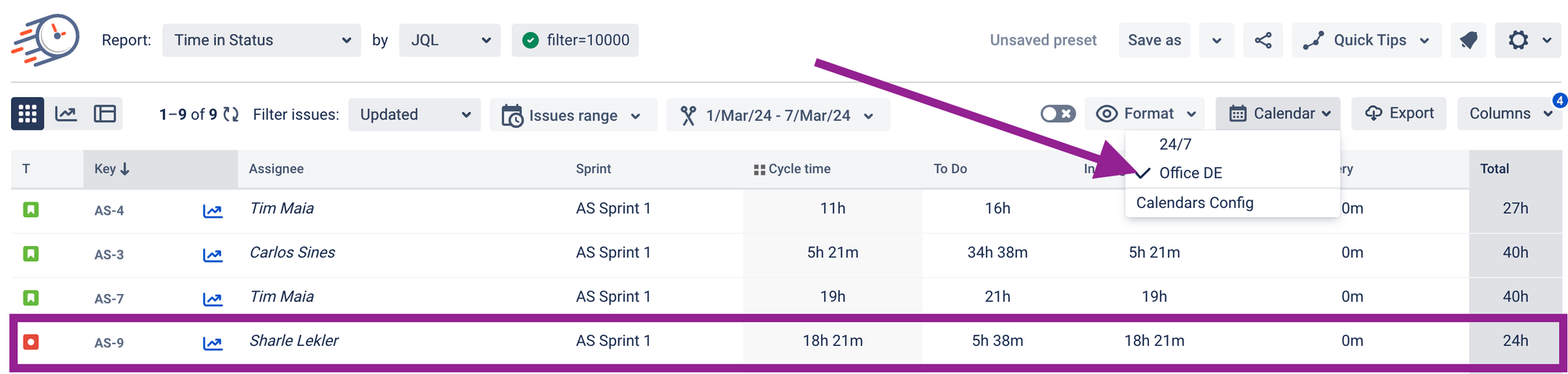
Time in Status ensures that work hours are consistently tracked, even during holidays or weekends, without any manual intervention. The automated process not only saves time but also significantly reduces the risk of errors, providing you with accurate and reliable data.
Other ways to track activity in Jira?
Jira offers a range of built-in features and add-ons to effectively monitor activities. Here are some of Jira's Time Tracking tools:
- Issue Worklogs: Jira allows users to log work directly within each issue, capturing the time spent on individual tasks and providing a detailed record of activities.
- Time Tracking Report: This report provides a summary of the time spent on issues within a project, helping project managers monitor progress and ensure that work is on track.
- Activity Stream: The Activity Stream gadget, when added to your Jira dashboard, shows a real-time feed of all activities, including worklog entries, offering a quick overview of recent actions taken by team members.
- Worklog and Time Tracking Gadgets: Jira dashboards can be customized with various gadgets that display worklog and time tracking information.
- Jira Query Language (JQL): JQL allows you to create custom queries to search for issues based on specific criteria, including worklogs, and generate reports based on worklog data.
- Time in Status: This add-on offers reports, real-time tracking, and automation capabilities to enhance your ability to monitor and manage team activities efficiently.
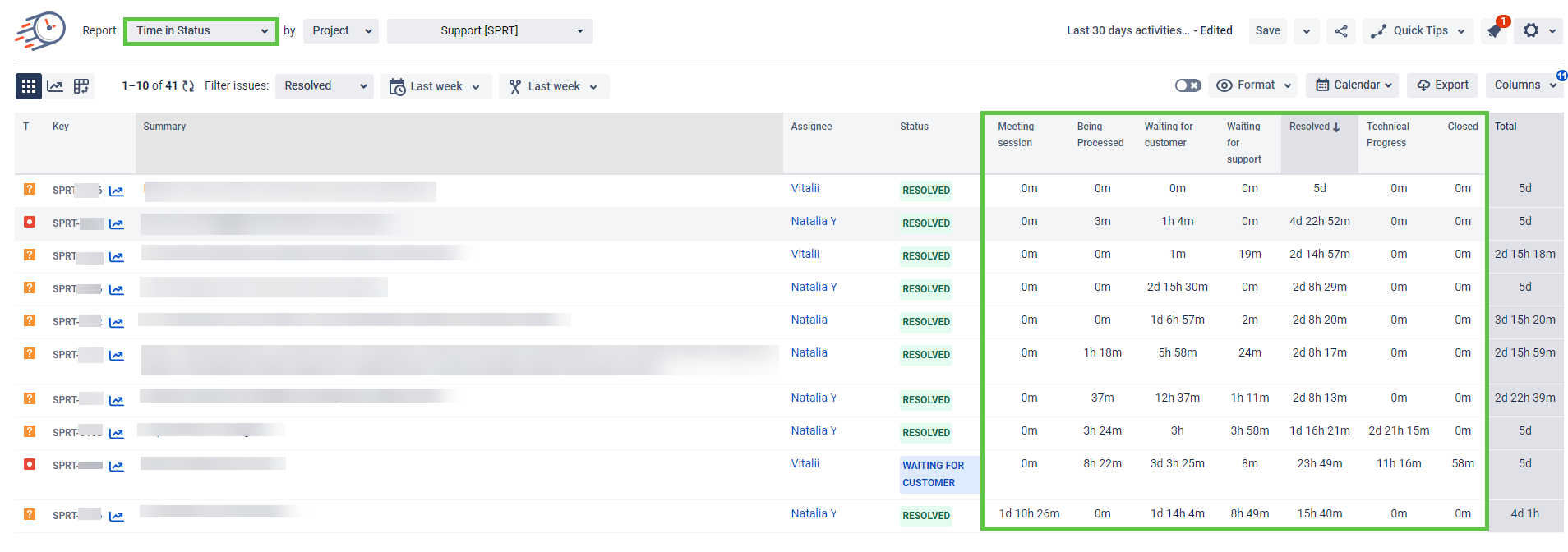
The Time in Status add-on simplifies tracking activity in Jira by offering detailed insights into the time spent on different tasks by team members or on the tasks themselves. Another report that we have not mentioned yet is the Time in Status Report, which tracks how long issues remain in different statuses.
Takeaway

With Time in Status, logging work automatically in Jira becomes a seamless experience. The add-on takes care of all the administrative tasks, freeing up your team to focus on their core responsibilities and enhancing overall productivity. With automated work logs, real-time tracking, and comprehensive activity reports, managing your projects has never been easier.
Try Time in Status now and unlock the full potential of your Jira workflow.
🚀 Get your 30-day trial:
☁️ Time in Status - Jira Cloud
🗄 Time in Status - Data Center
