Hi Team
I have 3 Columns New P Rating, Date Contract Will Expire and New Work Start Date. What I am trying to do is calculate the New Work Start Date base do the 'New P Rating' . For eg., If my
Conditions I require- If New P Rating is P4, then New Work Start date should be 2 months before the Date Contract will Expire. For P3 is 3 months before, P2 is 5 months before and P1 is 6 months before.
I Tried the below code which gave me the results in attached screenshot"
Select T1.'New P Rating',T1.Date Contract will Expire',
FORMATDATE(DATE_SUB(T1.Date Contract Will Expire',INTERVAL 60 DAY)) as 'New Work Start Date'
FROM T1
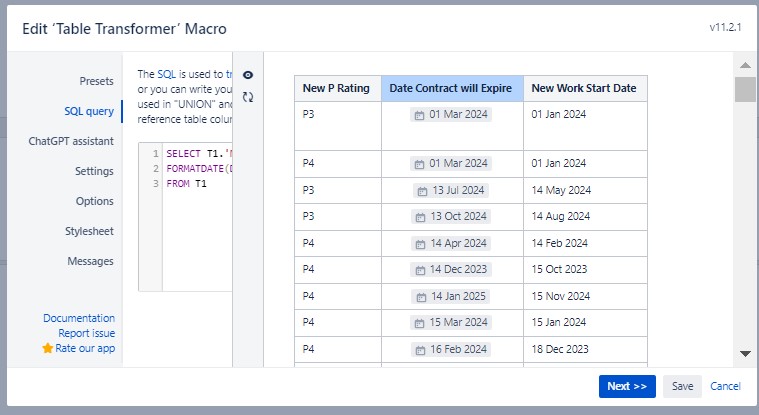
Just a note, New P Rating is a calculated column in itself in an internal macro. The actual column 'Contract Value' used for the calculation is not visible as I did not call it in my code.
SELECT *,
CASE
WHEN ('Contract Value') <= 500000 THEN "P4"
WHEN ('Contract Value') BETWEEN 500001 AND 5000000 THEN "P3"
WHEN ('Contract Value') BETWEEN 5000001 AND 20000000 THEN "P2"
WHEN ('Contract Value') >=20000000 THEN "P1"
END AS 'New P Rating'
FROM T*
Column Date Contract will Expire is a manually entered date in a typical Confluence date style ( // )
Is there a way I can get the New Work Start Date column to show the new date as per the P rating of P1-P4 and the result calculated as per my multiple conditions mentioned above?


