Mistake 10
When you’re wading through mucky configurations, you never know what is lurking underneath. Seemingly simple clean up activities are more complex or dangerous then they initially seem. It’s important to know exactly how each clean-up activity impacts other areas of the application.
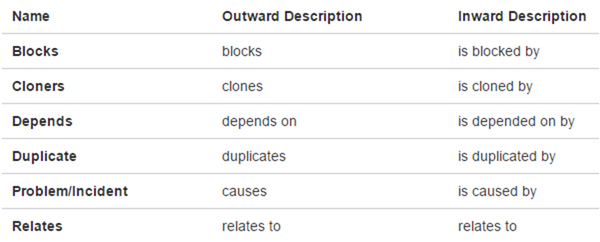
Admin > Issues > Issue linking
Jira comes with a standard set of link types. (e.g. blocks, clones, duplicates, etc.) At one company the list of link types grew to 20 different options! To remedy this, I removed unused, outdated, and duplicate types. Jira handled the migration, automatically updating any issues associated with those old types. Sounds alright so far, right?
Unfortunately, my clean up action changed the “Updated Date” to today's date for a large amount of old issues. An internal app using the REST API was using the issue "Updated Date" field to limit the number of issues in its own application. My change caused an increase in the scope of their queries, their queries timed out, and their app stopped functioning!
In this case, knowing what would happen in Jira wasn’t enough. It’s also important to know exactly what any apps using the REST API are doing too. Also check for the existence of service accounts in the user management admin area. This way you can consider other uses when making global changes.
Clean-up Tips
-
Always test the impact of any clean-up activities in a test environment first
-
After a clean-up action, manually verify the results
-
Be ready (reserve time in your schedule) to respond to any resulting user trouble reports
-
In Server and Data Center:
-
Communicate early and often with others to identify impacts on any service accounts, apps, or APIs
Back to intro and mistakes list
