Integrating Workday with Jira Service Management using Custom Reports
Workday provides two main ways to pull data:
- SOAP: Standard SOAP APIs. You can view the version and the specs here.
- RaaS: Report-as-a-Service (RaaS) to extract data from custom reports. Here is a sample Python Client provided by Workday.
In this article, we highlight Workday Custom Report integration pattern.
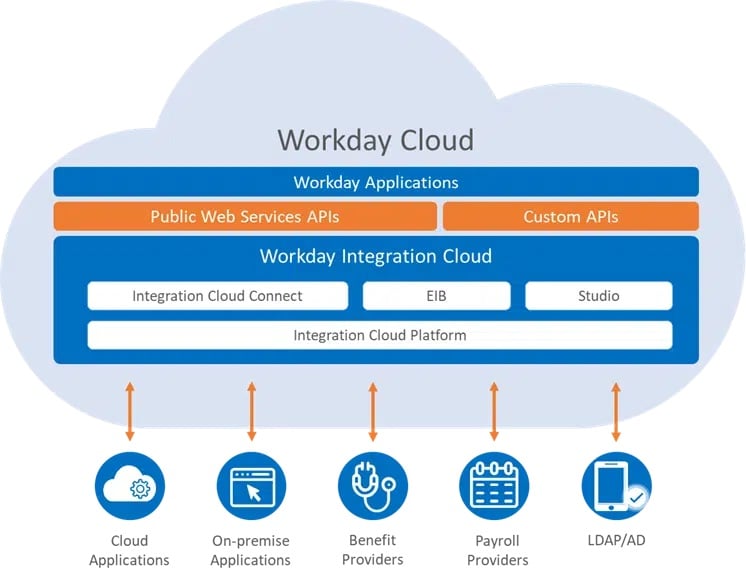
Image Source Credit: Workday Integration Documentation
The Report as a Service (RaaS) interface provides great flexibility as it is tied to custom reports that can pull data from any object with calculated fields defined by the users. While SOAP API is available out of the box with no additional development, custom reports do need to be defined by users first before they can be used to extract data. OnRamp provides support for both options in order to provide maximum flexibility to users. Here are a few use cases and our recommendation on which trigger type to use.
|
Use Case
|
Recommended OnRamp Trigger
|
|
Pull data when a position is closed in Workday Recruiting
|
Workday Custom Report
|
|
A worker is hired in Workday but pull data only when certain conditions are met
|
Workday Custom Report
|
|
Use custom or standard objects other than Worker e.g. Supervisory Org, Position, etc
|
Workday Custom Report
|
|
You want to pull data from multiple objects including custom objects and fields
|
Workday Custom Report
Note - Workday Employee Hire with Field Override Service is also an option
|
|
Hire Employee or Contract Contingent Worker BP is executed
|
Workday Employee Hire or Workday Cont Worker Hire
|
|
Terminate Employee or End Contract Contingent Worker BP is executed
|
Workday Employee Termination or Workday Cont Worker Termination
|
Infographic of Workday Integration to automate HR Workflows using Jira Service Management
Demo of Workday Integration with Jira Service Management
 https://www.youtube.com/watch?v=mhll-mg0p4s
For more information on how to use Workday Custom Report triggers in OnRamp, go to this link.
