I added the recommended status embed to my self-hosted WordPress site in the top-right corner. I copied and pasted the code right before the closing `</body>` tag as instructed.
A 'Status embed installed correctly' embed appears in the centre-top of the page, as shown in the attached screenshot, whether I am logged in to my site or not, and pressing the x to close the embed does not close it: the embed is still there, telling me it's installed correctly. This has happened in every browser I tried (Firefox, Safari, DuckDuckGo, Opera and Chrome; the screenshot is from Chrome).
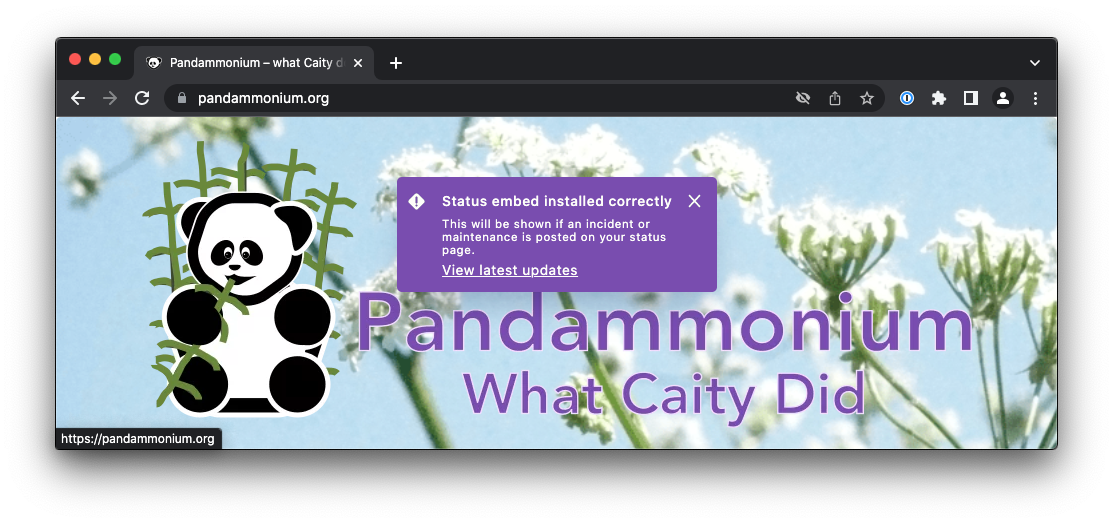
When I added an incident and a maintenance warning, the 'Status embed installed correctly' embed did not show; instead, an embed appeared in the top-right corner of the website showing the correct incident/maintenance information, and went away when I clicked the x. After that, however, the 'Status embed installed correctly' embed returned.
I have disabled the embed until this can be fixed.
How can I stop the 'Status embed installed correctly' embed appearing?


