Confluence Server version: 7.13.5 (Docker)
I am stuck in the step 'Prepare your apps' where I need to connect my cloud site in the migration process. I am following the next steps:
- Go to 'General configuration' > 'Migration assistent' on the Confluence Server instance
- Complete the step 'Assess your apps'
- Start the step 'Prepare your apps'
- Click the button 'Choose cloud site'
- In the dialog 'Choose your cloud destination' click 'Continue' to redirect to the Atlassian migration website
- Migrate from: xxx.mydomain.tld
- Migrate to: yyy.atlassian.net
- Check option 'Allow Atlassian to access migrations data'
- Click button 'Confirm'
- (Atlassian website redirects to my Confluence Server)
- The first page of the 'Prepare your apps' step is shown again (/admin/migration.action?&#apps/connect-to-cloud?cloudId=), but with no options to choose from (see image below)
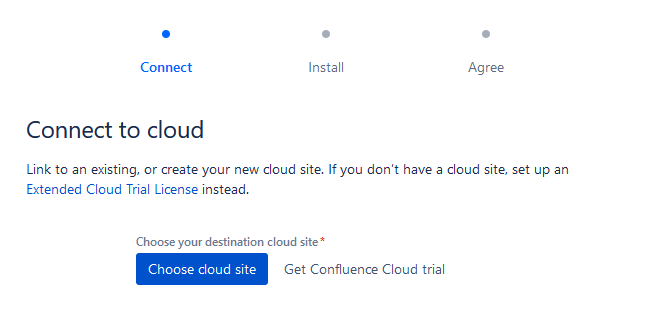
The same thing occurs when I try to skip the step 'Prepare your apps' and proceed with the step 'Migrate your data', since it requires the same information.
I suspect that this has something to do with my setup. I am running Confluence using Docker and I use a Nginx as reverse proxy to make the Confluence instance available through a subdomain without base path (e.g., https://confluence.mydomain.tld). For the Docker container, I use the following command:
docker run --rm \
  -v $CONFLUENCE_DATA:/var/atlassian/application-data/confluence \
  -v /etc/timezone:/etc/timezone:ro \
  --name="confluence" \
  -e JVM_MINIMUM_MEMORY=$CONFLUENCE_MEM \
  -e JVM_MAXIMUM_MEMORY=$CONFLUENCE_MEM \
  -e CATALINA_CONNECTOR_PROXYNAME=$CONFLUENCE_HOST \
  -e CATALINA_CONNECTOR_PROXYPORT=443 \
  -e CATALINA_CONNECTOR_SCHEME=https \
  -e CATALINA_CONNECTOR_SECURE=true \
  -p 127.0.0.1:8090:8090 \
  -p 127.0.0.1:8091:8091 \
  atlassian/confluence-server:$CONFLUENCE_VERSION
The proxy config in Nginx was configured based on https://confluence.atlassian.com/doc/running-confluence-behind-nginx-with-ssl-858772080.html and looks as follows:
server {
  listen 443 ssl http2;

  root /var/www/html/confluence.mydomain.tld;
  index index.html index.htm;
  server_name confluence.mydomain.tld;

  # Security options
  ssl_certificate /etc/letsencrypt/live/confluence.mydomain.tld/fullchain.pem;
  ssl_certificate_key /etc/letsencrypt/live/confluence.mydomain.tld/privkey.pem;
  include "/etc/nginx/conf.d/ssl-options.conf";

  access_log /var/log/nginx/confluence.mydomain.tld/access.log;
  error_log /var/log/nginx/confluence.mydomain.tld/error.log;

  location /synchrony {
    proxy_set_header X-Forwarded-Host $host;
    proxy_set_header X-Forwarded-Server $host;
    proxy_set_header X-Forwarded-For $proxy_add_x_forwarded_for;
    proxy_pass http://localhost:8091/synchrony;
    proxy_http_version 1.1;
    proxy_set_header Upgrade $http_upgrade;
    proxy_set_header Connection "Upgrade";
  }

  location / {
    client_max_body_size 100m;
    proxy_set_header X-Forwarded-Host $host;
    proxy_set_header X-Forwarded-Server $host;
    proxy_set_header X-Forwarded-For $proxy_add_x_forwarded_for;
    proxy_pass http://localhost:8090;
    proxy_connect_timeout 600;
    proxy_send_timeout 600;
    proxy_read_timeout 600;
    send_timeout 600;
  }
}
Is there something that I am doing wrong?

