So my friend @Mourad Marzouk asked in the Adaptavist forum:
But because Groovy makes my head hurt, I went ahead and posted an answer on how to do it with Automation, which well... probably belongs here.
Also, I think this is a simpler solution for this (if I'm interpreting the original question correctly):
The table we're splitting looks like this:
|
Old Part #
|
Old Rev
|
New Part #
|
New Rev
|
Part Description
|
Procurement/End Item
|
|---|
|
Part number 1
|
Old Revision 1
|
Part number 1
|
Revision 1
|
Description 1
|
End Item 1
|
|
Part number 2
|
Old Revision 2
|
Part number 2
|
Revision 2
|
Description 2
|
End Item 2
|
If you look at the wiki source for this table, it looks like this:
||*Old Part #*||*Old Rev*||*New Part #*||*New Rev*||*Part Description*||*Procurement/End Item*||
|Part number 1|Old Revision 1|Part number 1|Revision 1|Description 1|End Item 1|
|Part number 2|Old Revision 2|Part number 2|Revision 2|Description 2|End Item 2|
First you split the description by newlines: {{issue.description.split("\n")}}, and iterate through each line with the For each advanced branching.
Then for each line ({{row}}), if it doesn't contain || (header), but does start with a |, then create a new subtask.
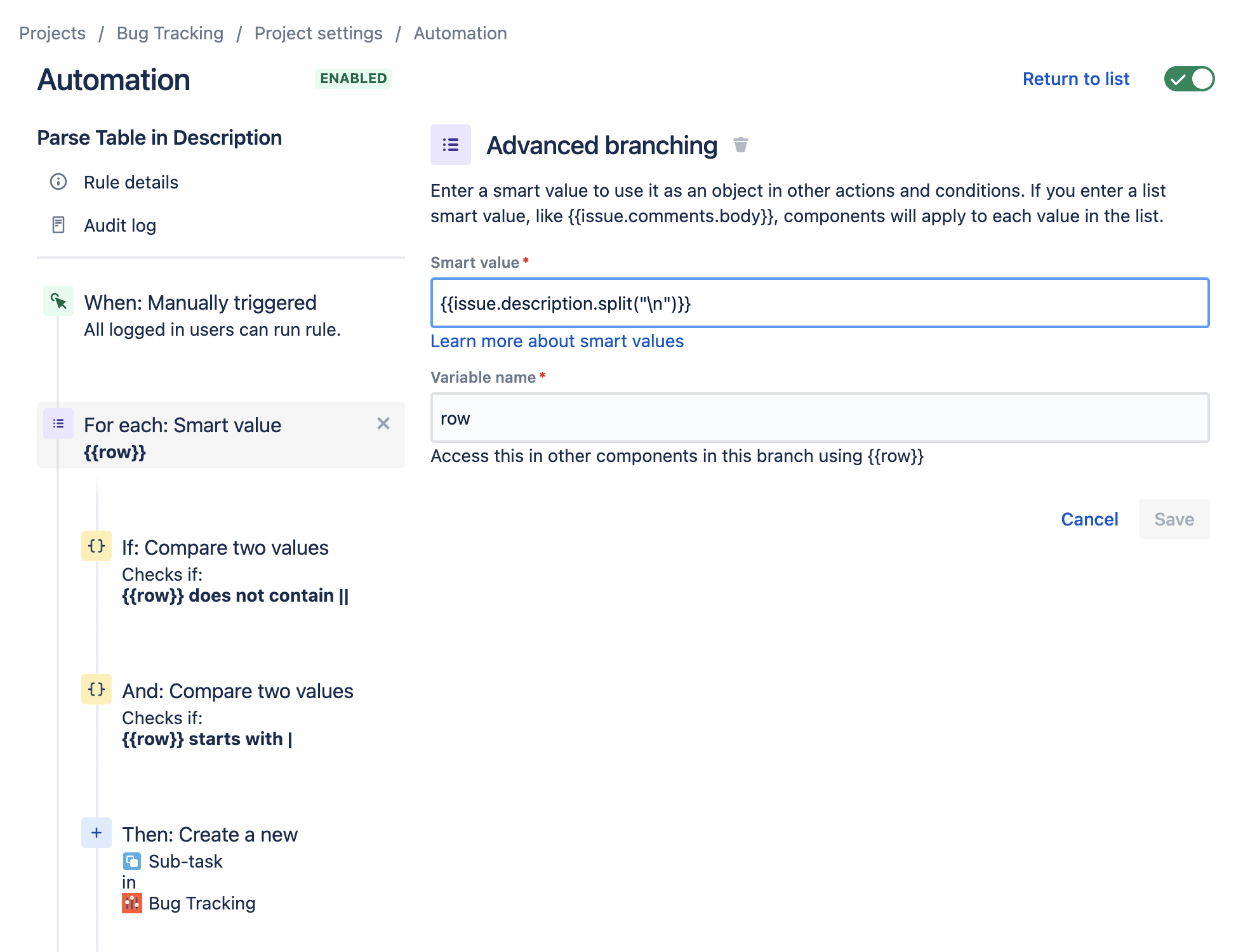
You then can split the row to get each "column", and those could be put in fields or whatever. I just threw them all in the Description.
First you split the description by newlines: {{issue.description.split("\n")}}, and iterate.
First column (Old part #) is: {{row.split("\|").get(1)}}
(Numbering starts with 0, but because the tables _start_ with a pipe character, we actually are getting the second column). Example:
0|1|2|3|4|5|6|
|Part number 1|Old Revision 1|Part number 1|Revision 1|Description 1|End Item 1|
So you'll get sub-tasks for each of the content rows in the table, and if you wanted, you could populate fields with different column data
.
Now this assumes that you only have one table per Description, and also that there aren't any other random lines that start with a | (pipe) character.
It might be safer to change the second comparison to exactly matches regular expression and use this:
^\|.*\|$
That will ensure that the line both starts and ends with a pipe character.


