As tracked at JSDCLOUD-4317, Jira Service Management's CSAT survey comments are not searchable via JQL. This article introduces a workaround to make them accessible via a custom field.
(0) Backdrop
Skip ahead to section (1) if you are not interested in the peripheral context.
You can browse the available Smart Values at the issue URL like https://SAMPLE.atlassian.net/rest/api/2/issue/EX-5?expand=names; however, there's no field holding the survey comment value. Refer to Find the smart value for a field for more details.
Although this article introduces an approach with REST APIs, it's error-prone due to some constraints. So please make a careful decision whether to implement the rule, considering the benefits vs. the operational costs.
(1) Preparation
First things first, you always need to have credentials when you do something important:
- Issue an API token of the site-admins account at https://id.atlassian.com/manage/api-tokens
- Encode your credentials "$EMAIL_ADDRESS:$API_TOKEN" with base64 as (1-2) Example below. Make sure not to include a line break at the end.
(1-2) Example - How to encode your API token
$ echo -n "site-admin@example.com:123e4567-e89b-12d3-a456-426614174000" | base64
c2l0ZS1hZG1pbkBleGFtcGxlLmNvbToxMjNlNDU2Ny1lODliLTEyZDMtYTQ1Ni00MjY2MTQxNzQw
MDA=
(2) Project prep
Make sure to have a custom field to save the values. For example:
- Create a custom field named "Satisfaction comment"
- Assign the custom field to the target issue types
(3) Create a rule
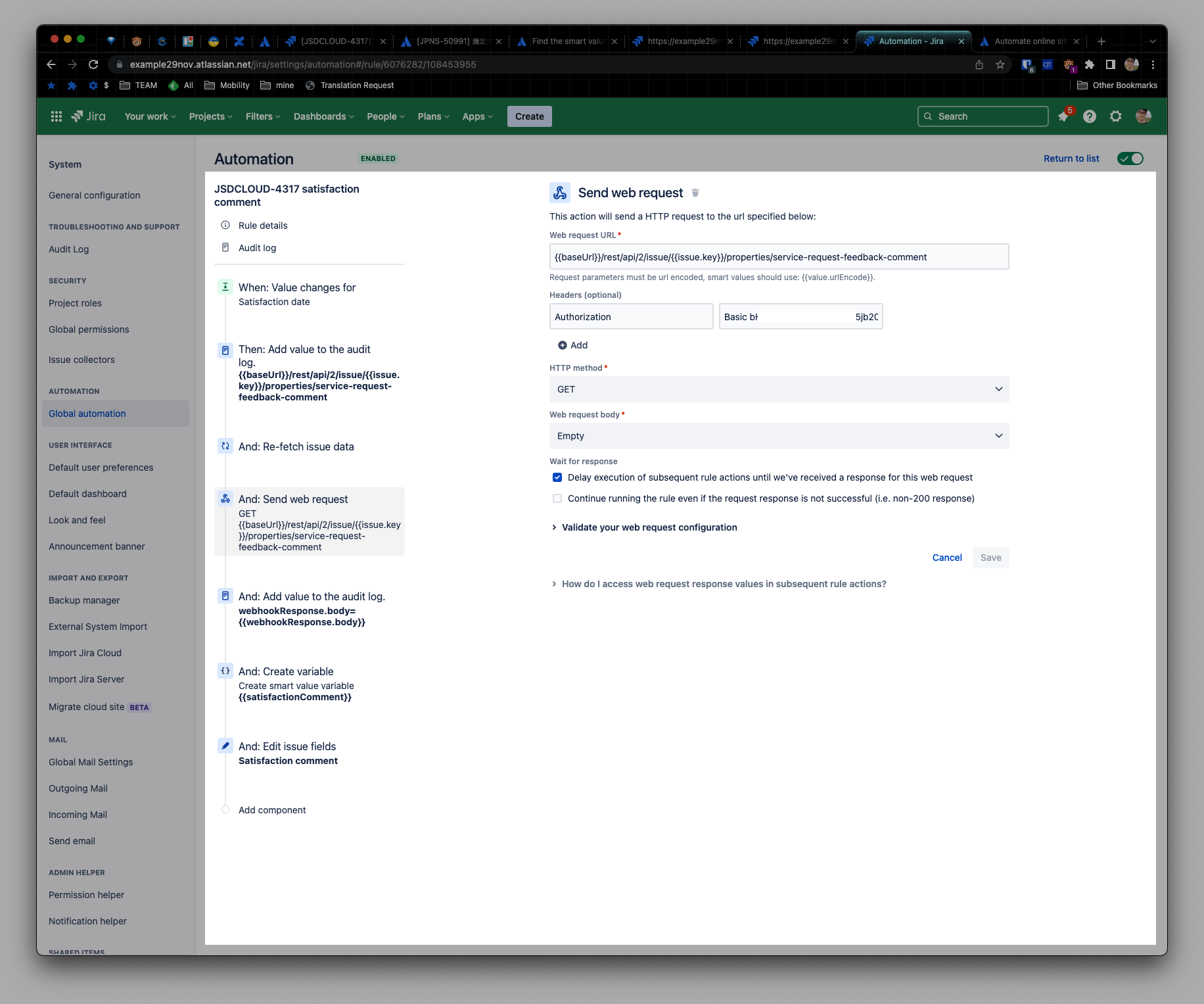
Here's the overview:
- Trigger: Field value changed
- Fields to monitor for changes: Satisfaction date
- Action: Re-fetch issue data
- Action: Send web request
- Web request URL: {{baseUrl}}/rest/api/2/issue/{{issue.key}}/properties/service-request-feedback-comment
-
Headers:
- Authorization: Basic <The output we got from (1-2)>
- Action: Create variable
- Variable name: satisfactionComment
- Smart value: {{webhookResponse.body.value.comment}}
- Action: Edit issue
- Selected fields: Satisfaction comment
- Value: {{satisfactionComment}}
(5) Caveats
When a customer selects the satisfaction rate in an email, this rule will be triggered because the "satisfaction date" field is changed. Then the web request can receive a 404 error due to the absence of comment. Feel free to add a comment if you find any handy solution for this symptom.
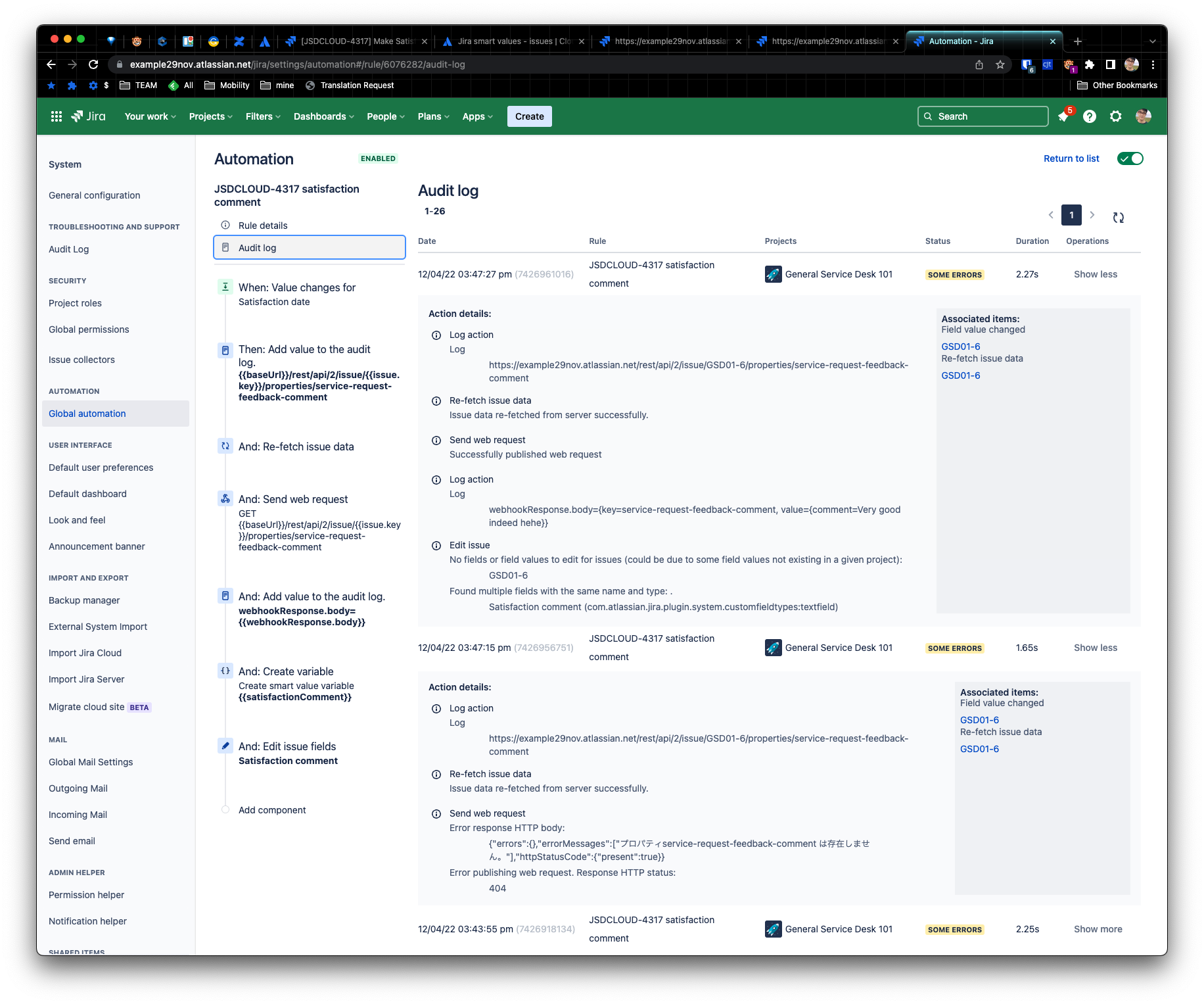
Besides, the edit issue action can cause the following error:
Found multiple fields with the same name and type
In that case, you can go with the additional fields like below:
{ "fields": { "customfield_10003": "{{satisfactionComment}}"} }
Refer to Advanced field editing using JSON for more details.


