|
Question
|
Answer
|
|---|
|
10. How to search by Sprint name or ID?
|
Start typing a field into the JQL query line, as shown:
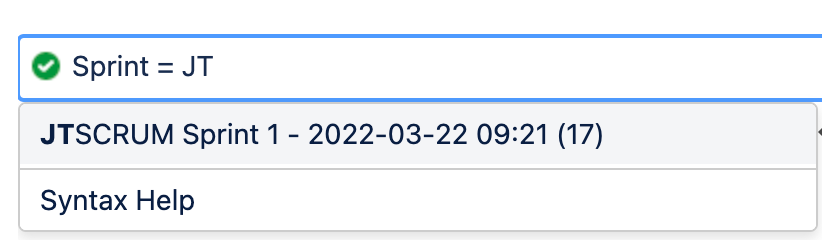
When you choose the value, it will convert to the ID
Sprint = 17
But you can put in the actual fullname, too.
Sprint = "JTSCRUM Sprint 1"
To find the ID of a sprint, click on the ellipsis for the sprint in the backlog view. The ID of the sprint will be in the URL displayed in the lower left-hand corner of the screen. For example sprintID = 21.
|
|
9. How to do searches for epic-story-sub-task relationships (use of Marketplace apps)
|
Jira offers a few ways to search for relationships between issues, including the following:
-
Find subtasks that are linked to a particular epic:
linkedissue = epicKey-123
-
Find issues that are linked to a particular issue via a particular type of link:
issue in linkedIssues(ABC-123,"is duplicated by")
-
Find issues and sub-tasks in the epic
parentEpic = DEMO 123
You can also search for issues by type:
-
Find issues of a particular issue type:
type in (Epic, Story)
-
Find issues that are subtasks (i.e. issues whose Issue Type is a subtask issue type):
issuetype in subtaskIssueTypes()
-
Find issues that are not subtasks (i.e. issues whose Issue Type is a standard issue type, not a subtask issue type):
issuetype in standardIssueTypes()
To do deeper searches, especially with nested queries, you should check out the many JQL-related apps in the Atlassian Marketplace.
|
|
8. How to do historical searches on data?
|
Jira offers 5 operators: WAS, WAS IN, WAS NOT IN, WAS NOT, CHANGED
With those operators, you can search on 6 fields: Assignee, Fix Version, Priority, Reporter, Resolution, Status.
WAS can take 5 optional predicates: AFTER, BEFORE, BY, DURING, ON.
CHANGED take 7 optional predicates: the 5 above plus FROM, TO.
Example queries are shown below:
status WAS "Resolved" BY jsmith DURING ("2010/01/01","2011/01/01")
priority CHANGED BY freddo BEFORE endOfWeek() AFTER startOfWeek()
The main difference between the two operators (WAS and CHANGED) is that WAS searches for values that were and possibly still are in the specified value. And it lets you find values that never changed; namely, the issue was initially created with the specified value and never updated after creation.
CHANGED, on the other hand, searches the change history table, so it means a value had to have been something else initially and then updated afterwards.
|
|
7. How do I find the ID of a custom field?
|
A Jira admin can find the ID of a custom field by clicking the Edit button for the field. The ID will be listed in the URL of the Edit Custom Field Details page for the custom field.
|
|
6. What is the difference between reporter and creator?
|
The reporter is the user that is listed in the Reporter field on an issue. This value can be changed, if the user has the “Modify Reporter” project permission. The creator is the user who initially created the issue, and is not necessarily the same user as the reporter. Both Creator and Reporter can be searched for via JQL and both can be added as columns on filter results.
|
|
5. How do I search for issue events using a date range?
|
You can enter a start and end date in a JQL and use the >, >=, <, <= operators with the date range. For example, to find all issues created between January 15, 2022 and February 15, 2022, the following JQL clauses could be used:
created >= "2022/01/15" AND created <= "2022/02/15"
|
|
4. How can I search for original estimate, time spent and remaining estimate?
|
To search for the original estimate of an issue, use the originalEstimate field.
To search for how much time is left on an issue, use the remainingEstimate field.
To search for how much time has been logged on an issue use the timespent field.
All three of these fields accept these operators: '=', '!=', '<', '>', '<=', '>=', '~', '!~', 'IN', 'NOT IN', 'IS' and 'IS NOT'.
To compare the original estimate to the time spent, use the workratio field.
To find issues that were overestimated (original estimate is greater than time spent), use this JQL: statusCategory = done AND workratio < 100
To find issues that were underestimated (original estimate is less than time spent), use this JQL: statusCategory = done AND workratio > 100
Adding the workratio field as a column on filter results will show the delta as a percentage.
|
|
3. What is the difference between “=”, “IN” and “IS”?
|
The “=” operator is used to search for issues where the value of the specified field exactly matches the specified value.
Example: assignee = jsmith
The “IN” operator is used to search for issues where the value of the specified field is one of multiple specified values.
Example: assignee IN (jsmith, bdavis, rlee)
The “IS” operator can only be used to find issues that have or do not have a value for a field. This is used with EMPTY or NULL.
Example: assignee IS EMPTY
|
|
2. How can I find issues created during the weekend?
|
Use this JQL to find issues created on the prior Saturday and Sunday:
created > startOfWeek(-2d) and created < endOfWeek(-5d)
|
|
1. Where can I find a list of all fields, operators, keywords and functions?
|
Start with this page Use advanced search with Jira Query Language (JQL) and all its linked pages, functions, fields, keywords and operators.
|


