Note: This use case can be implemented using Exalate Classic. Please contact our team for more details.
Given the stormy weather in Belgium today, I had some time to write up an article which I wanted to do for quite some time.
We got sometimes the question from our users how to automatically exalate all subtasks whenever an issue is being exalated
Exalate is an issue sync solution allowing to integrate between Jira, ServiceNow, SalesForce, Zendesk, ... - (and yes - I'm part of the team building that addon).
Therefore I thought to implement this requirement with ScriptRunner ...
The article shows how the exalate classes can be instantiated to trigger an exalate operation.
The way it works is
- Whenever an exalate operation is finished, a 'Exalate' issueEvent is raised
- A ScriptRunner custom listener picks up the issue event
- The custom listener will for each subtask on the issue trigger a new exalate event
Setting up the custom Listener
An image is worth 1000 words. The event the listener needs to listen to is 'com.exalate.api.domain.trigger.EXALATED'
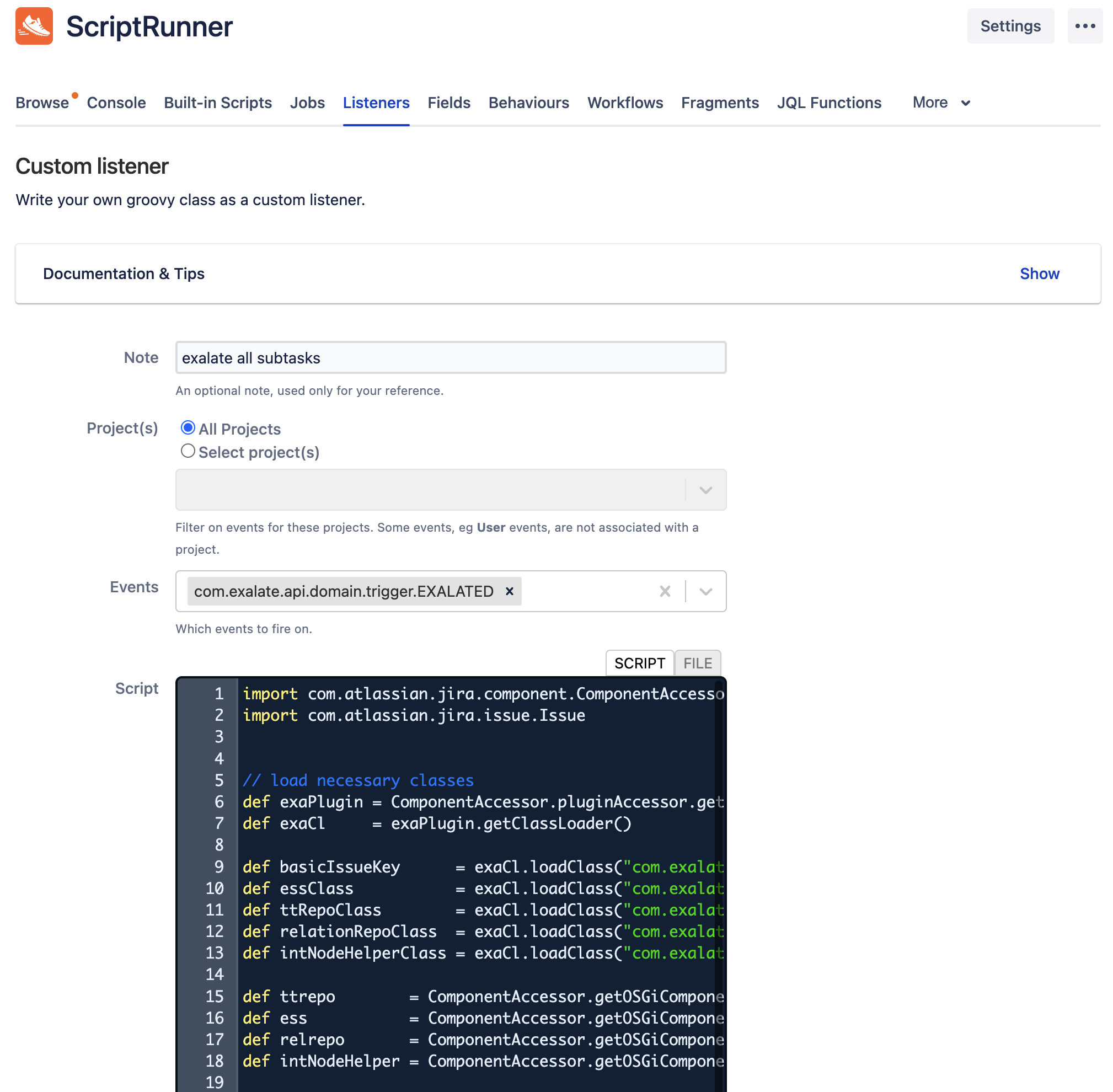
How does it work in detail
event.issue contains the parent issue which has been exalated. The exalateNow function is called on every subtask
def subTasks = event.issue.subTaskObjects


subTasks.each {

    log.info("Subtask trigger - ${it.key}")

    exalateNow(it, "auto_subtask")

}
The exalateNow function is a closure taking an issue object and a connection name.
21
22 def exalateNow = {
23 Issue issue, String connectionName ->
24
25
26 def connection = relrepo.getConnectionByName(connectionName)
27 if (connection == null) {
28 throw new IllegalArgumentException("""Connection with name ${connectionName} is not found""")
29 }
30
31 log.info("Connection found")
32
33 def exaIssueKey = basicIssueKey.newInstance(issue.id, issue.key)
34 log.info("Issue key available ${exaIssueKey.properties}")
35
36 def hubIssue = intNodeHelper.getHubIssueWithInitializedCustomFieldsValues(issue)
37 log.info("hubIssue built")
38
39 ess.schedulePairEvent(exaIssueKey, connection, hubIssue, null )
40 log.info("Pair event scheduled")
41
42 }
- On line 26 - the connection that needs to be used to exalate the subtask is looked up, An error is raised if the name is not found
- On line 33 - an exalate issue key is generated,
- On line 36 - the outgoing sync processor is run on the subtask, creating a 'hubIssue' which is the object that will be sent over
- On line 39, the exalate operation is scheduled (internally it is called Pairing an issue)
The exalateNow code is using a couple of classes that need to be instantiated.
This can be done using the code below
5 // load necessary classes
6 def exaPlugin = ComponentAccessor.pluginAccessor.getEnabledPlugin("com.exalate.jiranode")
7 def exaCl = exaPlugin.getClassLoader()
8
9  def basicIssueKey = exaCl.loadClass("com.exalate.basic.domain.BasicIssueKey")
10 def essClass = exaCl.loadClass("com.exalate.api.replication.out.IEventSchedulerService")
11 def ttRepoClass = exaCl.loadClass("com.exalate.api.persistence.twintrace.ITwinTraceRepository")
12 def relationRepoClass = exaCl.loadClass("com.exalate.api.persistence.relation.IRelationRepository")
13 def intNodeHelperClass = exaCl.loadClass("com.exalate.api.node.hubobject.v1_4.INodeHubIssueHelper")
14
15 def ttrepo = ComponentAccessor.getOSGiComponentInstanceOfType(ttRepoClass)
16 def ess = ComponentAccessor.getOSGiComponentInstanceOfType(essClass)
17 def relrepo = ComponentAccessor.getOSGiComponentInstanceOfType(relationRepoClass)
18 def intNodeHelper = ComponentAccessor.getOSGiComponentInstanceOfType(intNodeHelperClass)
- Line 6,7 - get the exalate class loader from the PluginAccessor
- Line 9 - 13 are used to retrieve the classes from the class loader.
- Line 9 - BasicIssueKey class is used to generate a unique identifier for the issue
- Line 10 - EventSchedulerService is the exalate service responsible to manage the sync events.
- Line 11 - a twin is the couple of issues that are related to each other. The twin trace repository contains all the twins managed by this exalate. It is not used in the code but it can be useful in certain use cases
- Line 12 - a relation is another name for connection - the relation repository contains all the defined connections
- Line 13 - the node helper class is used to run the outgoing sync processor
- Line 15-18 are used to get access to the OSGiComponents
Wrap up
This article is meant to give an example how to instantiate the exalate classes and use these to perform a more advanced synchronisation case.
Using the above logic it is possible to write a procedure to synchronise a complete issue structure (Project -> Epic -> Story) and all related subtasks.
Disclaimer
This example is using non-public api's which will change between different versions of the addon. Take this into account whenever using the api's to implement production scripts.
The example is an example and there is no guarantee that it would work in your case. If in doubt - there are 130+ Exalate partners providing professional services to help out.


