Hi,
I have a very straightforward requirement - putting 2 excerpt-includes side by side. I am surprised to find that whenever the excerpted data are from tables, it goes to the left of the page, instead of side by side.
Something like this -
(Edit Mode)

(View Mode)
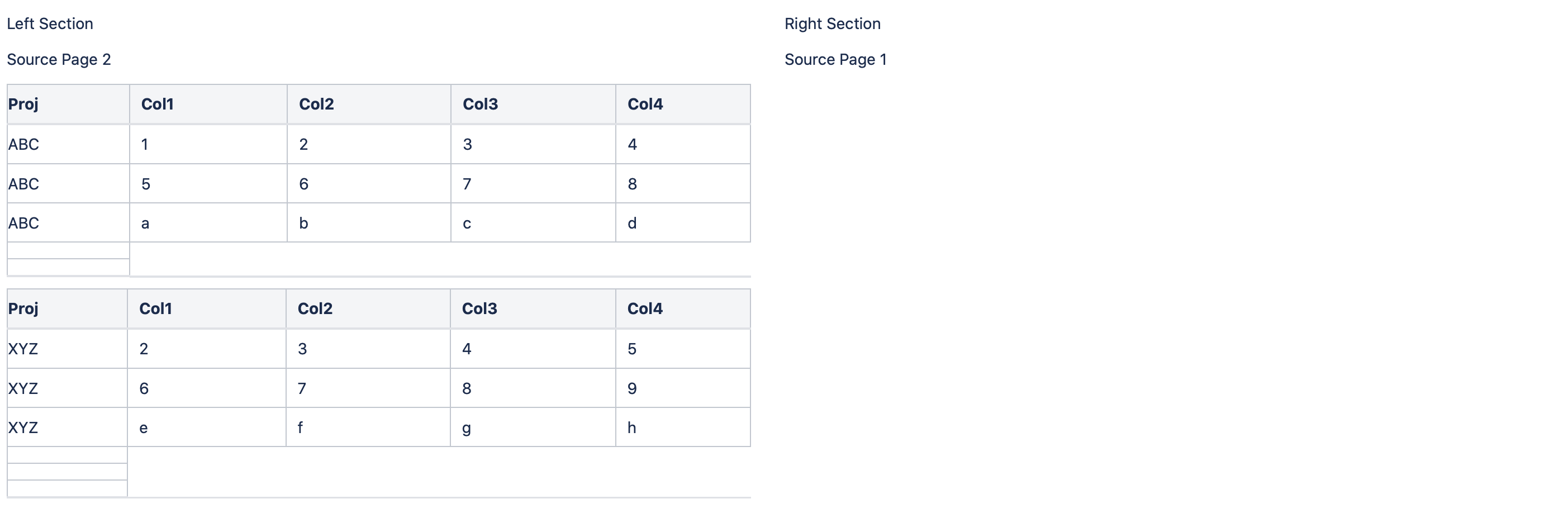
Few key points:
1. This happens only if there is a table in the excerpted element. As evident from the figure, "Source Page 1/2" are text within the same excerpts that contain Tables in the source pages. Text are displayed correctly.
2. I have tried using Page Layout, Section/Column for side-by-side view, but no success.
3. From Macro-side, I have tried almost ALL relevant ones i.e. excerpt-include, Table excerpt include, multi-excerpt include. And, put them in 2 separate sections/columns, page layout sections etc.
No matter what I do, I am not being able to view the excerpted table data side-by-side. Plz help!
P.S. Another weird thing is if I use Table Transformer Macro even in 2 different sections, it seems to combine both the tables based on the Column Name. Isn't the functionality of a Macro supposed to be contained within the section it is called in? How come 2 Macros (both Table Transformer in this case) from 2 different sections are getting merged into one output?


