I've configured Azure Resource Health integration, and noticed that alerts are not closed automatically even though they have Resolved activityLog status.
I looked at the Advanced configuration of the integration, and found out that the Close action checks the main status field of the message to be "Resolved". Given the Microsoft documentation about the resource health message payload, the Close action is never going to be triggered, since the main status is always "Activated" for this kind of message. Only the Activity Log Status is going to change, and here is an example of such a message:
{
  "schemaId": "Microsoft.Insights/activityLogs",
  "data": {
    "status": "Activated",
    "context": {
      "activityLog": {
        "channels": "Admin, Operation",
        "correlationId": "...",
        "eventSource": "ResourceHealth",
        "eventTimestamp": "2021-08-18T15:23:00.2603901+00:00",
        "eventDataId": "...",
        "level": "Informational",
        "operationName": "Microsoft.Resourcehealth/healthevent/Resolved/action",
        "operationId": "...",
        "properties": {
          "title": "Unknown",
          "details": "Unknown",
          "currentHealthStatus": "Available",
          "previousHealthStatus": "Unknown",
          "type": "Unknown",
          "cause": "Unknown"
        },
        "resourceId": "...",
        "resourceGroupName": "...",
        "resourceProviderName": "Microsoft.Resourcehealth/healthevent/action",
        "status": "Resolved",
        "subscriptionId": "...",
        "submissionTimestamp": "2021-08-18T15:23:14.0751627+00:00",
        "resourceType": "MICROSOFT.SQL/SERVERS/DATABASES"
      }
    },
    "properties": {}
  }
}I wanted to change the behavior of Close action, but there is no way of selecting Activity Log Status for the filter conditions...
Also there is no Activity Log Status field in draggable items:
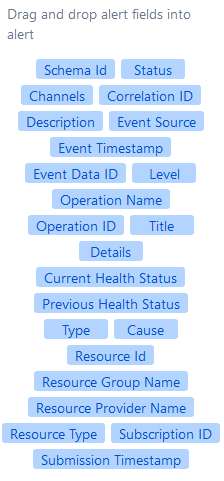
even though it's present in extra properties, but with a spelling mistake:

I know that I can still use {{_payload.data.context.activityLog.status}} but still I consider this as a bug.


