Hello,
I'm new to using Confluence and please excuse my ignorance. I've asked to be made space admin on a page I'm working on and we are part of our organization's Enterprise confluence.
I've been asked to take information from a large set of complicated Excel files and format them as tables in individual confluence pages.
I first tried to use the Excel or Spreadsheet macro, but the excel file itself is too large (9.1MB) to embed using either.
I've been copy/pasting the cells I want onto either Word or Powerpoint, then copy/pasting into the confluence page, it also worked a couple of times just directly copy/pasting from Excel to Confluence, because I didn't create the Excel, the format of certain tabs is a little wonky so direct copy/pasting doesn't seem to always work. I need to link some text in certain table cells so I want to be using the plain table format.
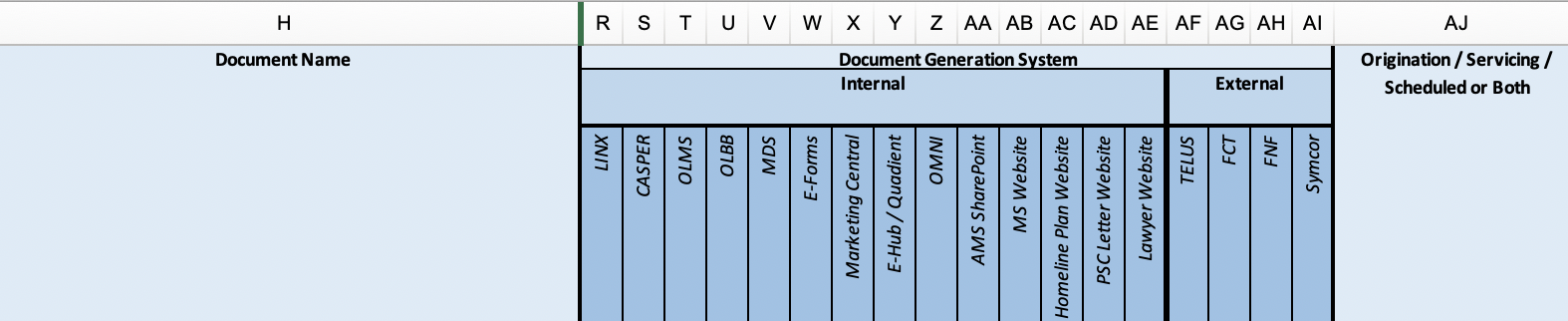
One thing our stakeholder wants to do is to rotate certain sub-headers in the table. I've googled how and saw a couple of solutions involving creating a User Macro. I've looked around and don't see the "Create a user macro" option, probably because I'm not a system admin; I also saw some folks suggest using Adaptavist but the use of any Apps is also disabled. I'm not sure how to locate the system admin, and no one I work with seems to know.
I know some html/css but my background is visual design and I'm not fluent in coding. Sorry for the long question, does anyone have any suggestions of manually rotate the cell-headers?
Thank you.
Desired format in Excel version:
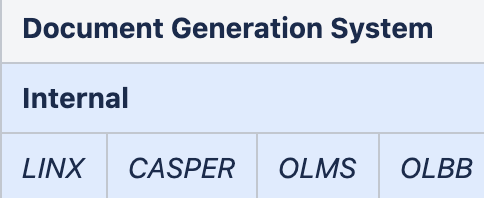
What I have so far in Confluence: