Jira version: 8.13
JIRA service management :4.13.3
Scriptrunner version: 6.19.0
Hi,
We are using the Script runner plugin via the Behaviours to show/hide fields based on the selected value.
Scenario:
1)On the create screen I have a "specify" single select box (dropdown) where there are two dropdown values mentioned "computer IP" and "computer hostname".
2)If any customer selects computer IP it auto populates computer IP dropdown on the create screen and the computer hostname is hidden and when the user selects computer hostname the computer IP is hidden and all the fields are required fields.
3) When the user specifies the computer IP by selecting the dropdown, I need to clear the value of the hostname and vice -versa in the create screen.
4) As it is capturing both the values IP/Hostname entered by the customer. Is there any function to clear the value of the text field so that it does not appear into the view screen?
I am using the below script for hiding the fields.
import com.atlassian.jira.component.ComponentAccessor
import com.atlassian.jira.issue.customfields.option.Option
def Computer_IP = getFieldById("customfield_13500")
def Computer_Hostname = getFieldById("customfield_13601")
def Specify = getFieldById("customfield_13603")
String opt = "Computer IP Address"
String Host = "Computer Hostname"
if (getFieldById(getFieldChanged()).clearError().getValue()==opt.trim()){
Computer_IP.setHidden(false).clearError()
Computer_IP.setRequired(true).clearError()
Computer_Hostname.setHidden(true).clearError()
Computer_Hostname.setRequired(false).clearError()
}
else if (getFieldById(getFieldChanged()).clearError().getValue()==Host.trim()){
Computer_Hostname.setHidden(false).clearError()
Computer_Hostname.setRequired(true).clearError()
Computer_IP.setHidden(true).clearError()
Computer_IP.setRequired(false).clearError()
}
In UI it appears as below:

Img1: The specify dropdown created with dropdown value computer IP and computer hostname

Img2: Error message for invalid hostname
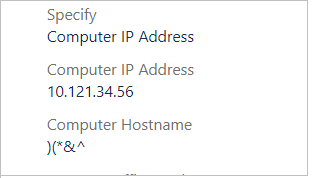
Img3: View screen of the ticket created with both custom field’s hostname and IP. Need to display any one of the custom fields selected by the customer on the view screen.

