Hi all,
Based on my previous post, I want to be able to parse JSON data to an html table from data pulled from an external API, which in our case is our ServiceNow instance.
The REST Endpoint Code is as follows:
import com.onresolve.scriptrunner.runner.rest.common.CustomEndpointDelegate
import groovy.json.JsonBuilder
import groovy.json.JsonOutput
import groovy.json.JsonSlurper
import groovy.xml.MarkupBuilder
import groovy.transform.BaseScript

import groovyx.net.http.ContentType
import groovyx.net.http.HTTPBuilder
import groovyx.net.http.Method

import javax.ws.rs.core.MultivaluedMap
import javax.ws.rs.core.Response
import javax.ws.rs.core.MediaType


@BaseScript CustomEndpointDelegate delegate2

CMRDisplay(httpMethod: "GET") { MultivaluedMap queryParams ->

    def query = queryParams.getFirst("query") as String

    def rt = [:]
    if (query) {

      String url = "https://test.service-now.com"
      String uriPath = "/api/now/table/u_jira_change_data"

      HTTPBuilder http = new HTTPBuilder(url)

      def output = http.request(Method.GET, ContentType.JSON) {
        uri.path = uriPath
        uri.query = [sysparm_query:"u_jira_ticket_number=$query", sysparm_fields:"u_change_record.number,u_change_record.short_description,u_change_record.state", sysparm_display_value: "true"]
headers.'Authorization' = "Basic ${"xxxxxxxx".bytes.encodeBase64().toString()}"

    response.failure = { resp, reader ->
            log.warn("Failed to query ServiceNow API: " + reader.text)
         }
      }

    def cmrState = output["result"]*."u_change_record.state"
    def cmrNumber = output["result"]*."u_change_record.number"
    def cmrDesc = output["result"]*."u_change_record.short_description"

    def table =
    """<table class="aui aui-table-list" aria-hidden="true">
        <thead>
         <tr>
            <th id="record-num">Record Number</th>
            <th id="record-desc">Description</th>
            <th id="record-state">State</th>
        </tr>
       </thead>
       <tbody>
            <tr class="aui-row-subtle">
                <td headers="record-num">${cmrNumber}</td>
                <td headers="record-desc">${cmrDesc}</td>
                <td headers="record-state">${cmrState}</td>
            </tr>
       </tbody>
       </table>
       """
  Response.ok().type(MediaType.TEXT_HTML).entity(table.toString()).build()
  }

}
Working with a test issue in our sandbox instance, we get the following JSON data:
{
  "result": [
    {
      "u_change_record.number":"CHG0010042",
      "u_change_record.state":"Draft",
      "u_change_record.short_description":"test app req 5"
    },
    {
      "u_change_record.number":"CHG0010061",
      "u_change_record.state":"Draft",
      "u_change_record.short_description":"test"
    },
    {
      "u_change_record.number":"CHG0016010",
      "u_change_record.state":"Draft",
      "u_change_record.short_description":"Test Jira"
    },
    {
      "u_change_record.number":"CHG0010057",
      "u_change_record.state":"Draft",
      "u_change_record.short_description":"tesst"
    }
  ]
}And the REST Endpoint code renders the json into the following. html table:

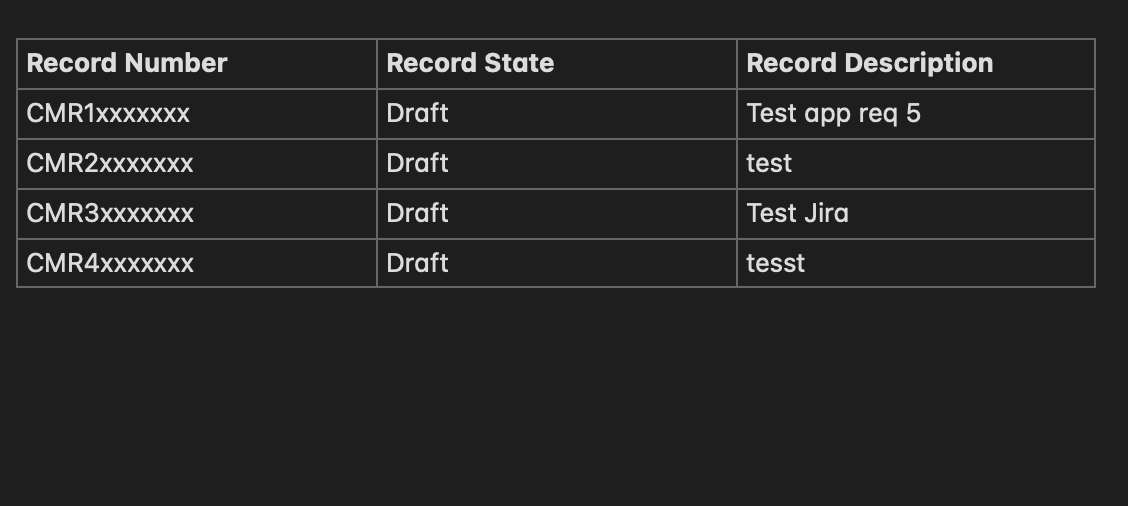
My only problem now is that the rows don't generate as expected. Obviously, there should be 4 rows in total, with [CMR1..., test app req 5, Draft] in one row, then [CMR2..., test, Draft] as the second row, and so on. But instead, the output results are being crammed into one row.
I want the table to look something like this, but styled with css to resemble a Jira table:
Additionally, the css class attributes don't take effect for some reason. Referencing Jira's AUI Documentation, I figured that the CSS would automatically apply when referencing the 'aui' class in for the table.
I know I have to iterate through the JSON Map somehow, but I don't know how to map that out to the html table and have each record number/recrod desc/record state set listed out as rows on the table.
Any tips/suggestions as always are highly appreciated!


