Summary: I am trying to update the SSL certificate for our BitBucket server. I am seeing assistance installing the new ps7 certificate as a PrivateKey type on my keystore.
As per the instructions on confluence I created a local self-signed certificate on a new keystore titled "bitbucket-keystore", using the following command:
"%JAVA_HOME%\bin\keytool" -genkey -alias sc.phgic.com -keyalg RSA -sigalg SHA256withRSA -keystore <Bitbucket home>\shared\config\bitbucket-keystore
Next, I used the keytool to generate a CSR and submitted the CSR to our certificate authority (CA) for signing.
After receiving the download link from the CA, I downloaded the SSL certificate in PKCS7 format, and ran the following command to install it on my keystore:
"%JAVA_HOME%\bin\keytool" -import -alias sc.phgic.com -file sc_phgic_com.p7s -keystore <Bitbucket home>\shared\config\bitbucket-keystore
The import appeared to be successful. I restarted the BitBucket service, but it failed to start. I discovered the following exception in the logs: java.io.IOException: Alias name [sc.phgic.com] does not identify a key entry
I searched the Knowledge Base and found this related issue:
https://confluence.atlassian.com/bitbucketserverkb/unable-to-start-tomcat-due-to-java-io-ioexception-alias-name-not-identifying-a-key-entry-943541751.html
Re: Cause #1, I confirmed the alias in the keystore matches the alias in our configuration file, and the keystore does contain this alias:
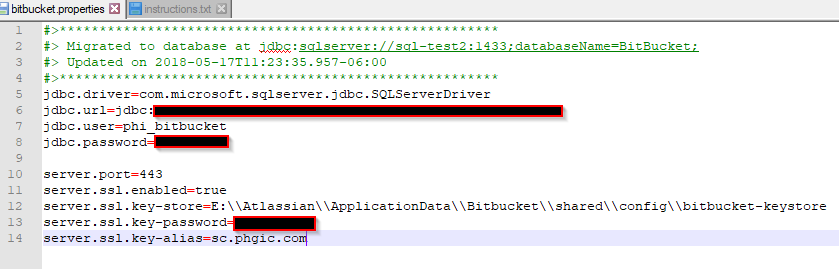
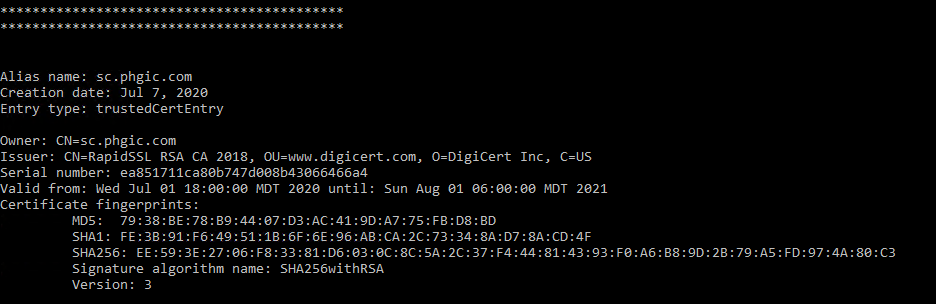
So, I suspect the root problem is Cause #2 - entry type is trustedCertEntry instead of PrivateKey.
(I also tried installing the intermediate and server certificate as separate .cer files, and received the following error: Input not an X.509 certificate)
I would prefer to work with a single .p7s file; but, how can this be installed as a PrivateKey entry type rather than trustedCertEntry?
Is there possibly some other issue with the private key in my keystore preventing this certificate from being installed as the correct entry type?

