Hallo Atlassian Community!
I am in the process of customizing a Jira instance for a customer. I stumbled on a roadblock when trying to rename labels of fields in the instance. Any help or suggestions on how to solve this problem would be appreciated!
Context:
- Jira Server instance with many projects.
- ScriptRunner plugin is installed.
- We are customizing one Project, i.e. the other projects should remain unaffected by the changes made to implement the requirement. However, the instance's settings can be changed, as long as other projects are not affected.
Requirement:
I need to rename the Issue Types, Custom Fields and System fields on Project-level (not instance-level). Built-in Jira functionality like Epics should not break by making this change. The renaming should be visible for all parts of the project, i.e. issue creation, editing issues, viewing issues.
As an example, I want to rename:
- "Epic" to "Phase" (Issue Type)
- "Epic Link" to "Phase Link" (Custom Field)
- "Epic Name" to "Phase Link" (Custom Field)
- "Summary" to "Name" (System Field)
What I have tried
Using ScriptRunner's Behaviours, I have added behaviours that set the labels of the fields I want to rename. Here is the code I used to achieve this:
// get the fields
def epicNameField = getFieldById("customfield_10003")
def epicLinkField = getFieldById("customfield_10001")
def summaryField = getFieldById("summary")


// rename the fields
epicNameField.setLabel("Phase Name")
epicLinkField.setLabel("Phase Link")
summaryField.setLabel("Name")
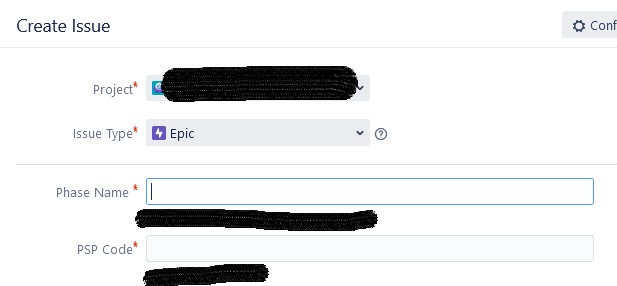
Doing so actually works great when creating or editing an issue (See Image 1). This approach does not work in the Issue View, however. (See Image 2)
Any help would be greatly appreciated!
Kind regards,
Simon
-----------------------------------
Images
1.
2.