Start a conversation with our team about improving Foxly. Raise bugs, ask for features and post questions. Every comment is welcome here
I'm wondering if you can restrict Foxly by a project? Only our Product/Dev teams need access to this plugin, but I'm assuming we will get charged for all our Jira users?
Hello!
Yes, that is correct. That's how Jira licensing works, there's no option to specify how many users will use the app, it will charge for all your users. We made it affordable, with only $0.40/user per month so hopefully, it wouldn't be too much of spending for your organization. Also the need for work backlog prioritization in Jira is is a common need for any department and team and possible that some of your other functions might find the tool useful.
Hope this helpsBiro
I'm getting an error and the screen won't load
Error! GraphQL error: There was an error
We got the error in our logs looking at it and I will email you as soon as we have a fix for that in a few moments.
Thanks so much
This is fixed now. Apologies, a small issue when clearing issue metric values.
Hi there, Is there a way to do the following:
Hello,
We’re planning to introduce a custom field called “Priority Score“ that will get updated by our app with the issue score. You will then be able to use this field in automation logic and on cards. We’re planning to deliver this quick, in the next couple of weeks along with a bundle of other small improvements.
I will update you here as well once released.
Thank you
Great thanks you so much and eagerly looking forward to it.
Also I'm unable to set value less than "1" for label metrics.
Not sure if you referring to negative numbers or decimals. Negative numbers should work but decimals are not available at the moment. Also, you can't set 0 value, this is by design to avoid issues in the formula calculations.
Hello!Do you plan to add the ability to filter backlog tasks by epic value? This will help a lot. Now you have the ability to filter by issue type, metric, status, version, label, assignee and component but not by epic.
Hi Dmitry,
Thanks for the question. This is currently on our backlog to implement in one of the upcoming releases. We are discussing to potentially enable JQL filtering to give you additional flexibility. I will notify as soon as we launch the additional filter.
Hi @Noureldin Ali ,
we recently released an improvement to support decimal numbers in Foxly. You can now store any number up to 3 decimal points (Negative numbers and zero as well of course 😉)
the Foxly Priority Score is now available as a custom field in Jira. This will allow you to show the value of this field on kanban but also use it in Automation for Jira.
Here is an article where you can see an example of how to automatically update Issue Priority based on Foxly Priority Score 👉 https://jexo.io/blog/3-tips-for-better-backlog-management-in-jira-with-foxly/
We also introduced an option to store metrics as a custom field that can help you with connecting Jira fields (eg. Story points) with Foxly metrics (eg. Effort). 👉 Read how to set this field up
Would love to be able to filter by Sprint
Hi @Evan Anselmi ,
this is coming really soon!
We're working on Advanced filters in Foxly priority table that will enable JQL search. You would be able to filter by almost anything, including custom fields
Awesome!
Another thought I had. We have different Weighting’s for our metrics e.g “Benefits existing customer” might have a 2x multiple on the selected value because it’s more important than say, “Increases site traffic” which is only the standard selected value.
Curious to know if you have scoped this ability to add a weighting?
Thanks!
I'll try to answer with an example, let me know if I understood it correctly
In your prioritization template, you have 2 metrics: Benefits existing customer and Increases site traffic
Your scoring formula is calculated as follows: Benefits existing customer + Increases site traffic
To increase the weight of Benefits existing customer 2 times you can change your scoring formula to:
0.7*Benefits existing customer + 0.3*Increases site traffic
(In this case, we'll distribute the weights across your metrics and when we add them together they'll give 1)
So by adjusting formula should do the trick.
Let me know if that works for you or you have bit more complex formula and set of metrics.
Hi @Dmitry Muskhabov ,
we just launched a new JQL filter in Foxly.
This will allow you to filter the Priority table in Foxly by anything you can possibly JQL in the current project. Foxly also remembers JQL you last used, so you don't need to type it every time to access the app
Here is a link to the documentation.
There are some additional improvements we need to do to make it more user friendly, but I hope it unblocks you for now.
Hi team,
Not sure why my formula score is not calculating? As shown, when I change Effort to 13. It holds its score, even after refreshing. All other ideas are divided by 1.
Formula as shown:
({{Strategy Alignment}}*1)+({{Market Size}}*1)+({{ Benefits Customer}}*1)+({{Reduce Churn}}*1)+({{Viral co-efficient }}*1)+({{Return on Investment}}*1)+({{Cost Saving}}*1)+({{Core Revenue}}*1)+({{Additional Revenue}}*1)+({{AP Traffic}}*1)+({{AP Engagement}}*1)+({{AP Conversions}}*1)+({{Design aesthetic }}*1)+({{Competitive advantage}}*1)+({{Clients Site Conversions}}*1)/{{Effort}}
Any tips?
Thanks,
E
Hi @Evan Anselmi
I had a look on the formula and it looks like you're adding all metrics together and you're dividing only the last one "Clients Site Conversions" with Effort.
Depending on what your other values are it might be possible that Effort doesn't have much weight in your formula score calculation because of that.
If you wanted to divide all the metrics with the effort you can try to change to this formula and see if anything changes:
(({{Strategy Alignment}}*1)+({{Market Size}}*1)+({{ Benefits Customer}}*1)+({{Reduce Churn}}*1)+({{Viral co-efficient }}*1)+({{Return on Investment}}*1)+({{Cost Saving}}*1)+({{Core Revenue}}*1)+({{Additional Revenue}}*1)+({{AP Traffic}}*1)+({{AP Engagement}}*1)+({{AP Conversions}}*1)+({{Design aesthetic }}*1)+({{Competitive advantage}}*1)+({{Clients Site Conversions}}*1))/{{Effort}}
If it still doesn't work out, could you please let me know what metric values you set for the issue and I'll validate if the formula is calculated right? Thank you
Hi,
I am trying to use Jira Automation to automatically set the EFFORT (set up as a custom field) to that of a field we already have in Jira for capturing the effort. I can't quite get it to work, the closest I have when testing is this JSON 'script' as part of the edit issue option within Automation
{ “fields”: {“customfield_10360": [{“name”: “issue.customfield_10027"}]} }
10360 is the Foxly Effort field (label) and 10027 is the t-shirt size field already in use.
Any ideas on how to do this please?
Hi @Morris Coyle ,
I'm happy to see you're setting up automation with Foxly custom fields. There are 2 ways you can go about it.
1. If the Jira custom field doesn't have exact same values as Foxly fields.
Eg: In Effort Jira custom field you're setting values like Medium, Small, Large
And Foxly has these values: XS, S, M, L.
Then you need to define exactly how values should be mapped with branch rules.I recorded an example setup: https://drive.google.com/file/d/1NPvgbW5S98ysTCKmXCjMAmp_VARHFq5l/view
2. Values in Jira custom field are completely the same as ones in Foxly
Eg: In Jira Effort field there are values like S, M, L. And in Foxly there are same values: S, M, L.
I recorded a video with this setup too: https://drive.google.com/file/d/1UZR7js7GJR_DrKusfsbaXhxj06rsokKd/view
JSON used to update field value is the following:
{"fields": {"Effort - ICE Label": {{issue.fields.customfield_10076.value.asJsonString}}}}
"Effort - ICE Label" is the name of the custom field created by Foxly.
"customfield_10076" is my Effort custom field I created in Jira. It's a dropdown custom field so to access the actual value I need to use "{{issue.fields.customfield_10076.value.asJsonString}}"
Let me know if this worked for you.
Thank you,
Nikki
That worked perfectly! Thank you Nikki, much appreciated.
No problem @Morris Coyle, let me know if I can help with anything else or you have some feedback
Team,
I want to view the sub-tasks/user-stories which are not assigned to any sprint.
If I filter it with 'Backlog' it is not filtering the backlog tasks.
I could see the tasks only if I filter it with 'Open' status, but it shows the tasks (backlog +Open tasks) which have been assigned to the sprint.
Kindly guide me how can I achieve this.
Thanks
Muthu
Hi @Muthu Kumar M ,
you can definetly do this in Foxly.To do more advanced filtering, like the one you're mentioning, you can use JQL filters instead of basic ones in Foxly.
JQL used for filtering in your case will be following, just replace the names of issue types with the ones you're looking for:
issuetype in (sub-task, user-story) AND Sprint is EMPTY
Here is the documentation for advanced filtering in Foxly.
Let me know if this works for you!
Do you know if it's possibly using Automation rules to cascade the Foxly score down to all child issues of an Initiative?
Hi Morris,
That should be possible with Automation yes. Foxly's Issue Score value exists as a custom field in your Jira called "Priority Score". So whenever you set priority metrics that change the score, the "Priority Score" custom field will update too. This means you can use the "Field value changed" trigger in Automation rules to populate child issues when score updates.
Hope this makes sense
Biro
Is there any way to a priority score as a custom field in Jira advanced roadmaps? (Plans)
I got an error saying that my version of advanced roadmaps does not support this custom field type.
This functionality would be great. Is there any workaround for this? I contacted jexo support, but the person was not able to help.
Hi Mikhail,
I looked at the configuration of the Priority Score custom field and noticed that the field is labelled as "locked" and assigned a custom field type when it was generated by Foxly so no-one accidentally deletes this field.
The advance roadmap does not seem to like this setting and that's why it doesn't allow you to select the field.
I'll pass this to our development team to look if there is a way to change settings of this custom field so it's supported by Plans. I tracked down the support ticket you raised, we'll re-open it and keep you posted on progress.
Awesome, Thank you!
is there a possibility to insert if else statements on foxly priority Score formula field?
Hey Seth!
Thanks for the question. ATM the formula field only supports basic calculations. I'd be interested in knowing how you'd like to use this, what kind of logic you want to introduce.
We're planning to eventually have a more complex option for scripting. However, there might be a way for you to use more complex calculations using Automation for Jira. The Score value is a custom field attached to issues and you can enable each metric as a custom field too. So theoretically you could listen to these metric custom field changes and run a script in Automation that alters the Score number. We listen for updates to that field and we will update in Foxly as well.
Hi Florin, thank you for the quick reply!
Well, the first thing that i've tried to accomplish, was to have, let's say, a "partial" score also if some metric of the formula are not valorised yet.
Another use for the if else statement in the formula filed could be the possibility to change the formula based on the values that some metric has.
Anyway, for the score partial value, I have added a "not analyzed yet" label to the metric with the value=1, and also have created an automation to set this value on every newly created ticket.
Thank you again.
P.S. There is now this message on the Foxly Priorities page of my project:
Error! GraphQL error: {"statusCode":429,"statusMessage":"Too Many Requests",
Can you tell me who to contact for a resolution?
Ciao
-Seth
Hey Seth,
Sorry, I missed your last reply, not sure how that happened! About the error, we got a similar issue with another customer and is due to a large number of issues retrieved when done statuses are selected or when using cross-project filter. We deployed a partial fix Friday and we plan to improve further this upcoming week. I'll keep you posted.
I'm happy to let you know that we introduced a custom field with a Priority score that can be used in the Advanced roadmaps, it's called "Priority Score for Advanced Roadmaps".
If you need any help or have any questions you can always let us know on our support portal.
Thank you, Nikki
I am seeing some odd behavior with Foxly. When Changing templates from ICE to a custom modified ICE, I do not see the stored values even though the values have the same names. Switching back to the original ICE template DOES NOT RESTORE the values. It seems to be saving them off in separate columns that I can see if I select those columns in the columns picker. The Previous columns are named: "Ease - ICE Value" "Ease - ICE Label" "Ease ICE 2 Value" "Ease - ICE 2 label" etc. This is repeated for Impact. I don't see this happening with "Confidence", which means those previous values appear to be gone. A new set of values gets created every time I switch templates an click "Save Changes"
This behavior seems to be restricted to the pre-configured ICE template (and perhaps the others that come preconfigured) Once I make a custom template, I can switch from and back without the weird field versioning.
Perhaps a related issue. Every time I switch back to the original ICE template and click "Save Changes" a new ICE template is added to the list.
OK... forgive me as I am figuring out what is going on. This is turning into a stream of consciousness, but perhaps it will be helpful to others. I had the "Store values in custom field" checkbox checked on Impact and Ease, but not Confidence. That seems to be responsible for the creation of those fields in the column list and explains why "Confidence" was not working the same as Impact and Ease. There is still some weirdness with Saving when you have selected a pre-configured template. It seems to not just save the template as the selected template for your project, but also "Save as a new template".Work around is to never save a preconfigured template without renaming it for the new template that will be created... and to never use a preconfigured template if you ever hope to switch to a different template... even temporarily.
Hi there,I've recently installed Foxly to our Jira instance and I was wondering if there was the possibility to remove a prioritization metric after being applied to a Jira issue. Was wondering this if for instance there was a user error and they prioritized the wrong issue.
Hi Rachel,
Thank you for the question. At the moment there is no way to clear the values in Foxly directly. However, the values are stored as entity properties attached to your Jira issue. This means you control them and you can clear them by using a free app for entity management.
Now, I don't recommend doing this often or even having this app enabled to the wider team to avoid folk accidentally deleting data. But for a one-off use, you can give it a try: https://youtu.be/mYtT6kcuSuk
You can find instructions on how to clear metrics and score of the issue you specified in the video above. We do plan to implement soon the ability to clear values in Foxly directly.
Hope this helps
Hi — We are looking to add metrics from Foxly directly onto the Create Issue screen. Is this currently possible?
Hi @Nelson DeMoraesgreat question!
You can switch on custom fields for your metrics and then add them to your create modal. The only downside is that there isn't a dropdown available in these custom fields yet so you would need to type in the metric values.
You can read more about custom fields here: https://wiki.jexo.io/
We're planning to support dropdown in these fields to make it easier to use. I noted your question as feedback and let you know once that's available.
I hope this helps. All the best,
Hi @rachel.ralph ,
I just wanted to let you know that you can delete metrics values in Foxly in a more user-friendly way now.
When you simply click on the metric in the table there is an "x" button that allows you to remove the metric value.
Hi Nikki — Thanks for the quick response! I understand switching on custom fields, but after that I get a bit lost. The metrics don't show up as fields I can individually add in the create issue screen. Is it possible to provide more detailed steps on how to accomplish this?
Nelson
Of course, let's have a look at that!
Check if you can see the custom fields here in the create issue form:
If yes just check the checkbox and you can then see them in the create form. If you can't see them hee you need to add them to be visible in your Jira issue first.
To do that go to your issue details and click on configure button:
If you can find the fields on the left side in the hidden fields section you need to add them by clicking on the link here:
And in the dropdown select the fields you're looking for:
After this you should be able to see the fields and select them to be visible as I showed on the first screenshot.
I hope this helps, let me know if you run into any trouble.
Hello - we've created a custom prioritization template and we're using the [Rating] metric type to capture separate risk dimensions. Some of these risk dimensions are not applicable to a given issue (i.e. result in a Rating of zero stars). However, if you leave the Rating for a metric blank, the final [Score] field will not calculate. Is there a way to around this vs. assigning a minimum of one star to each issue? Thanks!
Hi Darren, thanks for the question!
To calculate the priority score you need to have all metrics filled in order to avoid assigning scores to issues that weren't fully prioritized.
We do have examples of other customers with the similar use case you have - some of the metrics aren't applicable. We usually recommend using the "Label" type of metric where you can have one of the labels named "Not aplicable" and assign it the value that will fit your formula (usually 0 or 1 if you're doing division by this metric). This way you'll know that you already assessed that metric and it wasn't applicable instead of leaving it empty (this might look like you didn't yet prioritized).
If you would like to keep on using the rating for this use case you can use 1 star as "Not applicable". You can either assign it manually or you can set up automation for Jira that will assign a 1-star rating to every issue that was created.
Here are some examples of how you can use Foxly's custom fields together with Automation for Jira, let me know if you need any support with setting up yours.
I hope this helps,
Hi Team,
We would like to use this plugin as part of our Service Desk Portal, so users (internal users only) can set the Priority Score when they fill out the service desk ticket on the portal. So if we use ICE they can set the Impact, Confidence and Ease parameters as part of the workflow of entering the ticket.
Is this even possible and if yes, what is the best approach to accomplish this?
Thanks and have a nice day!
Kenneth
Hey Kenneth,
Sorry for the delay here on the forum. Think you raised a ticket as well and our team has replied but just to mention it here as well.
This week we've been working on implementing the ability to utilize the metrics as custom field dropdowns where you can choose the available metric options. You can currently discover the custom fields by enabling it in template config: https://wiki.jexo.io/space/FOX/228098049/Storing+metric+in+a+custom+field
However, until this latest fix, we're working on, you only had the custom fields as regular text instead of the dropdown with predefined options.
We plan to deploy the improvement sometime next week and once the new version is up you'll be able to set these metric custom fields in your JSM portal and your users will select the Impact, Confidence, and Ease using the dropdown fields generated.
Hi Biro,
Sounds perfect - thanks and have a nice day!
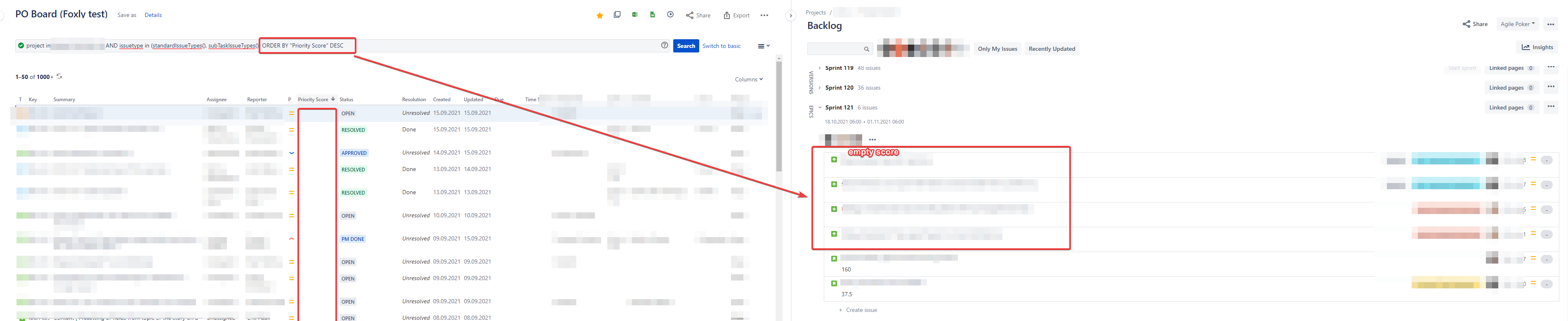
maybe I´m doing something wrong (😃), but is this on purpose: When I order a board / filter by the priority score descending, I always get the issues with empty priority score at the top...but I would expect these to be put below the issues with an actual priority score value.
See also: Would be happy for any input, thanks.
Hi @Andreas Schäfer,
thanks for reaching out to us with your question.
Unfortunately, this is how JQL ordering in Jira works. If you order DESC issues with fields that are empty appear first. When ordering ASC issues with empty fields appear last.
As a workaround you could use the following query and show only tickets that have a Priority score assigned on your backlog:
"Priority Score" is not null order by "Priority Score" DESC
Or at least add a filter to the board to filter out issues with an empty field:
"Priority Score" is not null
The second option might be better because you will still see issues with an empty field on the backlog but you can hide them by switching on the filter.
Here is a similar question where you can also find links to the Atlassian improvements/feature tickets that you can vote on 👉 https://community.atlassian.com/t5/Jira-Software-questions/ordering-null-value/qaq-p/1276050
I hope this helps, let me know if you have any questions 🤓
Nikki from Jexo
Thank you Nikki, that helped a lot!
We're finding this tool to be very useful and helpful in our Prioritization efforts, and wanted to suggest a couple of "enhancements" that we think would make it better:
Thanks for your consideration!!!
Hi @malexander ,
thank you so much for taking the time to give us feedback about priority planning poker. All of these are really great points that we'll consider in our future improvements.
The session reports and history is something that is already on our list so it's a great validation that we're heading in the right direction.
I took a note of all of these so we can work with them and will let you know once they're available in Foxly.
@malexander Just a quick question in regards to your first point:
When voting in a Priority Poker session, give the user the ability to "collapse" all screen component panels to make screen space...with smaller screens, users sometimes have to zoom-out on their browser to see all voting button/choices
Could you give us an insight into how many metrics you usually prioritize using priority planning poker and how many options your metrics have? If you can tell us the screen resolution you use that would be great too 🙏
It'll help us make an idea about your setup and fix an issue.
Thank you!
Hi everyone 👋,
I hope you're all enjoying using Foxly for your backlog prioritization. Foxly is currently competing in the Apptoberfest community competition.
Have a look at Foxly's creative demo and give us a like on the post 👍 (like counts as a vote in the competition)
Teamwork makes the dreamwork. Thank you for your support!
In our sessions, we were using 5 parameters…basically using WSJF, but with two separate factors to derive “User Business Value”. I’m not sure on the exact resolution the users hard on their machines, but it was folks using smaller laptops (e.g 14” screens) that had the problems seeing all the factors.
Hello Foxly team!
We have just setup Foxly for one of our projects and are encountering a problem.
Because we want our stakeholders to specify the prioritisation metrics when submitting a requirement, we enabled custom fields for our metrics and added them to the issue creation screen.
However, the metrics we have created are not updated in Foxly's Prioritise view when we create an issue after populating the custom fields (custom field has the correct label, but prioritise view has "none").
Interestingly enough, when we update the same fields after the creation of the issue, the updates are correctly reflected in the Priorities view.
Using your resources, we have tried setting up additional custom fields and automation rules to "force-update" the Foxly field, but did not find a functional workaround to this problem.
Could you please assist us?
Many thanks in advance,
Yanis
Hi Yanis! Thanks for reaching out to us. I can see that you raised a support ticket as well so I will go ahead and give you reply in that ticket.
Vlad from Jexo
Hello Foxly Team,
Is it possible to export the metrics fields to an excel CSV file? We want to show some statistical graphics.
Hello, if you enable the custom fields for the metrics you want to export then you can use the default Jira issue export functionality to export the issue details with the metrics to a spreadsheet.
Here's some more details on how to enable the metrics to be stored in custom fields: https://wiki.jexo.io/space/FOX/228098049/Storing+metric+in+a+custom+field
Ohh!! Great!! I get it now!!. Thanks a lot, Florin, and happy holidays!!
Hello Florin, just one more question.
I assume there is no impact on Jira's performance if I add six custom fields from the same number of metrics. Am I correct?
Hi! I scored tickets under epics. Is there a way that epics score is auto-calculated based on tickers under it. Right now, I dont see correct scores for epics
Hello Misha. Vlad here from Jexo! Sorry that we missed your message, not sure how that happened!
Answering your question, right now there isn’t a direct way to setup this in Foxly, however, you can achieve this by using the built-in Automation for Jira feature. As you probably seen, Foxly uses user-defined metrics and a formula to establish the Priority Score for issues. What you could do is in Foxly customize screen toggle each metric to be stored in custom fields in the issues (see instructions: https://wiki.jexo.io/space/FOX/228098049/Storing+metric+in+a+custom+field).
This subsequently will enable you to create an automation process in Jira that clones the field value from one child issue to a parent (epic in your case). Please see this documentation on how to set that up: https://confluence.atlassian.com/automation/synchronize-parent-and-sub-tasks-issues-993924786.html
Once you enabled all metrics as custom fields for that project and after you setup the automation to copy any changes to all of these custom metric fields to parent Epic, the Priority Score will automatically calculate for this epic each time you change metric values for child issues (which means recalculating score).
If you need additional help, let me know which prioritization template you are using in Foxly and I'll be happy to assist you with that. Will do my best to help🙂
Once again, sorry for not replying on time
Hello. I am trying to export the foxly fields thta I already filled in to a google sheet but the export always comes out empty. I already tried AIO export and Jira Export (current fields to csv) and still no results. How can I get this information?
The porpose of this export is to import again later, using import jira, and do a mass update. Is there other way to accomplish this?
Hello Andreia, thanks for contacting us!
Priscila here from Jexo.
Would you like to export the Foxly custom fields to see the custom fields' value? If so, it will be possible by enabling the option to store values in a custom field.
Enabling Metric custom fields,
Access Foxly > Customize
Then, you will need to run a filter, choose the columns, and click on the export to CSV.
In my example, I've enabled the Delivery Label, Effort Label, Typ Label, and the Priority Score.
When I imported the CSV file to the Google Sheet, it displayed the Foxly custom field value. Currently, we don't have an export functionality in Foxly. But, We have plans for implementing this feature in the future. We will keep you updated.
Let me know if you have any other questions or feedback!
Priscila.
Hi Folks,
I was wondering if there was a way to do asynchronous voting?
Hello @Sarah Mollner, I hope you're doing well!
Here is Priscila from the Jexo support team. Currently, we don't have asynchronous voting in Foxly. Foxly has real-time voting with the team.
However, the asynchronous functionality is in our backlog. Unfortunately, there's no ETA for when it will be available, but we will keep you updated.
Let me know if you have any other questions for us!All the best,Priscila
Hi foxly team, first off - super great tool for collaborative prioritisation!I've noticed the order of the metrics label in priority quadrant follows the value of the metric (ascending). This order leads to faulty interpretation of the graph.Kindly look into this and provide an option to select the order of sorting for labelling. thanks.
Hello Adhithyan, thanks for reaching out to us!
Priscila here from Jexo support team. Glad to hear from you that Foxly is a great tool for collaborative prioritization!
Regarding your feedback, it sounds like a brilliant improvement idea for the priority quadrant area. I'll add your feedback to the suggestion board for Foxly. We truly appreciate your feedback, and once this feature is released, we will send you a message on this thread.
Unfortunately, we cannot provide you with a timeline of this feature will be available, but rest assured that we will keep you updated!
Let me know if we can help you with anything else. I'll be happy to help!All the best,Priscila!
Is there a way to stop decimals from showing and just have a whole number show?
Hello Sarah! How are you?
I am messaging to let you know we recently released asynchronous priority planning poker, a feature you were asking about.
Here is more details how to use it in our release notes.
Let me know if you need any help with it!
Hi I am not sure what I am doing wrong but we are trying to weight our metrics by multiplying them by a decimal. Is this supported? The decimals I am using are always replaced by whole numbers.
Firstly, Love the tool, however it appears in a recent update that the Foxly 'widget' in the right hand pane of tickets reloads every time you make a change. It's super frustrating when you're trying to estimate and weight a ticket having it reload after every change.
Every time I update a single attribute of the Foxly score on the right panel of a Jira ticket it refreshes multiple times making it ridiculously tricky to update multiple things as each one I click refreshes everything.
Foxly overall functionality is great and it has been extremely helpful, but having to update dozens of issues a day became so frustrating that it is getting to a breaking point. Is there something that is already scheduled to fix this issue?
I'm having the exact same issue. It is incredibly painful using it just because of this problem.
I've used the RICE framework 3 times and for some reason the REACH metric keeps changing on us when we save. I set it to 50 and out of nowhere it becomes 3500. I've spent hours prioritizing and then suddenly the tickets complete change from my scores. The irony of using a product to prioritize bugs and to have THIS be a bug is maddening. Can someone on your team please help resolve this. I don't want to continue to lose all of my work.
Hello Adhithyan,
We just released the new version of Priority matrix for Foxly. Now you can change the order in the Priority matrix graph.
Please check it and let us know how you like it!
Regards,Konrad
It looks like you're new here. Sign in or register to get started.