I saw online that some users successfully installed confluence server on DSM 6.2.3 synology. Here is my trial:
- confluence-server.lastest installed on the nas
- MSSQL (14.0.3048.4) running docker on the same synology (running with other app fine) - it has no connection issues for various apps.
After completing the installation on docker, In browser, run setup fine (after enter license key) then database setup, the error coming out all times:
Can't reach database server or port
SQLState - 08S01
com.microsoft.sqlserver.jdbc.SQLServerException: The connection to the host localhost, named instance MSSQLSERVER failed. Error: "java.net.SocketTimeoutException: Receive timed out". Verify the server and instance names and check that no firewall is blocking UDP traffic to port 1434. For SQL Server 2005 or later, verify that the SQL Server Browser Service is running on the host.
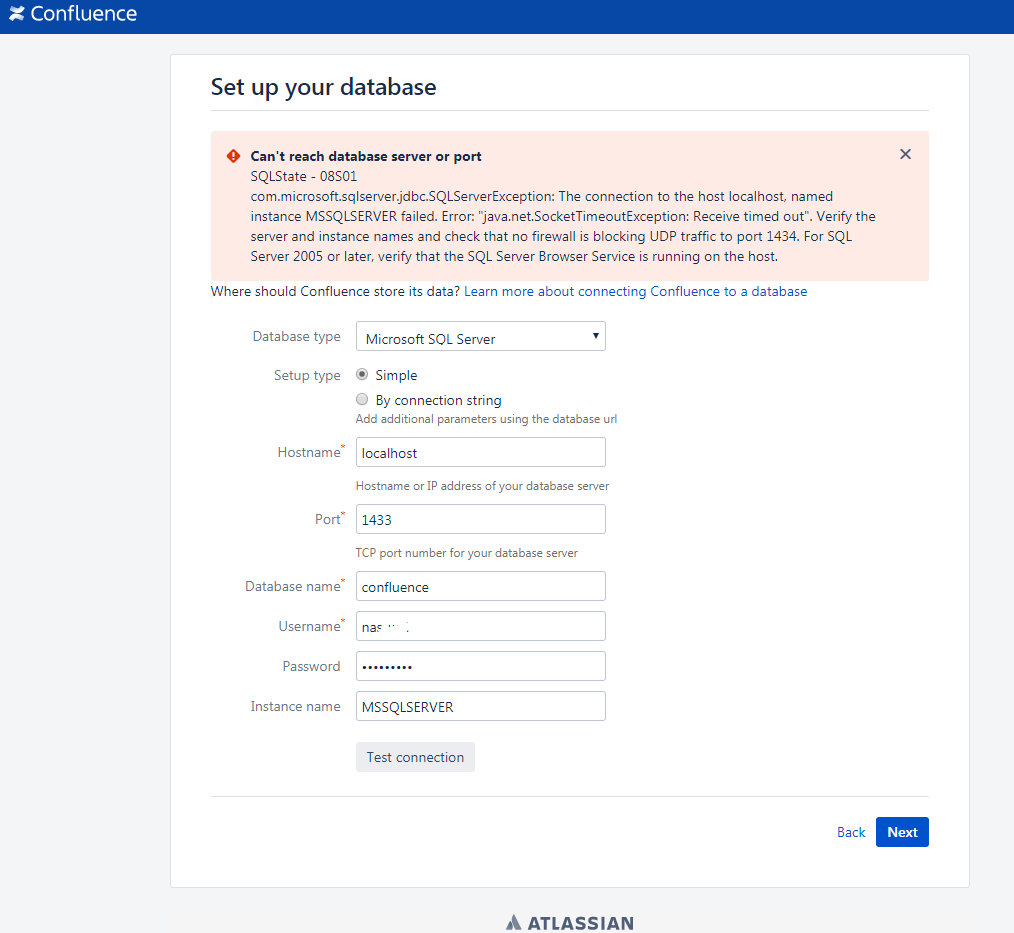
Very likely the cause is "For SQL Server 2005 or later, verify that the SQL Server Browser Service is running on the host." SQL Server Browser Service status in container can be viewed? any possible solution?
Anyone can help to resolve this issue?
Thank you.


