Hi all,
We have an issue when we add an help button beside several custom fields in a same screen.
If we add help beside only one custom field, there is no problem but if we add help beside more than one custom field, it's always the same text that is displayed.
Here is an example :
We have two custom fields with help (Risk probability & Risk Impact Level). If we click on the help button, it is always the description of the first custom field (in this case, Risk probability) that is displayed.
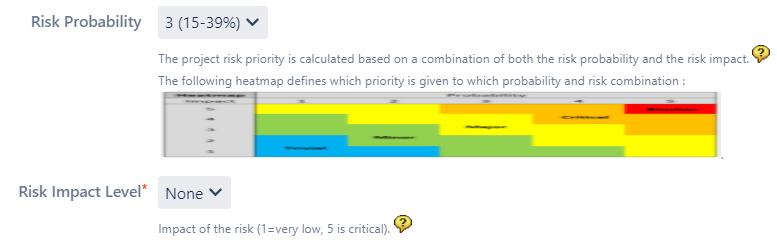
The script used in the Risk Impact Level's description is the following :
Impact of the risk (1=very low, 5 is critical).
<script type="text/javascript">
function showHelp() {
var listenersDiv = document.getElementById("qaFieldHelp");
if (listenersDiv.style.display == 'none') {
listenersDiv.style.display = '';
} else {
listenersDiv.style.display='none';
}
}
</script>
<a href="#" onclick="showHelp(); return false;"><img src="/images/icons/help_blue.gif"/></a>
<div id="qaFieldHelp" style="display:none">
An explanation of the possible values.<br />
1: very low<br />
2: low<br />
3: medium<br />
4: high<br />
5: critical <br />
More details on these values can be found <a href="/secure/custom/impactScale.xls">here</a>.
</div>
Thus, you can see that it's not the same than the message displayed above.
We have defined the Javascript script in the description of the custom field and also in the description of the field in the Field configuration.
Do you have any idea to help us ? We absolutely need the help for several custom fields.
Kind regards


