Hello everyone,
I'm using a drop down user macro who's code was originally added into the community by @Dalectricbut I'm having issues with the spacing underneath my "inputs" for this dropdown user macro. (All letters that hang under the baseline get cut off)
Example:
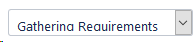
I've tried to look through the code for the fix but I can't seem to find anything that points to the dimensions of the dropdown itself. If anyone can help me resolve this issue, I'd be greatful.
User Macro Code:
## @param DropdownId:title=Unique dropdown ID|type=string|required=true|default=1|desc=If more than one dropdown in page, change this to a unique name.
## @param Label:title=Label|type=string|desc=Enter dropdown label, if desired
#set ( $dropdownId = "" )
#set ( $dropdownId = "dropdown-" + $paramDropdownId )
#set ( $label = "" )
#set ( $label = $paramLabel )
#set ( $toplabel = "" )
#if ( $label == "" )
#set ( $toplabel = "top-label" )
#end
#set ( $pageId = $content.id )
#set ( $options = $body.split("\n") )
<form class="aui $toplabel">
<div class="field-group">
#if ( $label != "" )
<label for="$dropdownId">$label</label>
#end
<select class="select" id="$dropdownId" name="$dropdownId" onchange="colourFunction()">
#foreach ( $option in $options )
#set ( $option = $option.trim().replaceAll('"', '' ) )
<option value="$option">$option</option>
#end
</select>
</div>
</form>
<script>
AJS.toInit(function() {
var canEdit = true;

#if ( $permissionHelper.canEdit($userAccessor.getUserByName($req.remoteUser), $content) )
jQuery("#$dropdownId").change(function() {
var dropdownObject = this;
jQuery.ajax({
url: contextPath + "/rest/api/content/${pageId}/property/${dropdownId}",
success: function(dropdownData) {
dropdownData.value = jQuery(dropdownObject).val();
dropdownData.version.number += 1;
jQuery.ajax({
contentType: 'application/json',
type: 'PUT',
url: contextPath + "/rest/api/content/${pageId}/property/${dropdownId}",
data: JSON.stringify(dropdownData)
});
},
error: function(response) {
var dropdownData = {};
dropdownData.key = "$dropdownId";
dropdownData.value = jQuery(dropdownObject).val();
jQuery.ajax({
contentType: 'application/json',
type: 'POST',
url: contextPath + "/rest/api/content/${pageId}/property",
data: JSON.stringify(dropdownData)
});
}
});
});
#else
canEdit = false;
#end

jQuery.ajax({
url: contextPath + "/rest/api/content/${pageId}/property/${dropdownId}",
success: function(dropdownData) {
jQuery("#$dropdownId").val(dropdownData.value);
if (!canEdit) {
jQuery("#$dropdownId").prop( "disabled", true );
}
}
});
});
</script>
Thank you!
Michael

