Hello, I’m running Confluence server 7.0.1 and I noticed an issue with Anchor links.
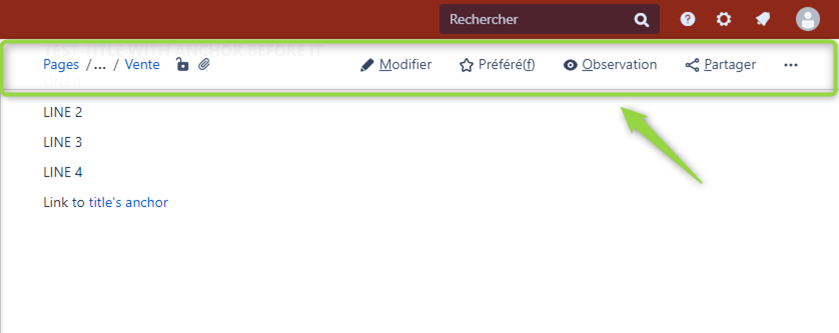
When clicking on a link pointing to an anchor (on the same page or on another page), the first lines where the anchor was set are hidden behind the breadcrumb navigation bar.
So we have the impression that the anchor link does not point to the exact position where it was set, but to the second or third line below.
This is often confusing when pointing to titles or sections, because we don’t know where we were pointed to because we cannot read the title.
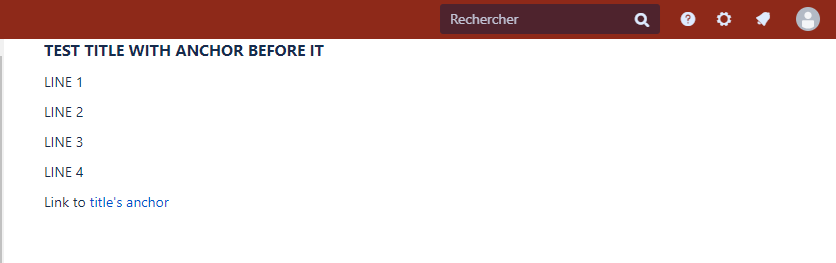
However when scrolling once down and up again, the breadcrumb navigation bar disapears and we can finally see the lines that were hidden before.
And they correspond to the place / title where the anchor was set, so we know the link works properly.
Is there any tips on how to solve this ?
Thank you in advance.
Example when clicking on a link to an anchor (Title where anchor is set is not visible) :
When scrolling once up then once down, breadcrumb navigation bar disapears and title can be seen :
Also, if the link and anchor are on the same page I noticed this issue only occurs when the anchor is located somewhere above the link (which is most of the time in my case).
If anchor is located somewhere below the link, the breadcrumb navigation bar dissapears by default so all the text is correctly visible.
The issue is even more annoying when pointing from another page to the anchor. In that case, it seems the global menu bar hidding the Title where the anchor was set :