I've been attempting to create a custom field using scriptrunner, but to no avail....it will not take my html code to create a dynamic table as a custom field.
Please note that I'm not a developer...took a js class years ago...so I'm piecing together things I've found on the internet to do this.
Right now I have code added to the Custom field description (minus scriptrunner).
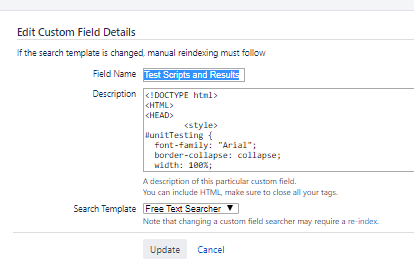

I can see that it "works", but this is what it is actually doing for the custom field:
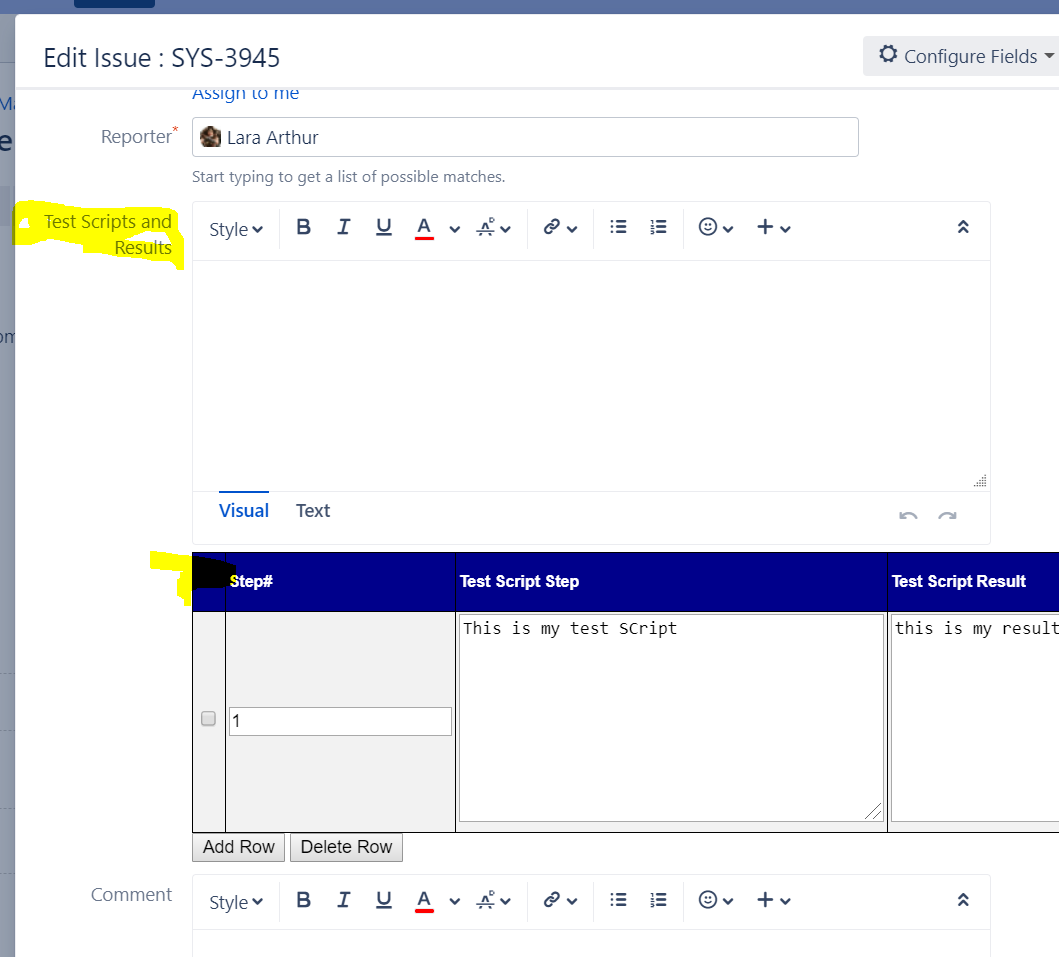
I'm able to add content and add/delete rows, but when I click on update, nothing happens. Now this could be because I'm not saving it to the db? But shouldn't this be showing up in the actual field instead of underneath it?
Can ANYONE tell me what I'm doing incorrectly here??? Would LOVE to solve this problem of mine.
When I tried using scriptrunner...I attempted to update it to xml (markup builder)...but I'm not translating it correctly.
Here is the code (thank you!):
<!DOCTYPE html>
<HTML>
<HEAD>
<style>
#unitTesting {
font-family: "Arial";
border-collapse: collapse;
width: 100%;
}
#unitTesting td, #unitTesting th {
border: 1px solid black;
padding: 2px;
}
#unitTesting tr:nth-child(even){background-color: #f2f2f2;}
#unitTesting tr:hover {background-color: #ddd;}
#unitTesting td {
text-align: left;
}
#unitTesting th {
padding-top: 12px;
padding-bottom: 12px;
text-align: left;
background-color: darkblue;
color: white;
}
</style>
<TITLE> Add/Remove dynamic rows in HTML table </TITLE>
<SCRIPT language="javascript">
function addRow(tableID) {
var table = document.getElementById(tableID);
var rowCount = table.rows.length;
var row = table.insertRow(rowCount);
var colCount = table.rows[0].cells.length;
for(var i=0; i<colCount; i++) {
var newcell = row.insertCell(i);
newcell.innerHTML = table.rows[1].cells[i].innerHTML;
//alert(newcell.childNodes);
switch(newcell.childNodes[0].type) {
case "number":
newcell.childNodes[0].value = "";
break;
case "area":
newcell.childNodes[0].value = "";
break;
case "area":
newcell.childNodes[0].value = "";
break;
case "checkbox":
newcell.childNodes[0].checked = false;
break;
case "select-one":
newcell.childNodes[0].selectedIndex = 0;
break;
}
}
}
function deleteRow(tableID) {
try {
var table = document.getElementById(tableID);
var rowCount = table.rows.length;
for(var i=0; i<rowCount; i++) {
var row = table.rows[i];
var chkbox = row.cells[0].childNodes[0];
if(null != chkbox && true == chkbox.checked) {
if(rowCount <= 1) {
alert("Cannot delete all the rows.");
break;
}
table.deleteRow(i);
rowCount--;
i--;
}
}
}
catch(e) {
alert(e);
}
}
</SCRIPT>
</HEAD>
<BODY>
<table class="table" id="unitTesting">
<th></th>
<th>Step#</th>
<th>Test Script Step</th>
<th>Test Script Result</th>
<th>PASS/FAIL</th>
<tr>
<TD><INPUT type="checkbox" name="chk"/></TD>
<TD><INPUT type="number" name="num"/></TD>
<TD><textarea type="area" name="testScript" rows="10" cols="40"></textarea></TD>
<TD><textarea type="area" name="testResult" rows="10" cols="60"></textarea></TD>
<TD>
<SELECT name="passFail">
<OPTION value="CH"></OPTION>
<OPTION value="PA">PASS</OPTION>
<OPTION value="FA">FAIL</OPTION>
<OPTION value="UN">UNABLE TO TEST</OPTION>
</SELECT>
</TD>
</tr>
</table>
<input type="button" value="Add Row" onclick="addRow('unitTesting')" />
<INPUT type="button" value="Delete Row" onclick="deleteRow('unitTesting')" />
</BODY>
</HTML>

