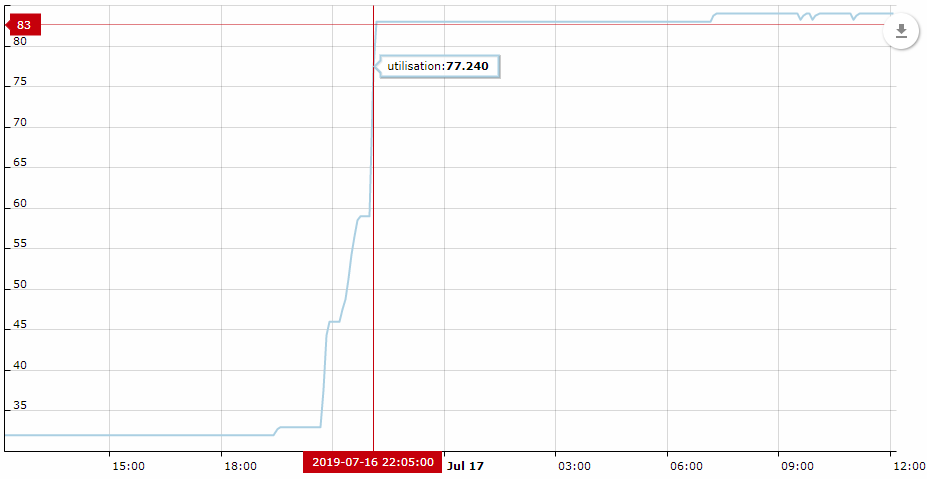
I've noticed a pattern when importing data using the Insight SCCM Integration where memory usage spikes in the host OS and remains at that level until the OS is restarted. A symptom of this is the SCCM import configured in Insight fails to connect to the SCCM DB after a couple of imports and the only thing that solves it is a Jira restart. Other imports continue to function.
Has anyone else experienced similar behavior with this app?
Import details:
-Occurs 1/day
-Affects 2 object types
--One filters the data to import using IQL, bringing the total objects imported/updated from ~16,000 to ~500
--The other imports/updates ~16,000 objects unfiltered.
-Import time is around 1.5 hours using 12 cores
The Jira Xmx is 16GB and the host has 64GB memory. After restarting the server, host memory usage is ~33%. When the SCCM import begins reading data, memory usage on the host moved up to ~38%, when it finishes reading the data, host memory usage is at 84%.
The worrisome part is that the memory seems not to be released. Host memory usage remains at 84% after the import completes and any additional usage is stacked on that until I reboot. I discovered this using monitoring tools and reviewing the insight_import.log; the times of the memory spike and associated actions shown in the log match exactly.
I'm still troubleshooting this, so haven't opened a support case with Riada just yet. Any thoughts from the community?
2019-07-16 20:45:00,210 [insight-DefaultImportService-IMPORTS-worker-2-thread] | SCCM Computers>>> Started reading data for configured object type
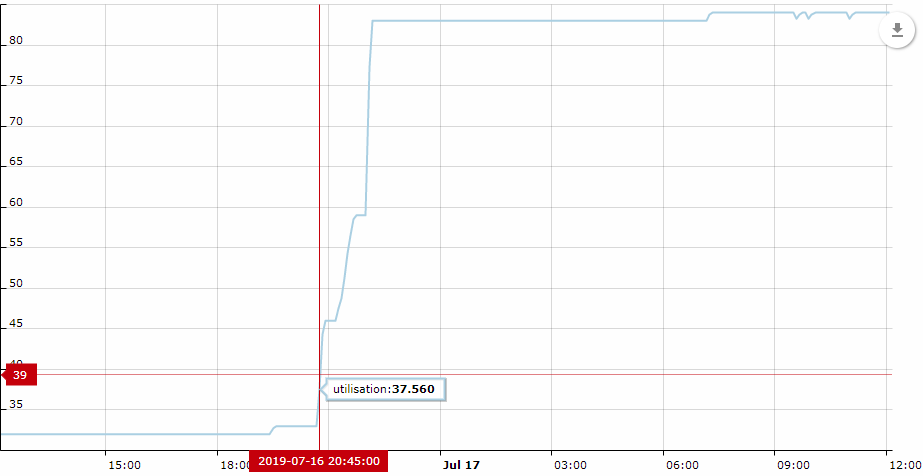
2019-07-16 22:01:14,193 [insight-DefaultImportService-IMPORTS-worker-2-thread] | SCCM Computers>>> Completed reading data for configured object type