Hi
I re-installed my Confluence Server upgraded to the latest version 6.15.3 and everything worked fine except, that the standard emoticons are not showing-up any more. In edit mode I see a broken image in normal mode I see the alternative text description instead of the image.
That is what I already tried to fix this issue:
(a) followed instructions on: https://confluence.atlassian.com/confkb/broken-avatars-icons-in-confluence-after-an-upgrade-329974322.html
(b) I checked on the image html tag and the strange thing is, that if I paste the address of the emoticon's image into from the html code into my browser navigation bar, the single image shows up on another browser tab without any issue.
(c) if I right click in normal mode (not edit mode) on the alternative text (e.g. "(tick)" or "thumbs up") and choose the option "view image" the image shows on a own page without any problems - the same as in (b).
Here a screenshot:
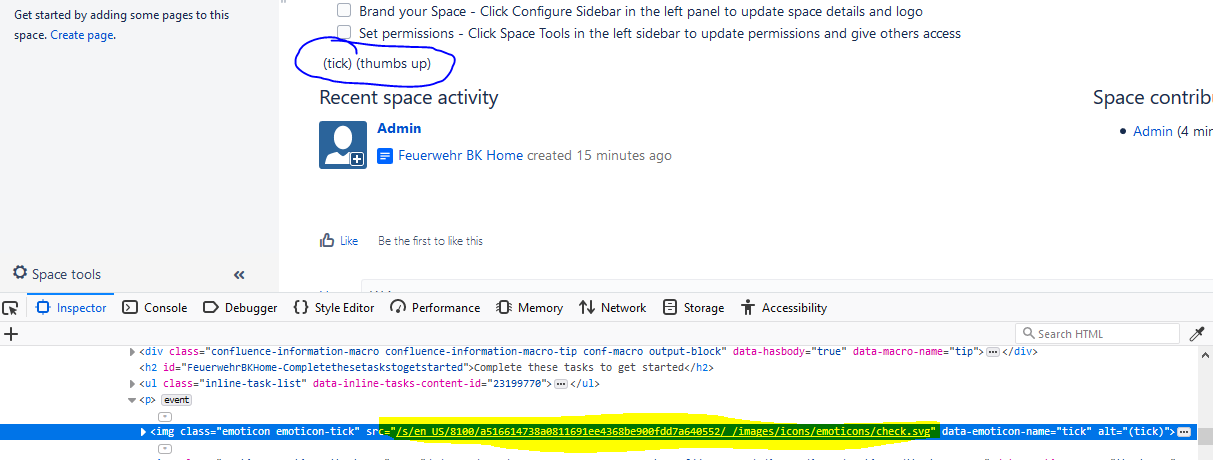
The marked link below works, if I paste it into the browsers navigation bar as described above.
Would be great, if you could get me some advice how to resolve this issue.
Best regards
Gunther


