Hey guys,
I've been trying to configure a deployment workflow with bitbucket pipelines using my own SSH Key pair with this pipeline script:
image: atlassian/default-image:2

pipelines:
   tags:
      release:
         - step:
            name: Deploy to development
            script:
               - echo "Deploying to development"
               - ssh ec2-user@xx.xxx.xx.xx /home/ec2-user/build.sh param1 param2
Unfortunately, I can not make it work since it gets stuck in the ssh connection returning:
<span>+ ssh <a href="mailto:ec2-user@18.218.144.51" target="_blank" rel="noopener nofollow noreferrer">ec2-user@x</a>x.xxx.xxx.xx /home/ec2-user/build.sh param1 param2 </span><span>ssh_askpass: exec(/usr/bin/ssh-askpass): No such file or directory</span><span>Permission denied (publickey,gssapi-keyex,gssapi-with-mic).</span>
I'm using my own SSH Key pair which I installed following the next steps:
1) Generate the SSH Key (RSA) without a passphrase;
ssh-keygen -f pipelineAccessKey -t rsa -N ''
2) Set the private key and the public key under Settings > SSH Keys (Pipelines) and fetch the fingerprint
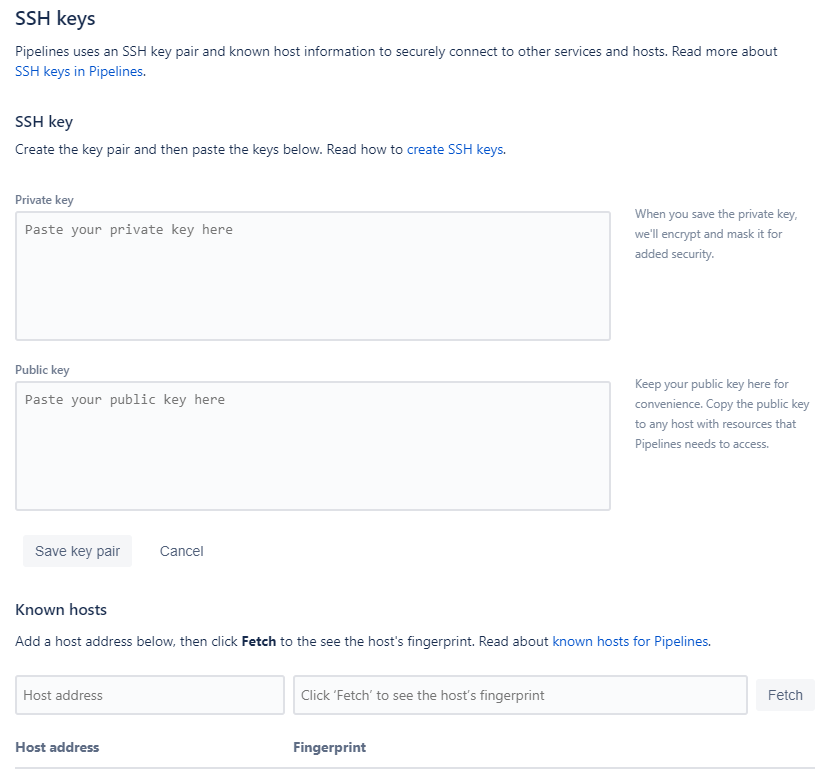
3) Add the public key into ~/.ssh/authorized_keys in the remote server and done.
However when I use SSH keys generated automatically by Bitbucket works but I need using my own SSH Key pair in order to use it in other repositories.
If anyone has any idea what is happening here it would be awesome.
Thanks!

