I have written a very simple user macro which mimics the effect of the Expand macro, but lets me style the clickable text as a heading in the H1 to H6 range.
I render it like this:
<div class="rs-expanding-heading-container">
<div class="rs-expanding-heading-control">
<$selectedStyle style="color: $selectedColor;" class="rs-expanding-heading">$paramTitle</$selectedStyle>
</div>
<div class="rs-expanding-content">$body</div>
</div>
Sometimes the body of the expanding heading macro contains a table, which always renders as expected.
However, it breaks when I attempt to apply the Table Filter plugin to that table.
If I apply the Table Filter in the editor and save the page, the table filter's CSS is as follows:
.tablefilter-outer-wrapper {

margin-top: 10px;

visibility: hidden;

} If I disable the visibility style, I get the following broken mess and no table:
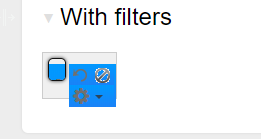
Furthermore, I've noticed that the underlying HTML for the Table Filter plugin is in a different order to when it appears in the regular Expand macro.
What could my User Macro possibly be doing that changes the underlying rendering order of other macros?


