Dear Confluence community.
We are using Confluence 6.4.1.
Sometimes, users edit the same page and same paragraph at the same time; this generates a conflict.
The first user saving - let's call her Alice - has his modifications saved.
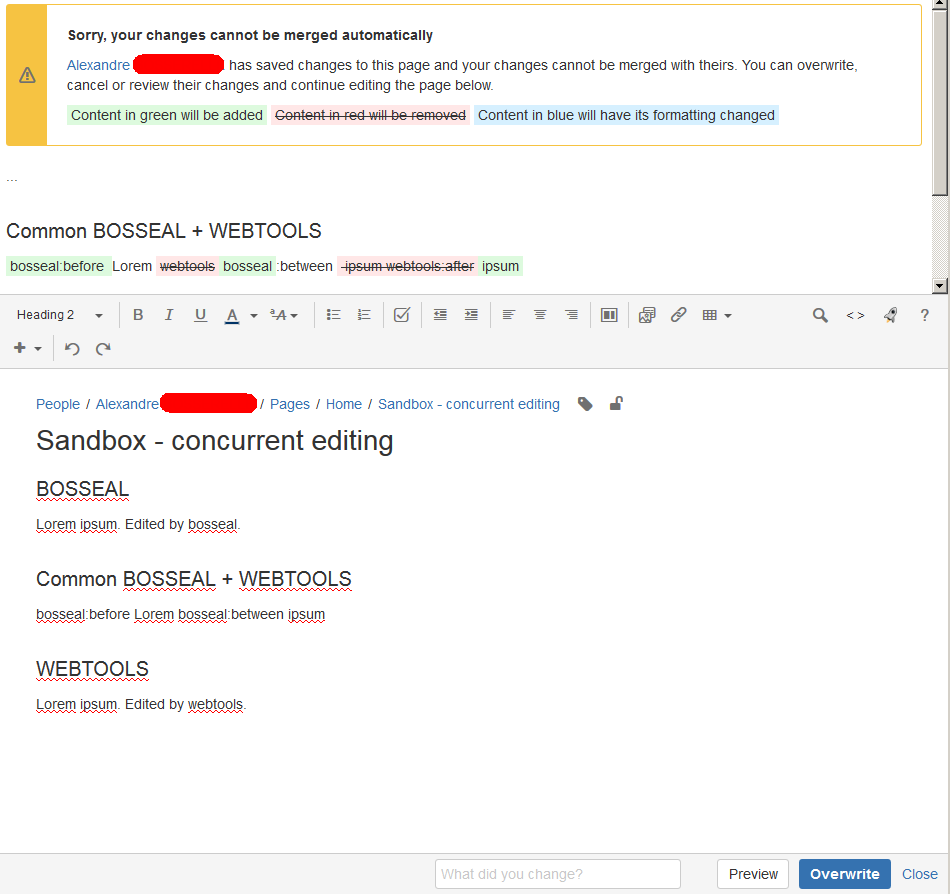
However, the second user - let's call him Bob - trying to save has a page refresh notifying the page cannot be saved because of a conflict. See https://confluence.atlassian.com/conf64/concurrent-editing-and-merging-changes-936510651.html
The conflicting paragraph is shown.
The options offered are:
- Overwrite: save and overwrite changes of the first user
- Cancel: keep changes of the first user, discard changes of the second user
According to https://confluence.atlassian.com/conf64/concurrent-editing-and-merging-changes-936510651.html :
>> Continue editing - Continue to edit the page; useful if you want to manually merge the changes.
>> If Bob's changes overlap with Alice's, Confluence will display an error message to Bob showing where Alice has changed the page, and giving Bob the options to overwrite Alice's changes with his own, to re-edit the document to incorporate Alice's work, or to cancel his own changes entirely, maintaining Alice's changes.
How is the manual merge supposed to work?
- Is it supposed to have a visual diff tool somewhere to see the changes and merge them (something similar to Meld or WinMerge but within the wiki page editor)
- Is it supposed to be copied / pasted from the warning message by Bob to the wiki page editor?
Please find below a screenshot of the warning message we have and the options proposed.
Thank you a lot for your help.
Best regards,
Alexandre - DIGIT WEBTOOLS team