Hi All,
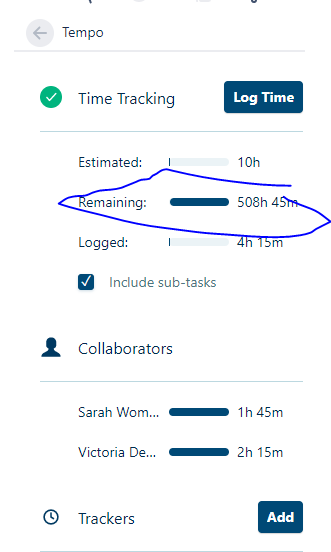
I use Tempo time tracking. Somewhere along the way of configuring, I added an imaginary amount of hours somewhere. Now I cannot find where to change this remaining time. I am in regular Tempo Timesheets. I will note, we did have Tempo Planner app as a trial for a bit, but I deleted it because it wasn't what we needed.
Solved! Go to Solution.
This worked! I had to go in and add time and then I was able to edit the remaining to zero hours and then it reset itself. Thank you all!
I see that the box "Include sub-tasks" is checked. Did you look at the sub-tasks too? I guess one of them can be the culprit.
I noticed the same, so try to uncheck the "Include sub-tasks" - then you will know, whether continue to investigate this issue or look at the sub-tasks.
The remaining time I have on the issue edit screen, so you should be able to edit it directly on the issue, or as suggested previously on subtasks. Depends on which screen the field is editable.
Recommended Learning For You
Level up your skills with Atlassian learning
Learning Path
Improve user experience across Jira with global settings
Learn how to set up and configure a Jira site, manage Jira permissions, and configure Jira apps and integrations.
Learning Path
Streamline projects across Jira with shared configurations
Build Jira work items with reusable configurations called schemes, and reduce administrative work with automation.
Learning Path
Become an effective Jira software project admin
Set up software projects and configure tools and agile boards to meet your team's needs.