The Atlassian Community Forums are currently in read-only mode. We will be relaunching on a new platform on September 22 (read more here). We apologize for the extended downtime. For concerns or questions, please email communitymanagers@atlassian.com. See you on the other side, on the new Atlassian Community Forums! :)

×

Forums

Articles
Create
cancel
Showing results forĀ 
Search instead forĀ 
Did you mean:Ā 

Why does Outgoing Links Macro not apply Labels?

Katy Bohnenblust
July 15, 2025

I'd like to integrate the two macros "Incoming Links" and "Outgoing Links" on my my page.

But I need the macro to only show the following links:

  • Within the same space as the page
  • With a specific label "prozess"

While the integration of the Incoming Links Macro was super easy and works as it should, the Outgoing Macro always shows all the outgoing Links of the page. and does not check the label.

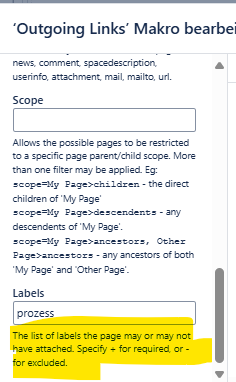
I also noticed that the fields which have to be filled out are labeled the same way as in the Incoming Link macro. 
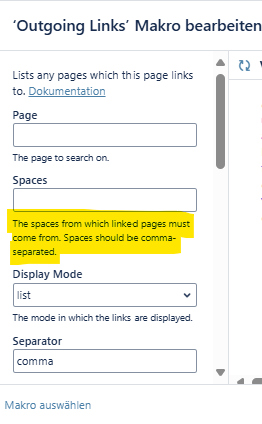
image.pngimage.png


Does this macro work properly? Is there a solution to this problem? Or what did I do wron?

Thanks a lot for your help!

1 answer

1 accepted

Comments for this post are closed

Community moderators have prevented the ability to post new answers.

1 vote
Answer accepted
Cyrille Martin
Community Champion
July 16, 2025

Hallo @Katy Bohnenblust

Did you try to add a '+' before the label term ?

+prozess  

 Regards,


Katy Bohnenblust
July 16, 2025

Hi @Cyrille Martin 

Yes I tried this as well and it still lists all the outgoing links.

Kind regards,

Cyrille Martin
Community Champion
July 16, 2025

When you click on "Dokumentation" where are you going ? is it the documentation site of Appfire ?


Katy Bohnenblust
July 16, 2025

Yes it's on Appfire.

This is the documentation: Outgoing Links - Linking for Confluence Data Center - Confluence

The description of the parameters is identical to one in the macro. Those are probably not correct.

Cyrille Martin
Community Champion
July 16, 2025

You may need to raise a ticket on Appfire site, because you clearly follow the instruction and you don't get the expected result :( 

https://appfire.atlassian.net/servicedesk/customer/portal/11 


Like • Katy Bohnenblust likes this
Katy Bohnenblust
July 16, 2025

Ok, I'll open a ticket there and see if they can solve the issue.

TAGS
AUG Leaders

Atlassian Community Events