The Atlassian Community Forums are currently in read-only mode. We will be relaunching on a new platform on September 22 (read more here). We apologize for the extended downtime. For concerns or questions, please email communitymanagers@atlassian.com. See you on the other side, on the new Atlassian Community Forums! :)

×

Forums

Articles
Create
cancel
Showing results for 
Search instead for 
Did you mean: 

Hide "Action button" by specific field value (TableView)

Michael Küng
Contributor
June 3, 2024

Hey,

I am quite sure this was working fine in the past, but now it seems the "hide if filter" don't work anymore. 

Usually I want to hide an action button if a checkbox is true, but I was not sure about the default value I changed it to a user field. Both was not working. I used also a date field as reference, same result.

Any advice for me and my problem?
2024_06_04_08_16_03_confiForm_TEST_Michael_Kueng_mosaic_.jpg

1 answer

1 accepted

Comments for this post are closed

Community moderators have prevented the ability to post new answers.

0 votes
Answer accepted
Alex Medved _ConfiForms_
Community Champion
June 4, 2024

Hi @Michael Küng 

This worked and still works fine

Do you mind sharing the configuration that does not work for you?

The simple one I have quickly verified this with:

<ac:structured-macro ac:macro-id="750c7d5a-3e5b-4a25-856a-c26000fad023" ac:name="confiform" ac:schema-version="1">
<ac:parameter ac:name="formName">form</ac:parameter>
<ac:rich-text-body>
<ac:structured-macro ac:macro-id="d02a0edf-1bec-4cf0-8c18-8eba2fbcb331" ac:name="confiform-entry-register" ac:schema-version="1">
<ac:rich-text-body>
<p>
<br/>
</p>
</ac:rich-text-body>
</ac:structured-macro>
<p>
<ac:structured-macro ac:macro-id="28cd7d60-553c-4240-9ee1-b175659113e8" ac:name="confiform-field-definition" ac:schema-version="1">
<ac:parameter ac:name="fieldName">ac</ac:parameter>
<ac:parameter ac:name="fieldLabel">ac</ac:parameter>
<ac:parameter ac:name="values">go=true</ac:parameter>
<ac:parameter ac:name="extras">go=true</ac:parameter>
<ac:parameter ac:name="type">action_button</ac:parameter>
</ac:structured-macro>
</p>
<p>
<ac:structured-macro ac:macro-id="e3daea70-5bc3-4536-9141-e83b7f1d3f84" ac:name="confiform-field-definition" ac:schema-version="1">
<ac:parameter ac:name="fieldName">go</ac:parameter>
<ac:parameter ac:name="fieldLabel">go</ac:parameter>
<ac:parameter ac:name="type">checkbox</ac:parameter>
</ac:structured-macro>
</p>
<p>
<ac:structured-macro ac:macro-id="24f0d9ad-b671-4b12-b6ab-1e05f5ca35f1" ac:name="confiform-field-definition" ac:schema-version="1">
<ac:parameter ac:name="fieldName">user</ac:parameter>
<ac:parameter ac:name="fieldLabel">user</ac:parameter>
<ac:parameter ac:name="type">user</ac:parameter>
</ac:structured-macro>
</p>
</ac:rich-text-body>
</ac:structured-macro>
<p>
<br/>
</p>
<ac:structured-macro ac:macro-id="10d2095c-e3b7-4879-9fb5-339ea62c66af" ac:name="confiform-table" ac:schema-version="1">
<ac:parameter ac:name="formName">form</ac:parameter>
<ac:rich-text-body>
<ac:structured-macro ac:macro-id="8e3ff2f1-20a9-4783-81a4-ac51c3f91c9a" ac:name="confiform-entry-edit" ac:schema-version="1">
<ac:rich-text-body>
<p>
<br/>
</p>
</ac:rich-text-body>
</ac:structured-macro>
<p>
<br/>
</p>
<p>
<ac:structured-macro ac:macro-id="dc38a1dd-b1ad-4e1b-8295-3dc10dffc4f3" ac:name="confiform-field" ac:schema-version="1">
<ac:parameter ac:name="fieldName">ac</ac:parameter>
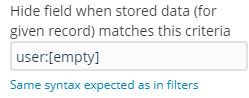
<ac:parameter ac:name="hideIfMatches">user:[empty]</ac:parameter>
</ac:structured-macro>
</p>
<p>
<ac:structured-macro ac:macro-id="78c6e632-d190-4b96-b268-a497ff76dd2f" ac:name="confiform-field" ac:schema-version="1">
<ac:parameter ac:name="fieldName">go</ac:parameter>
</ac:structured-macro>
</p>
<p>
<ac:structured-macro ac:macro-id="31bddbba-af1e-4668-b1c2-2959ad7d56be" ac:name="confiform-field" ac:schema-version="1">
<ac:parameter ac:name="fieldName">user</ac:parameter>
</ac:structured-macro>
</p>
<p>
<br/>
</p>
</ac:rich-text-body>
</ac:structured-macro>
<p>
<br/>
</p>

Alex

Michael Küng
Contributor
June 4, 2024

Thanks Alex! I have found the differences. THe problem is caused by the activation of inline edits (enableGridEdit=True)

If you activate this, the "Action button" is always present. Can you verify this? Was this also in the past? Is this correct?

Regards

Alex Medved _ConfiForms_
Community Champion
June 4, 2024

I think this was always like that, but we gonna fix it

Michael Küng
Contributor
June 4, 2024

Thank you, really appreciate as usual.

Regards.

TAGS
AUG Leaders

Atlassian Community Events