Hey Automation Community! 👋
We’ve made another improvement to the Smart Values panel: you can use 75+ more Jira and Confluence smart values directly from the panel.
Some of these smart values were already available, but weren’t visible or easy to discover when building rules. That meant users often had to know the exact smart value by memory, copy it from documentation, or use trial and error. Use these smart values directly from the panel, with descriptions and clearer terminology to help you understand what they do.
Why does this matter?
More smart values in the panel means less guesswork, fewer workarounds and more power to automation users! Whether you’re new to automation or building advanced rules, these updates make it easier to find the right smart values, add richer context to actions, and create rules that use project, parent, user, time tracking, and Confluence content metadata.
What’s included?
We’ve expanded smart value coverage across Jira and Confluence, focusing on smart values that are useful for routing work, sending richer notifications, adding context to comments, creating audit logs, and powering integrations.
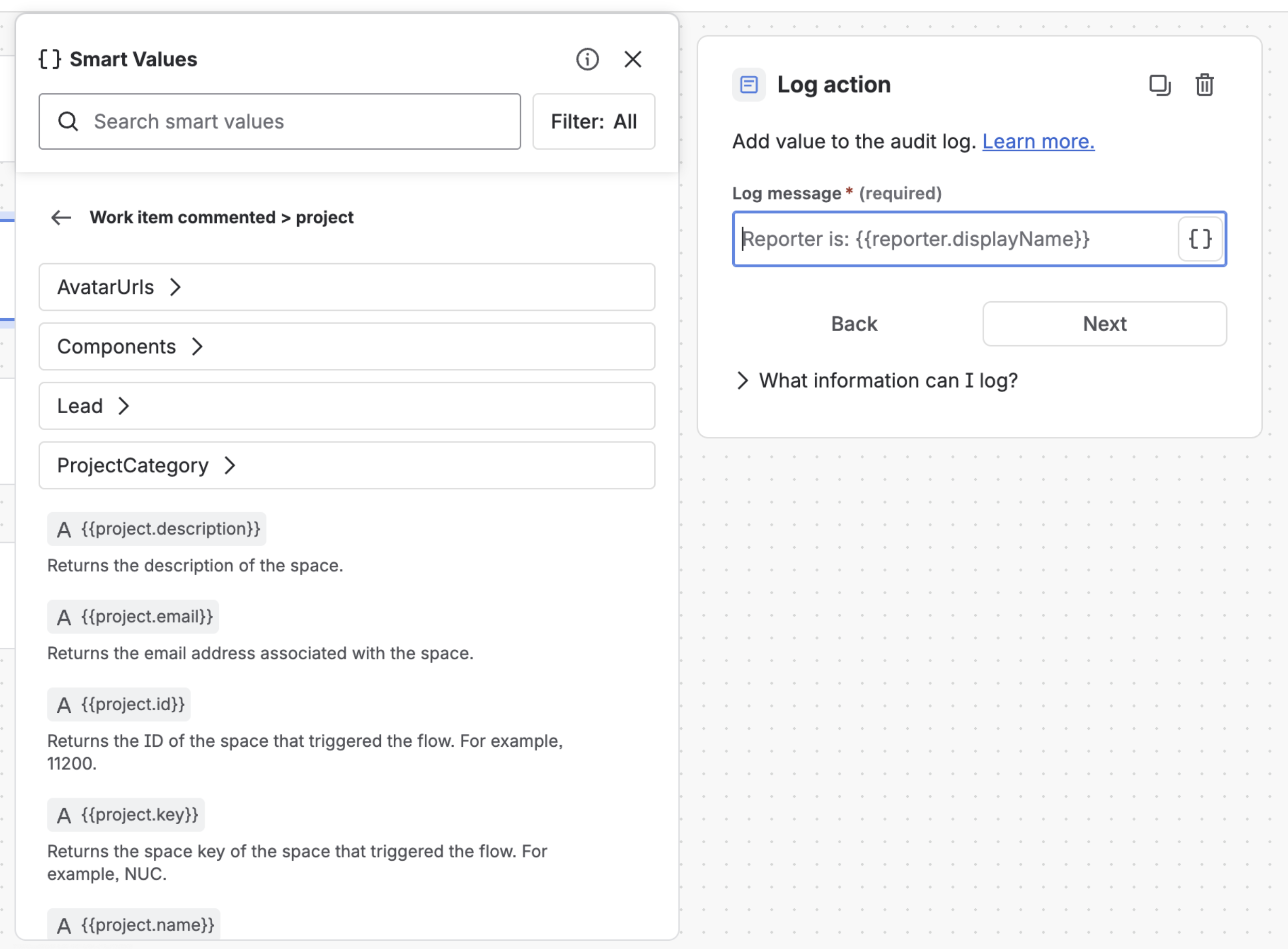
🔎 Use more smart values from the panel
Before: Some smart values were supported by Automation but weren’t shown in the Smart Values panel. If you didn’t already know the exact syntax, they were easy to miss.
Now: Use 75+ more smart value properties directly from the panel while building your rule.
For example, use the panel to find smart values like:
{{project.lead.displayName}}
{{project.lead.emailAddress}}
{{issue.epic.key}}
{{issue.timeTracking.remainingEstimate}}
{{database.owner.displayName}}
{{whiteboard.parent.title}}
This makes the panel a better source of truth for what’s available in your rule context.
🧭 More Jira project and user context
Project metadata is now much richer. You can reference project details, project lead information, and project components:
{{project.email}}
{{project.description}}
{{project.lead.accountId}}
{{project.lead.active}}
{{project.lead.avatarUrls}}
{{project.lead.displayName}}
{{project.lead.emailAddress}}
{{project.lead.timeZone}}
{{project.lead.locale}}
{{project.lead.manager}}
{{project.components.id}}
{{project.components.name}}
{{project.components.description}}
Here are a few examples of what this unlocks:
-
Send a notification to the project lead when a high-priority work item is created.
-
Include project component names in an audit log or Slack message.
-
Route work differently depending on the project lead or project metadata.
Use user-shaped smart values for locale and manager information where available:
{{assignee.locale}}
{{assignee.manager}}
{{reporter.locale}}
{{reporter.manager}}
{{creator.locale}}
{{creator.manager}}
{{initiator.locale}}
{{initiator.manager}}
These can help with localization, people-routing, and escalation workflows.
🧩 Epic and parent work item context
Use these smart values to reference key details for the epic or parent associated with a work item:
{{issue.epic.id}}
{{issue.epic.key}}
{{issue.epic.summary}}
For example:
This work item belongs to {{issue.epic.key}} — {{issue.epic.summary}}
This is useful when you want comments, notifications, or web requests to include parent context without adding extra lookup steps.
⏱️ Expanded time tracking smart values
Use Jira time tracking smart values for original estimate, remaining estimate, time spent, and rendered variants:
{{issue.timeTracking.originalEstimate}}
{{issue.timeTracking.timeSpent}}
{{issue.timeTracking.remainingEstimate}}
{{issue.timeTracking.originalEstimateRendered}}
{{issue.timeTracking.remainingEstimateRendered}}
{{issue.timeTracking.timeSpentRendered}}
The standard values are formatted from seconds using your Jira time tracking settings. For example, {{issue.timeTracking.timeSpent}} might return 2d 3h.
The rendered values return the value as Jira provides it, which can depend on your Jira time rendering settings. For example, {{issue.timeTracking.timeSpentRendered}} might return 2.375d.
This is useful for rules that summarize estimates, track remaining work, or notify teams about logged time.
🚢 More version metadata
Use version smart values for start date and related project context:
{{version.startDate}}
{{version.project}}
This helps release and version-based rules include timeline and project information.
📎 Confluence attachment smart values
Use attachment smart values from the Smart Values panel:
{{attachment.id}}
{{attachment.type}}
{{attachment.title}}
{{attachment.downloadLink}}
{{attachment.mediaType}}
{{attachment.fileSize}}
{{attachment.dateAdded}}
{{attachment.dateLastEdited}}
{{attachment.author}}
These smart values are useful for rules triggered when files are added, removed, or changed.
📚 Confluence database, folder, and whiteboard smart values
Use smart values for richer metadata from newer Confluence content types.
Databases:
{{database.id}}
{{database.type}}
{{database.title}}
{{database.dateFirstPublished}}
{{database.dateLastUpdated}}
{{database.state}}
{{database.space}}
{{database.parent.url}}
{{database.parent.id}}
{{database.parent.title}}
{{database.author}}
{{database.owner}}
{{database.url}}
Folders:
{{folder.id}}
{{folder.type}}
{{folder.title}}
{{folder.dateFirstPublished}}
{{folder.dateLastUpdated}}
{{folder.state}}
{{folder.space}}
{{folder.parent.url}}
{{folder.parent.id}}
{{folder.parent.title}}
{{folder.author}}
{{folder.owner}}
{{folder.url}}
Whiteboards:
{{whiteboard.id}}
{{whiteboard.type}}
{{whiteboard.title}}
{{whiteboard.dateFirstPublished}}
{{whiteboard.dateLastUpdated}}
{{whiteboard.state}}
{{whiteboard.space}}
{{whiteboard.parent.url}}
{{whiteboard.parent.id}}
{{whiteboard.parent.title}}
{{whiteboard.author}}
{{whiteboard.owner}}
{{whiteboard.url}}
These smart values help rules understand where content lives, who created or owns it, and when it changed.
🔗 Confluence Smart Link and embed smart values
Use Smart Link and embed smart values for more useful metadata:
{{smartlink.id}}
{{smartlink.type}}
{{smartlink.title}}
{{smartlink.dateFirstPublished}}
{{smartlink.dateLastUpdated}}
{{smartlink.state}}
{{smartlink.space}}
{{smartlink.parent.url}}
{{smartlink.parent.id}}
{{smartlink.parent.title}}
{{smartlink.author}}
{{smartlink.owner}}
{{smartlink.url}}
{{smartlink.embedUrl}}
These smart values are useful for rules that need to reference linked or embedded content, including where it lives and who owns it.
📝 Terminology improvements
We’ve also started improving terminology in smart value descriptions so the panel better matches current Jira and Confluence language.
-
Some descriptions now use work item where appropriate instead of issue.
-
Epic-related descriptions are starting to move toward parent terminology where that better reflects the relationship.
-
Project and space terminology has been improved in some descriptions where product language has changed.
Existing values like {{issue.epic.key}} and {{project.name}} continue to work as expected, even where descriptions use newer terminology.
When will this be available?
These smart value additions are available right now!
You’ll see these smart values in the Smart Values panel when they’re relevant to the rule component you’re configuring.
We want your feedback!
We’d love to hear how these smart values help your team build better rules.
Drop a comment below and tell us what you build with them!