Forums

Articles
Create
cancel
Showing results for 
Search instead for 
Did you mean: 

Announcing User Permissions for Rovo Agents: Custom Access, Your Way!

We’re excited to introduce a powerful new update to Rovo Agents—user permissions! Now, you have the flexibility to decide exactly who can access and use your agents. Whether you want to keep things open, invite a select set of users, or make your agent private to just you, it’s all just a click away.
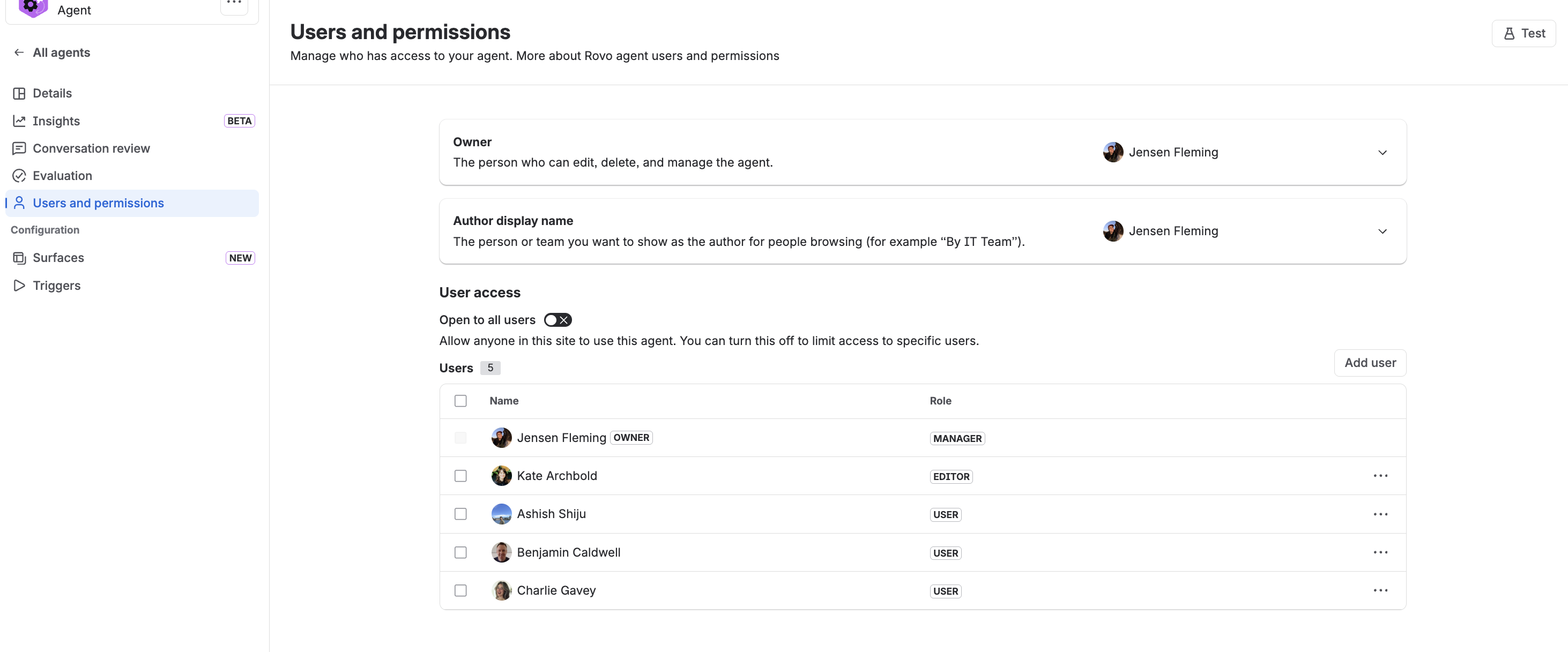
Untitled.png

Why This Matters

As Rovo Agents have become more popular, teams have started creating agents for all sorts of unique use cases—some for everyone, some just for a few. We heard your feedback: you wanted more control and a way to keep your workspace focused and relevant.

With user permissions, you can:

  • Tailor Access: Choose exactly who can view and use your agent—perfect for sensitive, experimental, or team-specific agents.

  • One-Click Privacy: Easily make your agent private with a simple toggle.

  • Clearer Roles: We’ve updated roles to “managers, editors, users” for more clarity.

Thank you!

Your feedback is invaluable—let us know what you love and what you’d like to see improved.

Happy agent-managing! 🚀


P.S. This feature is progressively rolling out. Everyone should have access by end of this week. 


9 comments

Shane Johnson
February 24, 2026

Wonderful! 

This functionality was needed, and will help foster buy-in in cases where security is an emphasized consideration!

Like # people like this
Justin Millette
Contributor
February 24, 2026

This is great!

Are you able to only add users at the moment, or can groups or an Atlassian team be used as well? 

Like # people like this
Jensen Fleming
Atlassian Team
Atlassian Team members are employees working across the company in a wide variety of roles.
February 24, 2026

@Justin Millette -- currently only users. Full transparency, groups added a ton of dev complexity which would have delayed this release, so we prioritized getting this version in your hands quickly. Pending feedback from users, we'll consider prioritizing groups/teams. 

Like # people like this
Ariel Kauan
February 24, 2026

I thought it was incredible. I was looking forward to it. I hope this configuration is possible in Atlassian agents as well, and not just the ones we created.

Yichi Zhang
February 25, 2026

This is great!

Like Janessa Drainville likes this
Asaf Shamay
I'm New Here
I'm New Here
Those new to the Atlassian Community have posted less than three times. Give them a warm welcome!
February 25, 2026

@Jensen Fleming 
For enterprise organization, group option is required since groups already used for other configurations like addons, permission etc. 
managing it user by user will not be sustainable

Like # people like this
Leif Ericson
I'm New Here
I'm New Here
Those new to the Atlassian Community have posted less than three times. Give them a warm welcome!
February 25, 2026

Will agents be private by default (just like filters are today)? That would make most sense to me in a corporate settings where you could otherwise easily be flooded by a bunch of agents, many of which were only ever intended to be private.

Jensen Fleming
Atlassian Team
Atlassian Team members are employees working across the company in a wide variety of roles.
February 25, 2026

@Leif Ericson -- they are public by default (we didn't want to change fundamentally what people were used to) , but we will mostly likely adding something on publish that asks you what you want your permissions settings to be prior to publish. 

Jensen Fleming
Atlassian Team
Atlassian Team members are employees working across the company in a wide variety of roles.
February 25, 2026

@Ariel Kauan  -- it is possible in Atlassian created and Forge installed agents :) You just need to be an org admin to edit it. Find the agent in Browse, click Edit agent, then user and perms. 

Like Ariel Kauan likes this

Comment

Log in or Sign up to comment
TAGS
AUG Leaders

Atlassian Community Events