The Atlassian Community Forums are currently in read-only mode. We will be relaunching on a new platform on September 22 (read more here). We apologize for the extended downtime. For concerns or questions, please email communitymanagers@atlassian.com. See you on the other side, on the new Atlassian Community Forums! :)

×

Forums

Articles
Create
cancel
Showing results for 
Search instead for 
Did you mean: 

condition to hide an UI element

Aswin Sudharsan
I'm New Here
I'm New Here
Those new to the Atlassian Community have posted less than three times. Give them a warm welcome!
December 31, 2019

Greetings,

I am trying to hide a UI from our board u could see below. I am trying to remove add users to role and edit defaults. 

We have the script runner 5.6.9.1p5. I have found out which element to hide but it's not accepting any of the conditions.

Can anyone help me regarding the condition in hiding this element?
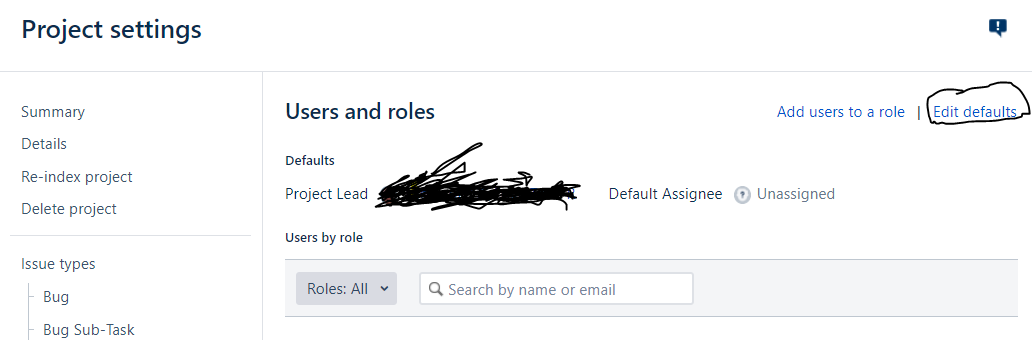
Capture121.PNG

1 answer

Comments for this post are closed

Community moderators have prevented the ability to post new answers.

0 votes
Katy Kelly
Rising Star
Rising Star
Rising Stars are recognized for providing high-quality answers to other users. Rising Stars receive a certificate of achievement and are on the path to becoming Community Champions.
January 15, 2020

Hi Aswin,

You'll need to see if Atlassian allows this to be hidden. You can enable the fragment locator on the script fragments page and see if that button has an associated section. If it doesn't show any section name then it cannot be hidden. If it does you can use Hide UI Element in ScriptRunner.

Regards,

Katy

Adaptavist Product Support  

Aswin
January 17, 2020

Hi Katy. 

We did try by enabling the fragment locator, it seems it doesn't have a separate section. It comes as a Header section -secondary.

So from your answer, I am confirming that it cannot be hidden. Will pass it on to the Team

Many Thanks for the response.

Aswin

TAGS
AUG Leaders

Atlassian Community Events