If you run tests in Xray, you have probably built this page by hand more than once: a list of the tests for the current release, each with its latest run, laid out on a Confluence page so that people who do not live in Xray can read it.
Then the version rolls over, and you build it again.
This is a recipe for generating that page automatically, and for making it point at whichever version your team is working on right now. The interesting part is not the automation itself. It is that after you set it up, moving to the next version is a single change in one place.
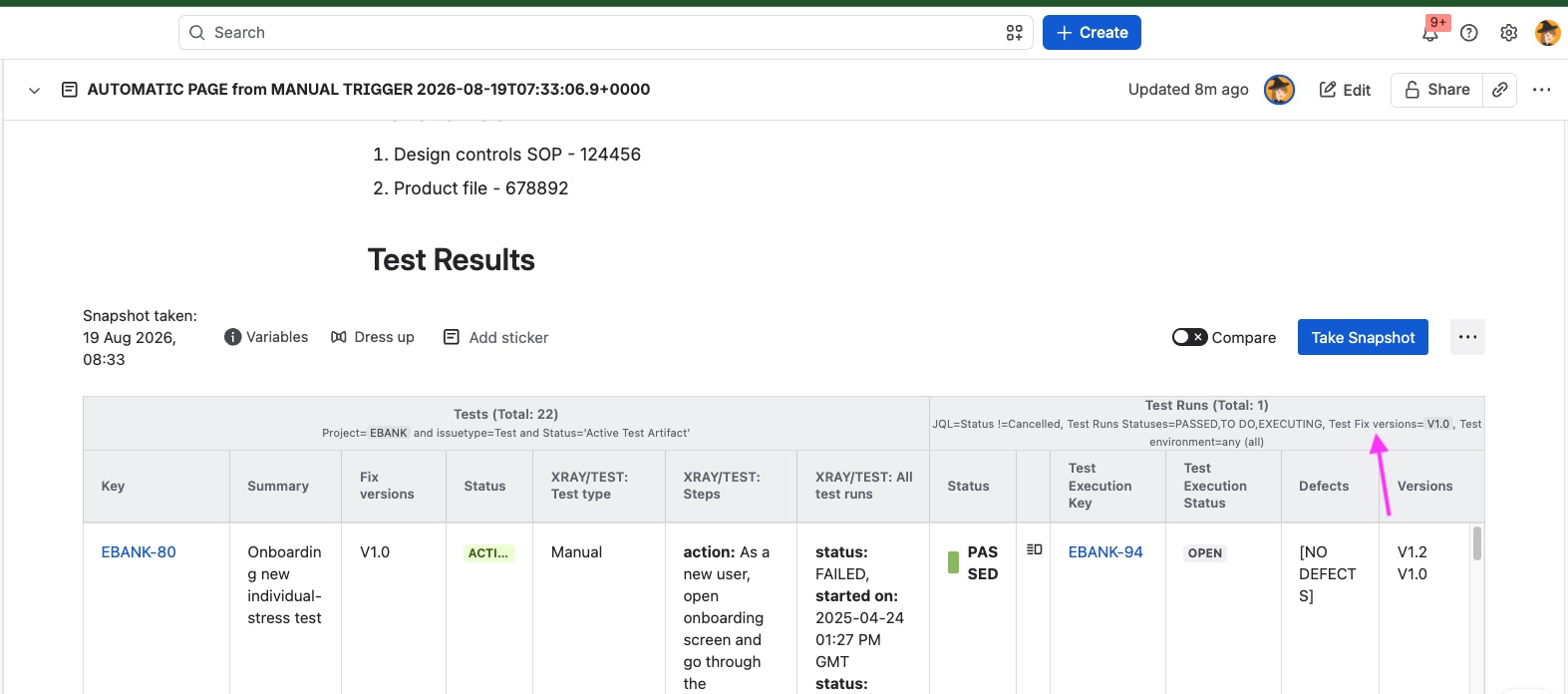
A disclosure before we start: the app I use here is Snapshots, which my company builds. The Atlassian pieces in this recipe (Confluence templates, Jira automation) are standard, and the pattern is worth knowing even if you solve the middle step differently.
What a snapshot is, if you have not met one
A snapshot is a point-in-time capture of Jira data rendered into a Confluence page. You configure a search, choose the fields, and the data appears as a table on the page. It stays as it was until someone takes a new snapshot.
Two things matter for this use case. It reads Xray data, so a snapshot can show tests at one level and their test runs at the next, which is what makes a coverage report rather than a list of issues. And anyone who can open the Confluence page can read it, without an Xray or Jira licence, which is one of the reasons teams start using it: the people asking for test evidence are not always the people with seats in the test tool.
What we are building
A Jira automation rule that creates a Confluence page from a template, and fills it with a coverage report for the version you are currently testing.
The page has your standard structure: whatever headings and boilerplate your organisation expects, then the report. The report has your tests at level one and their runs at level two, filtered to the current version.
The four pieces of the recipe
- A variable holding your current version.
- A Confluence template with the page structure and the report configuration.
- An API key so automation is allowed to take snapshots.
- A Jira automation rule that ties it together.
You set all four up once, and from then on you are reusing them every release rather than rebuilding anything.
1. The variable does the heavy lifting
Everything else in this recipe is fixed. The structure of a coverage report does not change from release to release: same fields, same layout, same relationship between tests and runs. The only thing that changes is which version you are looking at, so that is the one value worth pulling out into a variable.
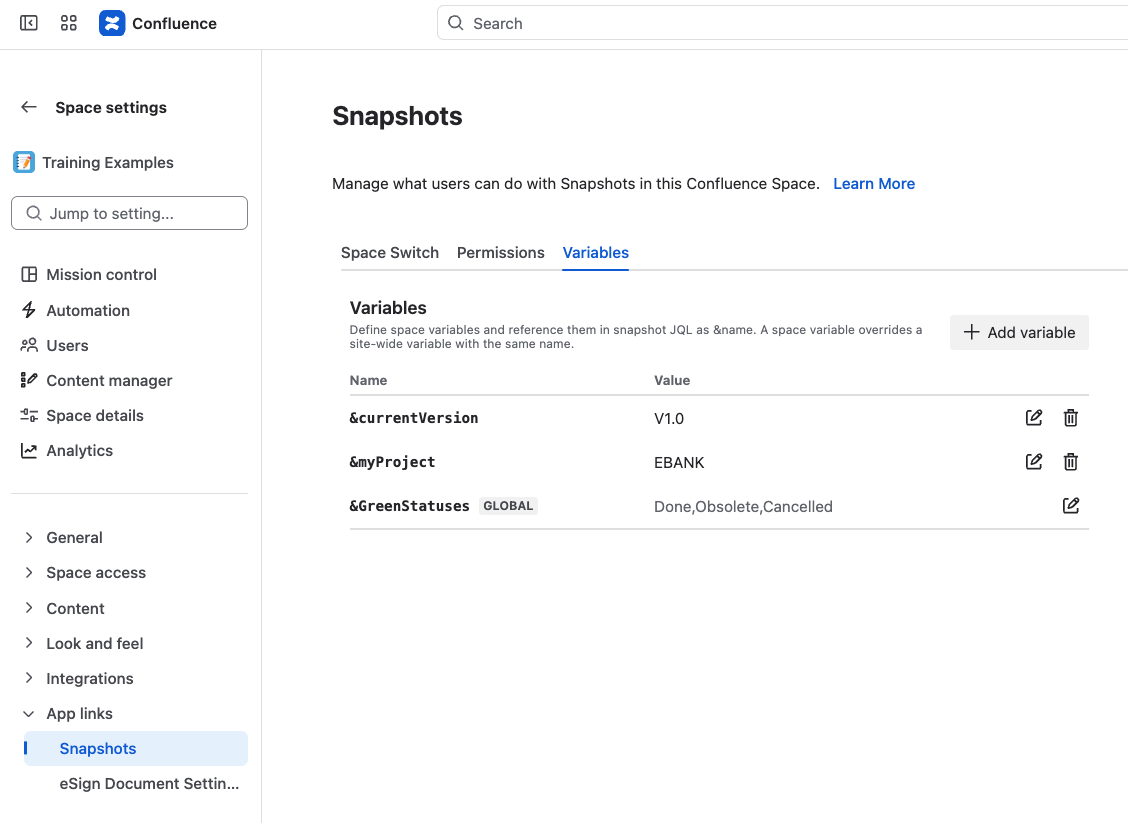
In Snapshots, a variable is defined centrally, at space or site level, and referenced from a snapshot's configuration instead of a hard-coded value. Call it something like myLatestVersion and set it to whatever you are testing now. Then reference it in two places: the filter that selects the tests, and the Fixed version filter of the test run level. When your team moves on, you change that one value and every report built on it follows.
If you have ever gone hunting through a dozen Confluence pages after a release, updating a version string in each one and wondering which you missed, that is the problem this solves.
2. The template holds your standard coverage page
The template is what makes the output consistent. Every page generated from it has the same structure, the same fields and the same layout, so a coverage report from March and one from September are comparable documents rather than two people's idea of what a report looks like.
Create a Confluence template, put your page structure in it, the headings and the standard text people expect above the report, then add the report configuration itself with the variable in the filters. Global templates and space templates both work.
One thing that will confuse you if nobody warns you: if you build a global template and use a space-level variable in it, the editor shows an error. A global template does not belong to any space, so the variable has nothing to resolve against while you are editing. Save anyway. Once a page is created from the template inside a space, the variable resolves normally.
3. Let automation take snapshots
This is the Atlassian-admin part, and it takes a minute. A Confluence administrator opens the Snapshots configuration, goes to the Automation tab, makes sure automation is allowed, and generates a global API key. Keep it somewhere your automation rule can read.
4. The rule
Build the rule in Jira, not in Confluence. The action that takes the snapshots is currently available only in Jira automation. A Confluence version depends on changes on Atlassian's side.
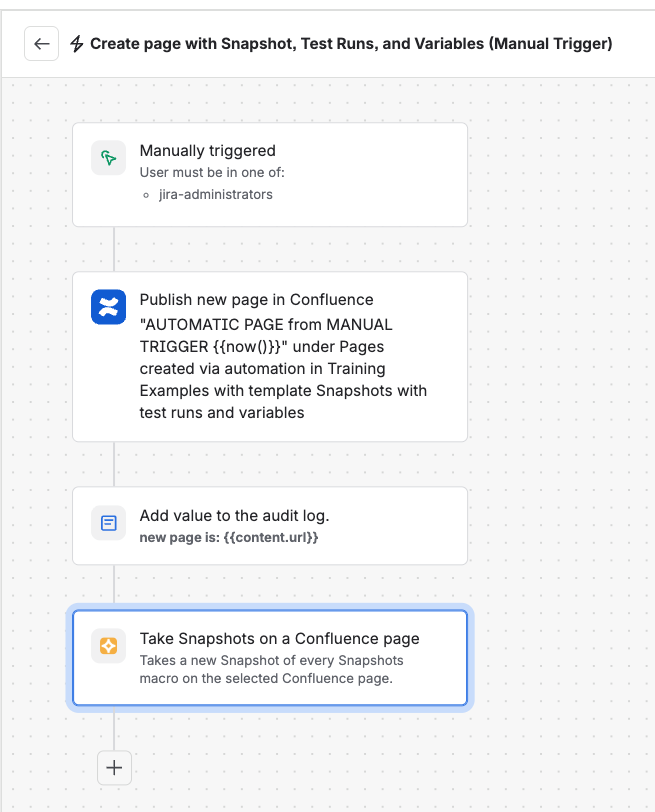
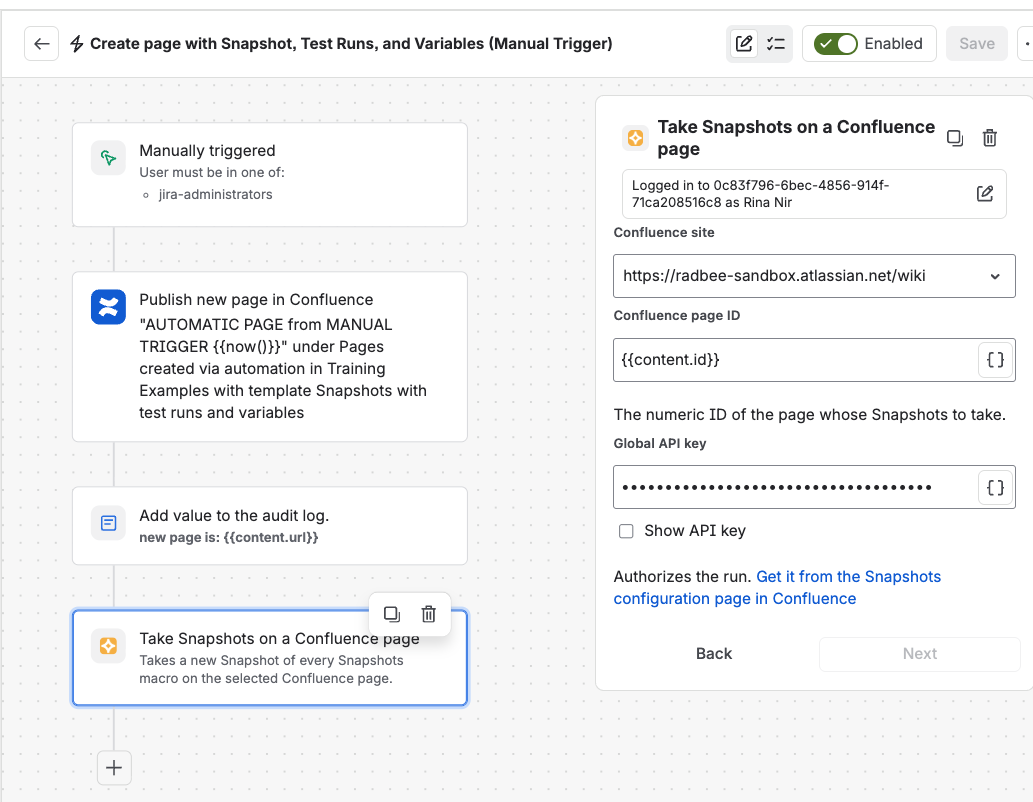
The rule has four steps:
- Trigger. Start with a manual trigger while you are testing the rule. Once it works, tie it to
something real: a test plan transitioning to closed, or whatever event in your process means the testing is done and the report should exist.
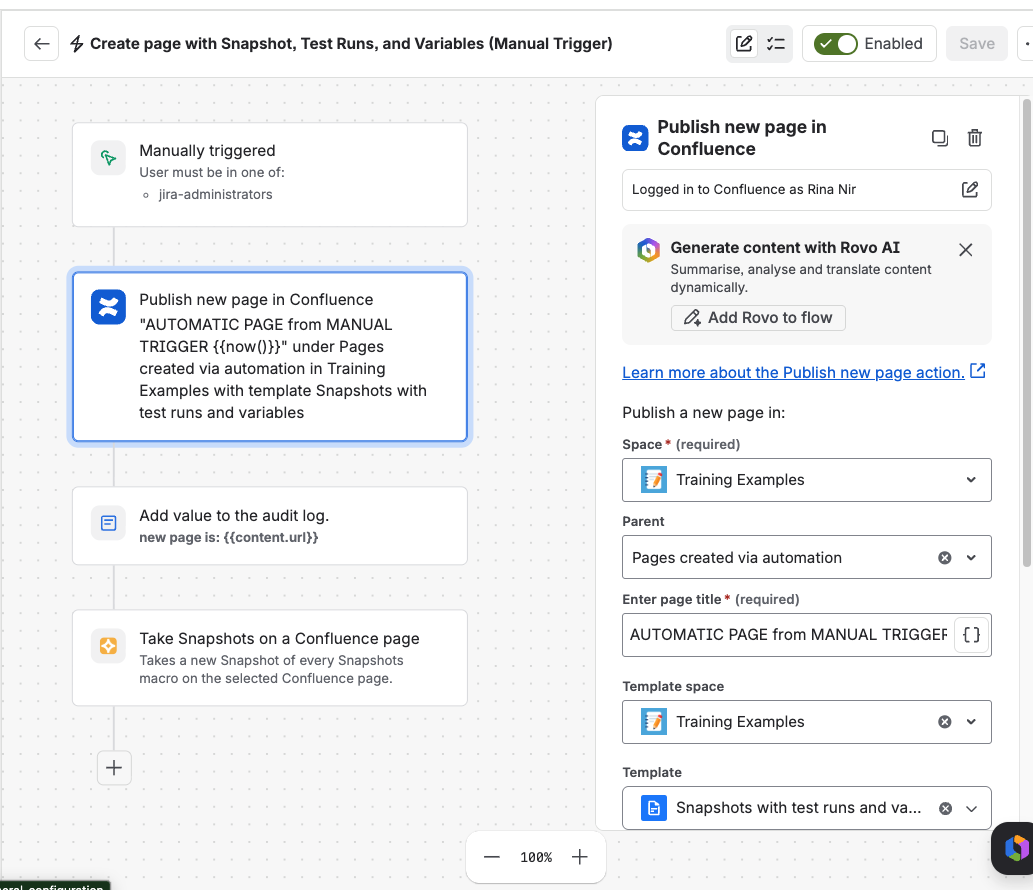
- Create the page with Confluence's own publish new page action, selecting your template.
- Log a message containing a reference to the new page. Optional. You will want it the first
time something goes wrong.
- Take the snapshots, using the content ID of the page created a moment earlier and the global
API key. This is the step that turns an empty template into a report.
What you get
Trigger the rule and a page appears, structured the way your organisation expects, populated with the tests and runs for your current version, readable by anyone with Confluence access.
Roll to the next version by changing the variable. The rule, the template and the structure all stay as they are.
Honest limitations
The action is Jira-only for now. If your process would naturally trigger from Confluence, you can still do this with a web request instead, but it is more fiddly: a URL, headers, and an API key in the request.
The report is a snapshot, not a live view. It shows what was true when it ran. For release evidence that is usually what you want, and it is worth knowing before you build it.
TestRail users get part of this. Snapshots renders TestRail data too, so the template, automation and page-generation parts of the recipe work the same way. Using a variable inside test run filters is Xray only at the moment.
Someone still has to look at the report. Automating the assembly does not automate the judgement.
If you try it
I would be interested to hear which trigger you settle on. The manual trigger is fine for building the rule, but the teams who get the most out of this seem to be the ones who find the natural moment in their own process and hang it off that.
