Co-authored by Luis Ortiz (Catapult Labs) & Yong Yang (Forge5)
Scrum teams generate a massive amount of data every sprint, but data alone doesn't fix broken processes.
A recent IDC report (and many other reputable sources) surfaces that the average knowledge worker spends nearly 30% of the workday just looking for internal information or tracking down the colleague who has the context, and consolidating it. In Jira, sprint health is scattered across boards, reports, time logs, and comments. And even when a Scrum Master pulls all that together, they hit a second hurdle: translating those quantitative metrics (the "What") into qualitative team discussions (the "Why" and "How").
When execution data is disconnected from the human discussions that happen in Agile ceremonies, sprints fail. Our shared belief here is simple: the goal isn't to automate the ceremony or let AI make the team's decisions. It's to put the right evidence in front of the team so the humans can have a better conversation. In this post, we'll show how to build the Complete Agile Loop natively in Jira: plan accurately, execute cleanly, and improve continuously.
Phase 1: Planning with Evidence and Consensus
Sprints usually derail on day one because commitments are based on gut feeling rather than historical evidence and team consensus. That maps to what the Project Management Institute has found for years in its Pulse of the Profession research: unclear requirements and poor communication are among the most frequent root causes of project failure. Inaccurate requirements gathering alone was cited as a primary cause in 37% of cases, and ineffective communication contributes to failure about a third of the time. A shared estimation ritual attacks both.
A healthy sprint starts with two integrated steps:
- Building Consensus: Use an established estimation method the whole team agrees to. This part is non-negotiable, because it's what eliminates the "loudest voice in the room" bias. Estimating asynchronously or via blind voting surfaces hidden technical complexity before the work starts. There are plenty of good options in the Atlassian Marketplace; my team built ScrumPoker Estimates for Jira.
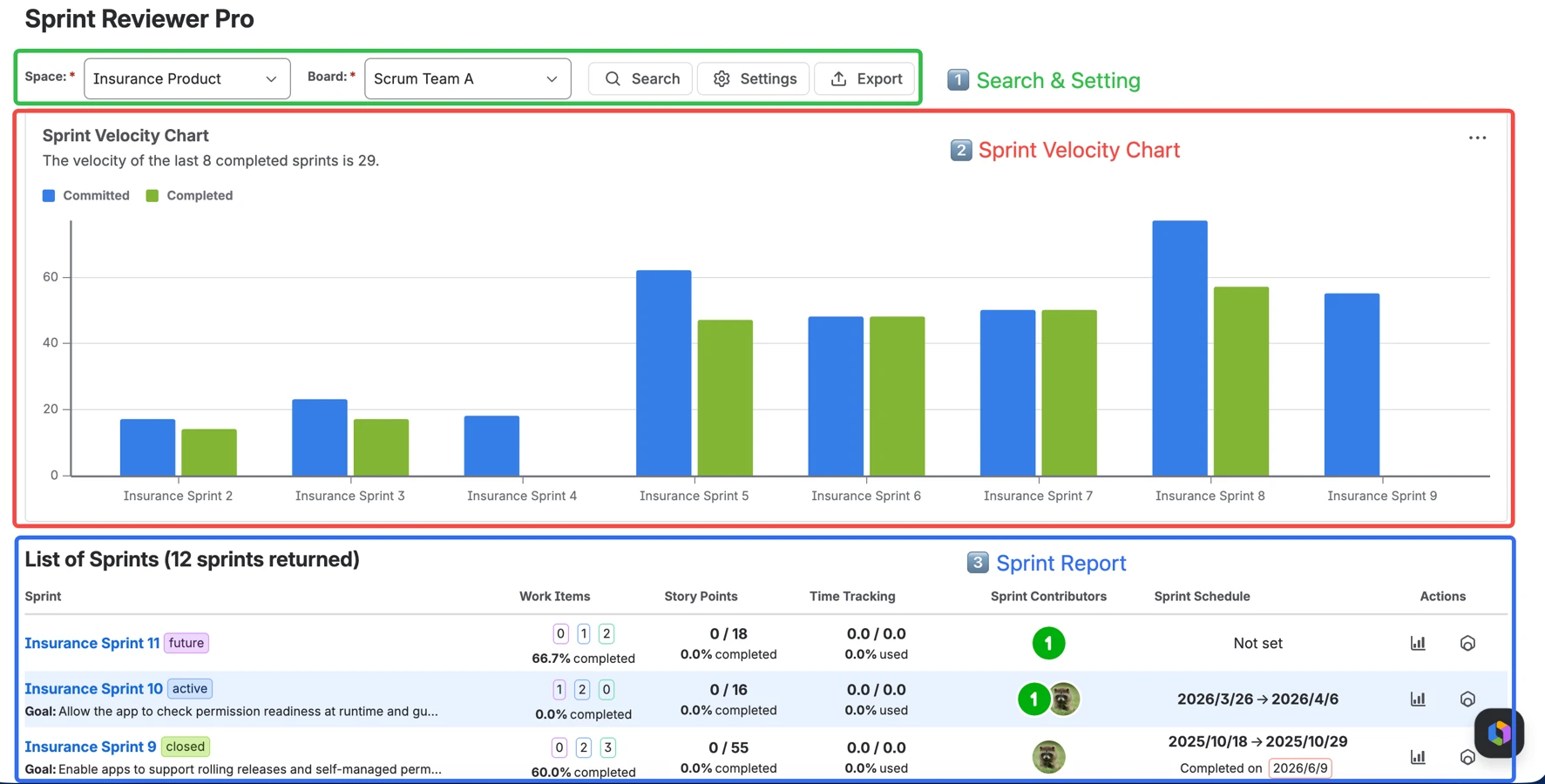
- Validating the Plan: Once the backlog is pointed, validate those estimates against reality. We're using Sprint Reviewer Pro (Yong's app at Forge5), which compares the current plan against an interactive Velocity Chart of the last 8 completed sprints. If your team just pointed 60 story points but your 8-sprint average is 42, you know immediately the sprint is overcommitted. You shift from guessing to planning responsibly.
Phase 2: Active Inspection Without the Manual Mining
During an active sprint, the daily standup often devolves into a status report because the Scrum Master doesn't have time to dig through the board for real bottlenecks; and half the meeting gets spent reading out what everyone did yesterday.
Two moves fix this, and neither requires AI to run the meeting for you. First, take the status collection off the meeting entirely. Our team developed a Slack bot: StandBot. It runs the daily stand-up asynchronously in Slack and writes each update straight back to the relevant Jira issues, so status flows into your system of record automatically and blockers surface the moment someone raises them; not a day later. Then the live standup can then be about decisions, not recaps.
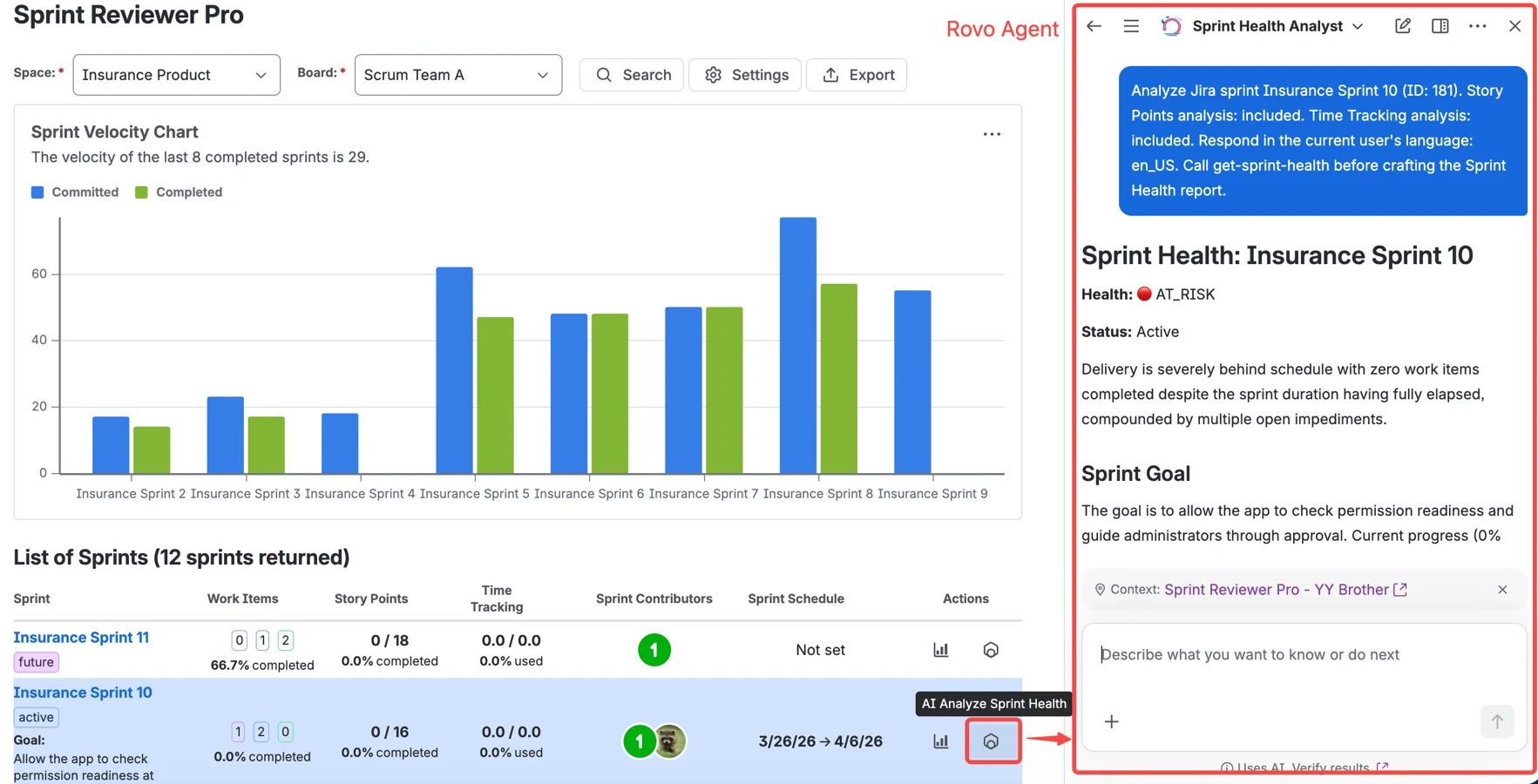
Second, instead of manually clicking through the board, ask the Sprint Health Analyst Rovo Agent (powered by Sprint Reviewer Pro) for a plain-language summary before the standup:
- "Which work items are still unfinished?"
- "Which bugs are still unresolved?"
- "Are there any hidden blockers?"
Notice the pattern across both: the tools surface the picture: async status from StandBot, health signals from the agent. But the team still decides what to do with it.
Phase 3: Data-Driven Retrospectives
The 17th State of Agile Report names "inconsistent processes and practices across teams" as the top challenge organizations face with Agile. In the retro, that shows up as the Retrospective Black Hole: teams complain from recency bias, and action items never make it back into Jira. The fix is to ground the ceremony in objective data and run it inside your system of record, without letting a tool do the team's thinking for it:
- Set the stage with data: Open by reviewing the closed sprint report in Sprint Reviewer Pro. Instead of "How did we do?", you can say: "We completed 70% of planned points, and the assignee breakdown shows QA was the bottleneck. Let's discuss why."
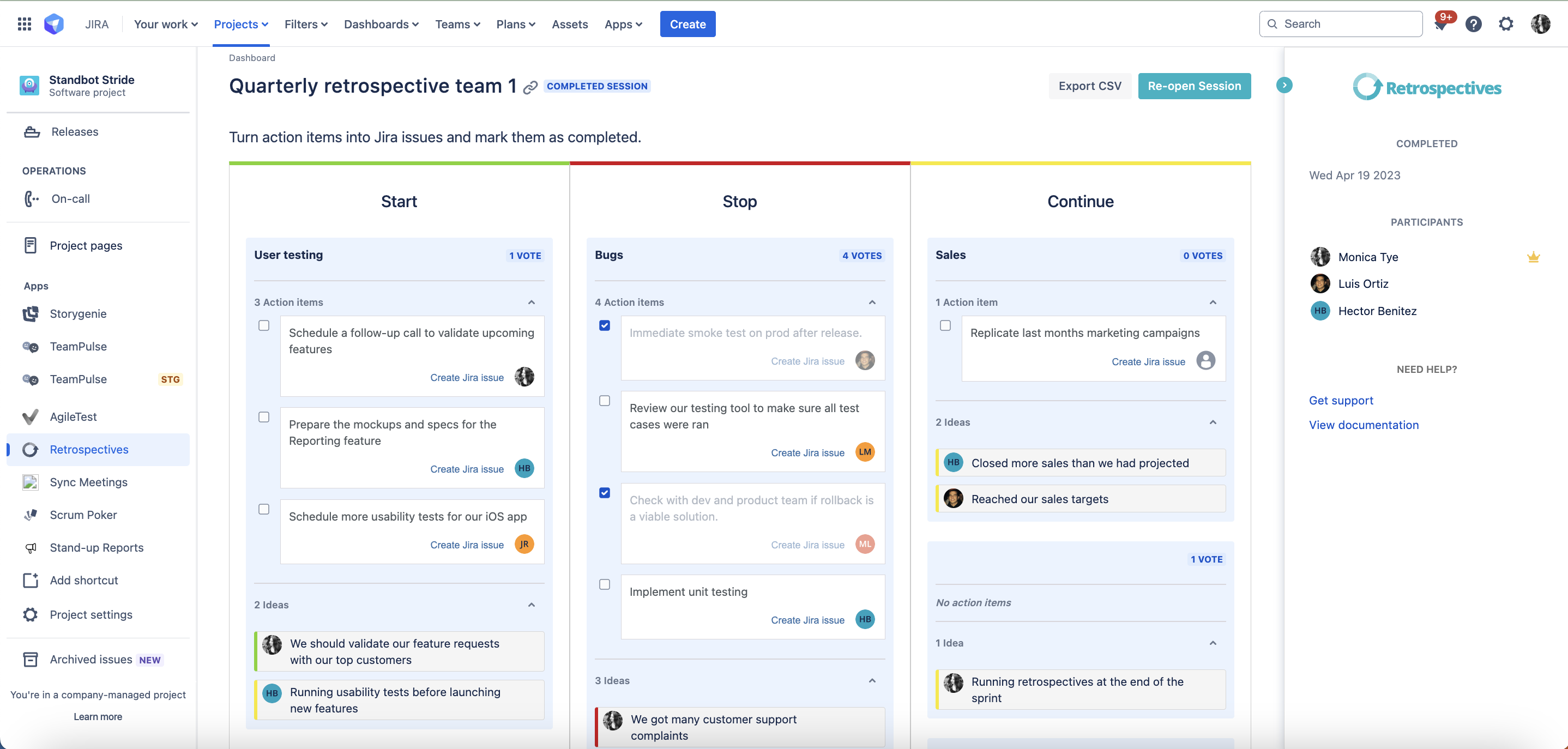
- Capture the context, humanly: Use a native retrospectives app inside Jira. In Agile Retrospectives for Jira, the team anonymously brainstorms, groups their own themes, and dot-votes the priorities. No AI writing your topics or your action items; that's the part that has to stay human.
- Prevent invisible work: The retro doesn't end until the team converts its top items into real, tracked Jira issues, pushed straight into the next sprint's backlog. So continuous improvement gets the same visibility as feature delivery.
The Bottom Line
Agility isn't about moving fast; it's about moving with intent. By pairing the analytics of Sprint Reviewer Pro with native ceremony facilitation from Catapult Labs, you bridge Jira data and team culture: historical evidence to plan, AI assistance to inspect, and structured ceremonies to adapt. The tools inform the conversation; your team makes the calls.
What's the biggest challenge your team faces connecting sprint data to your Agile ceremonies? Let us know in the comments. We have plenty of stories from the Agile trenches, and would love to hear more.
Tools referenced in this article:

