It’s been a while since the last update on our plans for Java 11 and OpenJDK support. As you can imagine, changing our support strategy for a core platform like Java across all Server and Data Center products requires a lot of thought. In this post, we want to share with you as many details as possible. Let’s jump right in.
Java support strategy for Server and Data Center
This states our current strategy. We may make changes to it in the future to ensure we are providing our customers with the best support. We will continue to inform you of any changes we make.
With the new Oracle Java licensing and release strategy, a new major Java version will be released every 6 months and a Long-Term-Support (LTS) version every 3 years. We’ve decided that we want to avoid a frequently recurring effort associated with supporting a new Java version every 6 months. Instead, we’d like to keep our focus on delivering more value to our customers. That’s why we plan to support Java LTS versions only. We will support Java 8 and Java 11 - both of which are the first LTS versions. On top of providing support for LTS versions of Java we will keep supporting both Oracle JDK and OpenJDK distributions. The Java JRE/JDK ecosystem is still evolving to account for recent change in Oracle support policy. Beyond Java 11 support we will continue to review and modify our set of supported platforms to ensure the best experience for our customers.
Java support plan by product
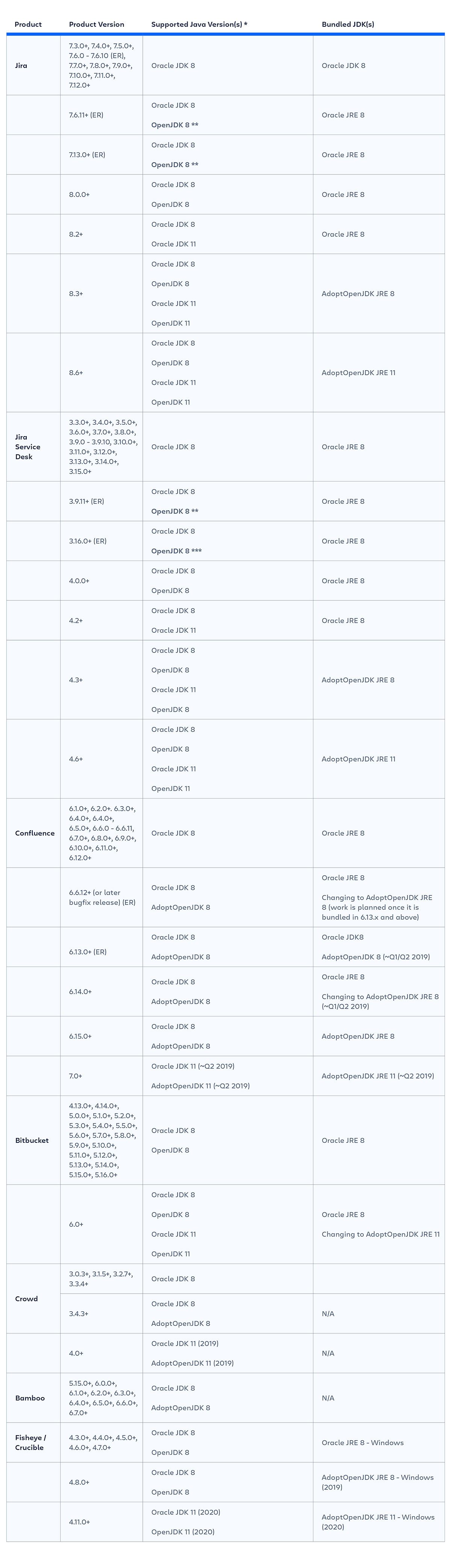
The table below outlines which Java versions are supported (or are planned to be supported) by eachproduct version.
Product Version: specific product versions that are not End of Life. E.g. 7.5.0+ means 7.5.0, 7.5.1 and so on.
Supported Java Version(s): it includes specific Java versions but also distributions a product version supports (or will support), e.g. Oracle JDK 8, AdoptOpenJDK 11.
Bundled JDK(s): some of our products are released with bundled Java within product installers. This column specifies which Java builds we use for each product version. 
Note: any approximate dates included here are based on our best knowledge for the time of this publication and are subject to change. Please watch this page for ongoing updates!
Note: Dates are based on the calendar year. We have provided specific timeframes for some in the near-term future (i.e. Q1). Otherwise, we’ve only identified the year when we will introduce support, but we will continue to revisit and update more specific timeframes as they become available.
*This information is important to developers building apps and integrations for our products. In cases where we provide support for both Java 8 and Java 11, the language level is set to Java 8. It means that no JDK 11 language features / API can be used in the products or plugins.
** Jira 7.6.11 or 7.13.0, Jira Service Desk 3.16.1 and Confluence 6.13.0 (our most recent Enterprise Releases) include OpenJDK support
If a customer is upgrading and chooses to use AdoptOpenJDK, we recommend that they perform thorough testing of user-installed and marketplace apps to ensure compatibility. App vendors should also review their apps against this bug fix version and make any necessary fixes. We wouldn't usually add support for a new platform in a bugfix release, however, we want to ensure that our customers can stay on an up-to-date JDK with the latest security fixes. Customers can also choose to continue using Oracle JDK under the new licensing terms.
***Jira 7.13.x and Jira Service Desk 3.16.x already support AdoptOpenJDK 8. One of the bug fix versions of the 7.13 release line will be announced as an Enterprise Release. Watch for updates!
Known issues and workarounds
We've identified several issues caused by some of the differences between Oracle JDK 8 and OpenJDK 8. We are working with AdoptOpenJDK and making in-product changes to fix these issues, see the table below for details and available workarounds:
Issue: Missing fonts in OpenJDK 8 builds
Issue: Missing CAcert from jdk8u172 window build
Issue: LinkError on GUI apps on MacOS
FAQs
What does it mean you support OpenJDK? Which distribution?
Apart from supporting Oracle JDK, we test and bundle most of our products with HotSpot distribution ofAdoptOpenJDK (for details see the table above). It also means that our Support team uses AdoptOpenJDK to replicate issues that a customer using OpenJDK Java has raised. If a customer uses a different distribution of OpenJDK (e.g. Zulu) we’ll still provide support for our products. However, if the reported bug is caused by a problem in Java distribution we’ll ask you to reach out to the Java distributor for help.
Why has Atlassian chosen to bundle and test products with AdoptOpenJDK?
We wanted to choose a solidly backed open source initiative that’s compatible with Oracle OpenJDK and with a clear policy and free of charge. We also wanted it to support multiple operating systems that our products run on and ensure commitment to provide updates to OpenJDK 8 until our products stop supporting this version. Finally, we wanted to provide easily accessible builds for Java versions that our customers use. All of these requirements have been fulfilled by AdoptOpenJDK.
As a customer, what do I need to do after Jan 2019 if I'm running an Atlassian Server or Data Center product on Oracle Java 8?
- Upgrade to a product version that supports OpenJDK (Recommended): Each Server and Data Center product now has a feature version which supports OpenJDK and will continue doing so. If you don’t want to purchase an Oracle subscription you can upgrade to one of the product versions that run on OpenJDK (see table on top of this article). To make it even easier, we’ve introduced support for OpenJDK on our current Enterprise Release (ER) versions of Jira and Confluence. Note that some product versions supporting OpenJDK do not bundle it with installers. In such cases, make sure you install OpenJDK manually.
- Stay on an old version of Oracle JDK: We will continue to support any customer using Oracle JDK 8, however, running on Oracle JDK 8 without a subscription will leave you vulnerable to any Java security issues that are identified after January 2019.
- Get an Oracle Java SE: If you want to continue to get updates and security patches beyond January 2019, you'll need to purchase an Oracle Java SE subscription.
What if a customer doesn't upgrade Atlassian product to a version supporting OpenJDK and still switch to run it on OpenJDK? Would it work? Will it be supported?
In such case most of our products might still run on OpenJDK with glitches in some areas of a product. However we discourage customers from doing so since such set up is not supported.
Does Atlassian have any agreement with Oracle thereby Atlassian customers are eligible to get commercial support for Oracle Java platform that is shipped with Atlassian Server or Data Center products?
Atlassian doesn’t have an agreement covering customers. Customers can have their own agreement with Oracle.


