Hello Atlassian Community! We're back with exciting updates for Confluence Server & Data Center: the launch of the Confluence Server mobile apps and CalDAV support in Team Calendars.
Read on for more details!
The Confluence Server mobile apps are here!
We know that work doesn't just happen from your desk. Sometimes, you need to be able to stay on top of the latest developments with your team, capture a great idea on the go, and move work forward – wherever you happen to be. That's why we're excited to announce the launch of the Confluence Server mobile apps for Android and iOS, so you can collaborate anywhere, anytime.

With the Confluence Server mobile apps, you can:
- Collaborate on the go: Create pages or edit existing ones from your smartphone. Prefer to jot down notes on the bus and finish it at the office? No problem. Support your team's work with likes, comments, and shares to maintain momentum even when you're out and about.
- Stay in the loop: Get push notifications for shares, @mentions, comments, or when a task has been assigned to you.
- Get back to your work, fast: Quickly find pages you’ve recently viewed or worked on so you can seamlessly transition from desktop to your phone and vice versa.
Check out our blog for additional information, or head to our mobile documentation for all the details and requirements.
Introducing CalDAV support in Team Calendars
Today, the Confluence team is also excited to announce that in Team Calendars Server 6.0, we're closing the #1 customer voted feature request: CalDAV support.
CalDAV support enables two-way syncing between Team Calendars and your calendar app. Now you'll be able to view and update Team Calendars events from Outlook, Google Calendar (Android) or Apple Calendar. For example, if you use Outlook, syncing Team Calendars will allow you to create, update and delete events right from Outlook.
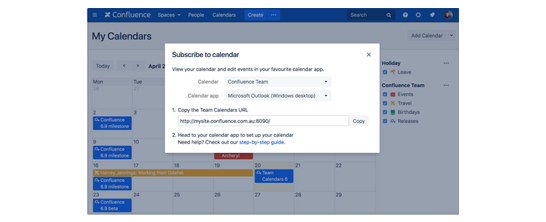
To sync your calendars, hit 'Subscribe' at the top of any of your Team Calendars, and then choose your calendar app. Team Calendars will generate a URL and you can follow our step-by-step guide to get set up.
For additional information, head over to our blog!
We  feedback!
We are always looking to improve, so if you have comments or ideas on how we can better showcase recent releases, please let us know in the comments section below. Also, if you missed our last update, check it out here.


