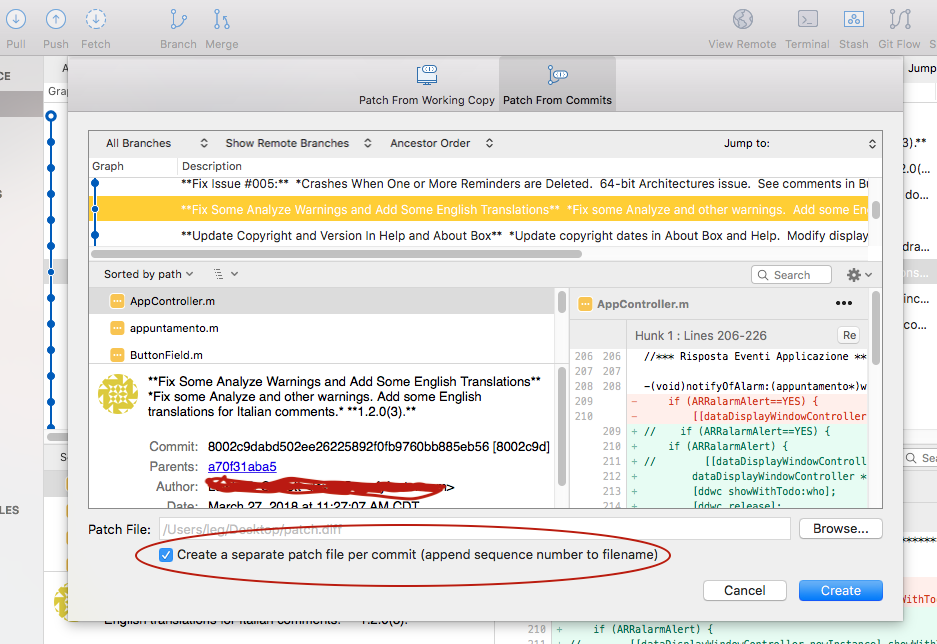
I would like to create separate patch files for each of several commits, but can not find a way to select multiple commits in the create patch panel.
- As depicted in the following screenshot of my Create Patch…/Patch From Commits, I have ticked the Create a separate patch file per commits (append sequence number to filename) checkbox so that I could create a series of patch files. I have selected commit "**Fix Some Analyze…" and would have liked to select commit "**Fix Issue #005…" also. But, there doesn't appear to be any way to select more than one commit.
- If I proceed with 1., a commit file named "patch0001.diff" is created from commit "**Fix Some Analyze…" and the Patch From Commits panel is dismissed.
- If I return to Create Patch…/Patch From Commits, the panel is set to its default state with the Create a separate patch… checkbox unticked and the Patch File: path reset to the repository.
- If I reset the panel as in 1. and this time select a different commit, "**Fix Issue #005…", then create the patch, the patch file "patch0001.diff" is replaced with the patch from commit "**Fix Issue #005…". I was expecting another patch file to be created titled "patch0002.diff".
I just don't see how one is supposed to utilize the Create a separate patch file per commits (append sequence number to filename) checkbox to create a sequence of patches.