Recently SourceTree is not updating the UI properly, either in the files list for a particular repo or in the Repository Browser.
When looking at a repository the list of modified files does not update - I have to switch to different views (eg click on different branches and/or History/File status/etc) in order to get the list of modified files to update. Obviously I need the list to update in order to be able to add my changes to the Git index and make the commit.
But then once I commit changes in my repo and switch branches, the Repository Browser still says that I have uncommitted changes and am on the old branch.
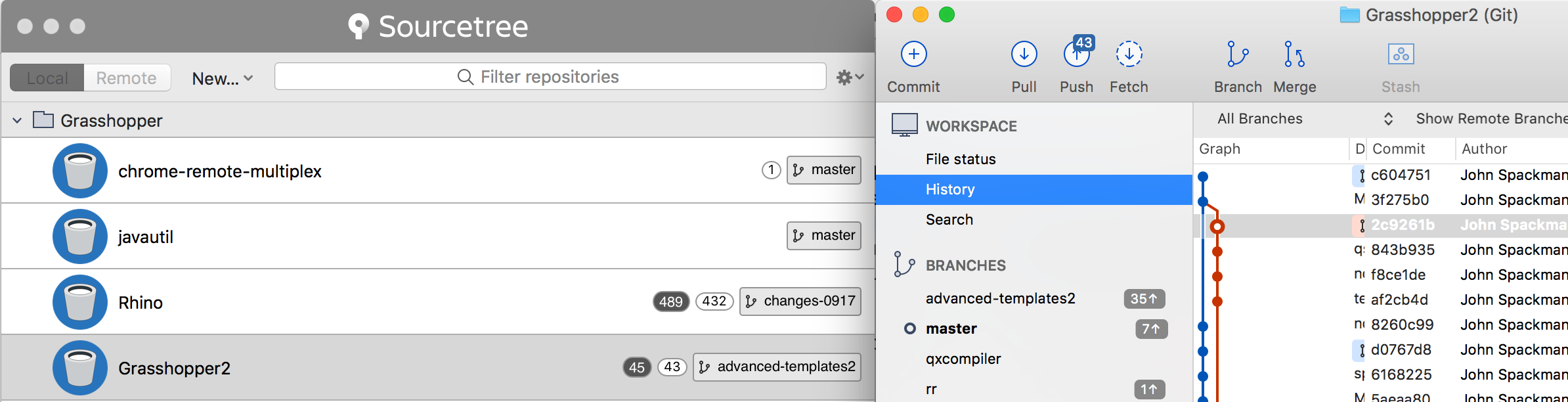
To illustrate my point, take a look at this screenshot - the window on the left is the Repository Browser and you can see that it thinks the current branch is "advanced-templates2" and that there are 45 modified files; but the repository itself has just had all the files committed and been switched to the master branch. This screenshot was taken quite some time after the commit.
This behaviour has only started with a recent update.
All my repos are Git repos, I am running SourceTree 2.6.3(134) on Mac OS 10.13.1


