Hi,
I have configured the following settings in my bitbucket repo:
- Project > Settings > Permissions > Default Permission (=No access)
- Project > Settings > Permissions > All users/groups except the Admin users/groups should be granted Read access
- Repository > Create branch > develop (branch-type: Custom, branch-from: develop, branch-name: develop)
- Repository > Repository permissions > All users/groups except the Admin users/groups should be granted Write access
- Repository > Branch permissions > Add permissions > Branch name (=master) , Restrictions (=Prevent changes without a pull request)
- Repository > Branch permissions > Add permissions > Branch name (=develop) , Restrictions (=Prevent changes without a pull request)
- Repository > Settings > Repository details > Clear the checkbox to prevent forking of this repository
- Repository > Settings > Pull requests > Requires N approvers (see to-be-reviewed-by list below)
- Repository > Settings > Pull requests > Unapprove automatically on new changes
- Repository > Settings > Pull requests > Requires all reviewers to approve the pull request
- Repository > Settings > Branching model > Development (=develop)
- Repository > Settings > Branching model > Enable automatic merging
I would like to allow pull requests only on brach develop:
I believe that the problem is that "Push latest changes from local to remote" is enabled and is not-editable option.
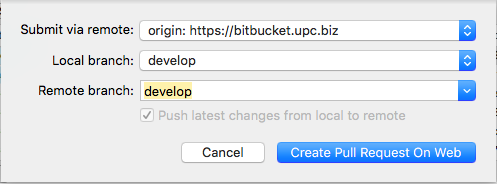
Please note that the following option is enabled when I do commit, although I am not sure if it plays a role

The error message I am getting is:
remote: Branch refs/heads/develop can only be modified through pull requests.

remote: Check your branch permissions configuration with the project administrator.
Could you please advise on how to setup the pull-request only workflow in bitbucket using sourcetree ?
Nikos

