Hi community,
When we rolled out editor permissions in Goals and Projects, we mentioned we had plans in the works to give you a way to configure the default, depending on your organisation's preference. That's what we're beginning to rollout from today.
Admins can now choose the default access for new goals and projects on their site.
What's changing?
Until now, every new goal and project was created as Anyone can edit, and owners had to change it one by one after the fact. Now, site admins and app admins can set the starting permission that applies to every new goal or project created on the site.
There are two options:
- Open - Can edit: anyone with access to the app can view and edit new goals or projects. This is the behaviour you have today - new items start as Anyone can edit.
- Open - Can view: anyone with access to the app can view new goals or projects, but only the creator and the owner can edit. New items start as Only specific people can edit.
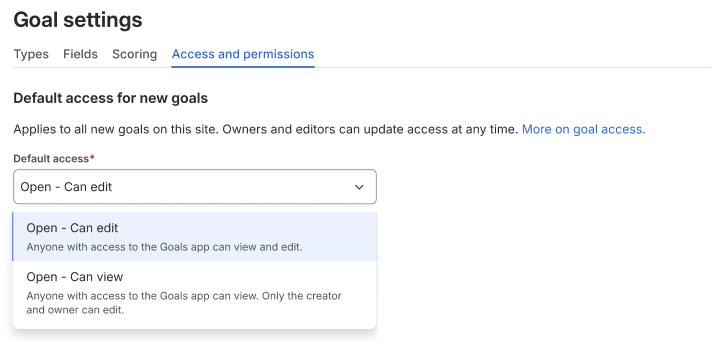
The setting is a starting point, not a lock - owners and editors can still change access on any individual goal or project after it's created, and can share it with specific people as usual.
Why are we making this change?
Open-by-default editing works beautifully for some teams and is a genuine governance concern for others. When we shipped editor permissions, the clearest piece of feedback was that setting this per goal and per project doesn't scale - if your organisation has a consistent preference, you shouldn't have to reapply it every single time someone creates something.
Rather than forcing one model on everyone, we've made it a choice you make once, at the site level.
How to change the default
Admins can configure the default independently for the Goals and Projects apps.
For goals
- From the Goals app, select the Settings icon, then select Goals settings.
- Select the Access and permissions tab.
- In the Default access for new goals menu, choose Open - Can edit or Open - Can view.
For projects
- From the Projects app, select the Settings icon, then select Projects settings.
- Select the Access and permissions tab.
- In the Default access for new projects menu, choose Open - Can edit or Open - Can view.
The change applies immediately to any new goals or projects. Existing goals and projects keep their current access - nothing is retroactively changed.
What do I need to do?
Nothing, unless you want to change it. Sites will continue with their current behaviour by default, so there's no action required and no disruption to your existing goals and projects.
If you're an admin who has been asking for tighter control over editing, head to your Goals or Projects settings and pick the option that suits your organisation. This will roll out over the next few days, so you may not see it immediately.
What about restricted goals?
Plenty of you have asked for the ability to limit who can see a goal, not just who can edit it. That work - restricted goals, along with improvements to projects - is in active testing and progressing well. We’ll have more to share shortly!
Learn more
Let us know what you think!
We'd love to hear which default you've chosen and why. Drop a comment below - your feedback directly shapes what we build next in this space.
As always, thanks for your feedback!


