Hi all,
It's been a long time coming, but we now have proper support for JPD date fields in JQL, e.g. in search or Automation rules.
Those are not your usual date fields in Jira, they are a date range:
- A quarter: Jan-Mar 2026
- A month: Apr 2026
- A day: 1-Apr-2026
Technically, they are stored in a JSON formatted string, for example:
{"start":"2026-01-01","end":"2026-03-31"} (for Jan-Mar 2026)
Up until recently it wasn't possible to use these fields in JQL. Now they are properly supported. We didn't change how they're stored or returned by the API. If you use these fields in Automation rules, nothing will change and they will keep working just fine.
To use a date field in JQL, here is the syntax you can leverage
Imagine a JPD date field called Project start.
- Exact start or end match:
"Project start[Interval]"[startDate] = "2025-01-01"
OR "Project start[Interval]"[endDate] = "2025-01-01"
"Project start[Interval]"[startDate] >= "2025-01-01"
AND "Project start[Interval]"[startDate] < "2026-01-01"
AND "Project start[Interval]"[endDate] >= "2025-01-01"
AND "Project start[Interval]"[endDate] < "2026-01-01"
"Project start[Interval]"[startDate] IS EMPTY
"Project start[Interval]"[startDate] IN ("2025-10-01", "2025-07-01")
"Project start[Interval]"[startDate] >= startOfYear()
Known limitations
JQL auto-complete
When in the JQL editor, autocomplete doesn't yet work great with this new syntax, so when you type startDate, it doesn't yet show autocomplete suggestions. But you will get validation messages to verify your query.
Date auto-fill
When the date field is configured to be overwritten by Jira or Project dates, these dates still aren't stored in the date field yet / available via JQL (you will get the date that was set manually or via automation on the idea). It's on the roadmap.
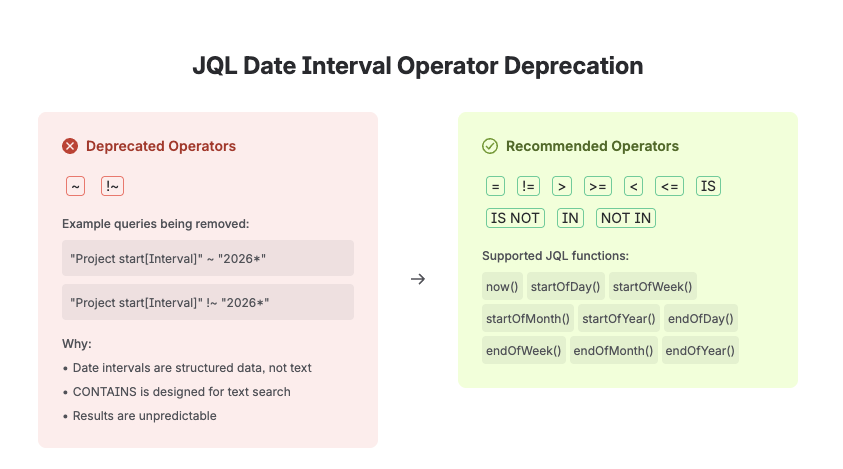
👉Do not use string manipulation 👈
If you're using string manipulation to work with date fields today we're going to announce a 3-month deprecation notice soo - this won't be supported anymore in a few months.
For example:
"Project start[Interval]" ~ "2026*"
Expect an announcement soon with more details.