We’ve made a few updates to make it easier for your team & stakeholders to understand the context behind each view and collaborate more effectively.
🆕 What’s changed
-
Visible short description: You can now add a short description right next to your view title — perfect for highlighting what the view is about at a glance.
-
Unified “About” panel: The view description and comments now live together in one place, making it simpler to find and share context.
-
Easier access: You can open the “About” panel by clicking either the 💬 comments icon or the 🛈 view description next to the title.
Visible short view description + unified 'about' panel:
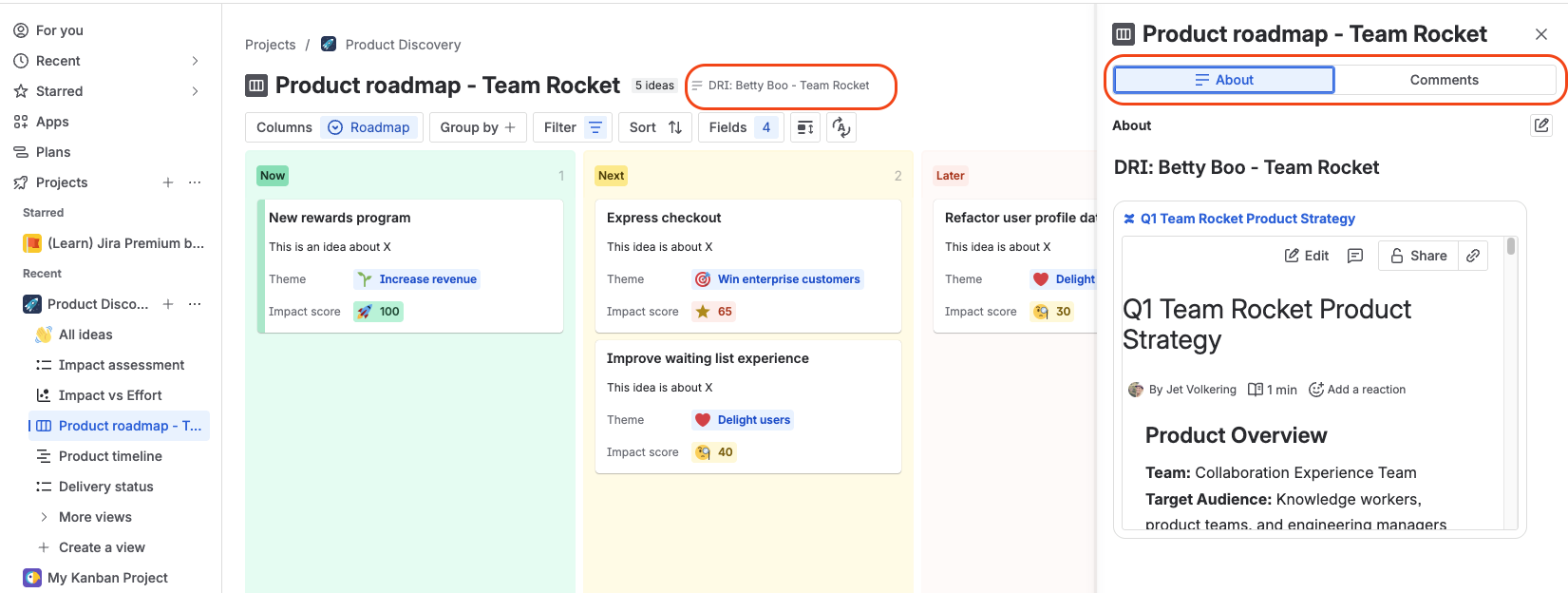
Click short description or view comments to access unified 'about panel':

Why we made this change
We heard from many of you that the About this view section was helpful — but too hidden. Teams wanted a clearer way to:
-
Display key context or embed relevant links directly on the view
-
Share short updates like “This view is being updated”
-
Make sure stakeholders see important info as soon as they open the view
Now, your audience can immediately see what a view is about and easily jump into discussions or leave feedback — all from one unified space.
🙌 We’d love your feedback
Try it out and let us know what you think!
What else would help you share context or communicate updates within your views?
