Hi Community,
We're excited to announce the release of a new Goal hierarchy table in Analytics! In addition to this release, we've also added the Status column to the previously released “Goal” table. Read more about the new table and columns in our documentation.
“Goal hierarchy” table
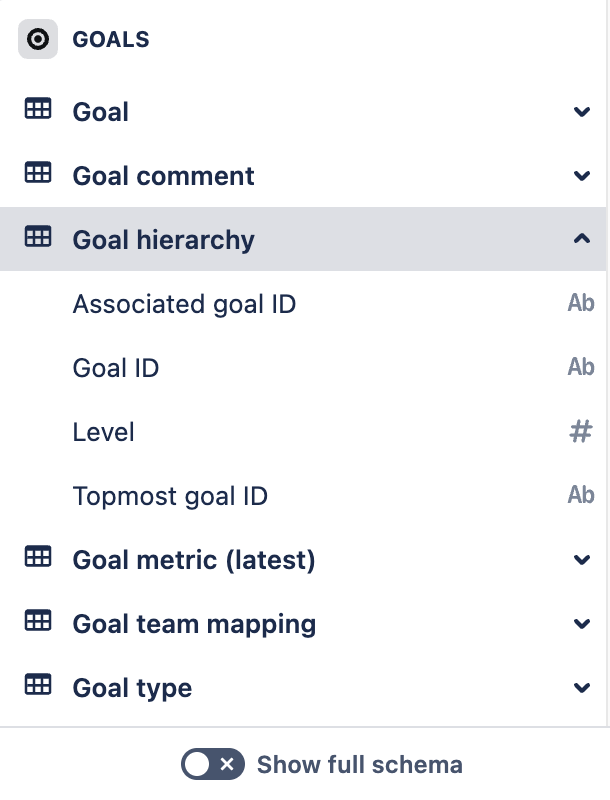
The new “Goal hierarchy” table offers a clear hierarchical view of your goals, making it easier to track progress and relationships between goals across your organization.
This table gives you the flexibility to report from either the top-down or the bottom-up of the goal hierarchy. In other words, you’re able to get the higher-level goals associated with a particular goal or all the children of a top-level goal.
Easier access to current goal status
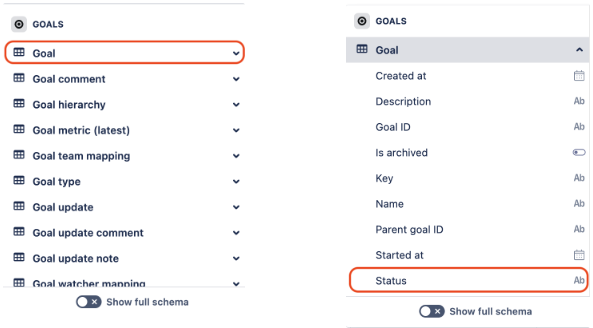
We've also improved the accessibility of a goal’s current status by adding a new “Status" column directly into the “Goal” table. This column will show the most recent “Status” after the update.
A “Status” can be the following values: on-track, off-track, at-risk
🎥 Check out our video example
Take a look at our Loom video that shows how you can use the “Goal hierarchy” table:
How to get the new table and columns
For new Data Lake connections that include Goals data, the new hierarchy table and updated status column will automatically be available.
For existing Data Lake connections, an organization admin needs to edit the connections. If the connection already includes Goals data, the organization admin can edit the connection and save it without making any changes. More about editing Data Lake connections.
Tell us what you think
If you have any questions or feedback, let us know by commenting below or contacting support.
Mehak Bokhari
Product Manager, Atlassian Data Lake

