G’day, community!
A couple of months ago, we announced the availability of BYOK product data in the Atlassian Data Lake. Since then, we’ve made even bigger strides to ensure your data is secure — Analytics itself now supports data residency and BYOK, and is also HIPAA compliant! 🎉 These features empower you to manage your data with greater control, confidence, and flexibility to meet your business needs.
HIPAA compliance
For our customers that handle protected health information (PHI), Analytics is now ready to support HIPAA-compliant operations. You’ll be able to securely analyze your data, knowing that patient privacy is protected in accordance with federal regulations.
Once you’ve taken the required steps to start using Atlassian apps in a HIPAA-compliant way, you’ll need to ensure that your organization follows HIPAA best practices to remain compliant.
Data Residency
Data residency gives you control over where your in-scope app data is hosted. All regions except for Switzerland are available.
Please note, that because our servers are located in the US, you may experience slower performance when you pin your data outside the US. The following table lists what data can and cannot be pinned:
| Can be pinned |
Can't be pinned |
-
Atlassian app data stored in the Atlassian Data Lake
-
Chart metadata (including chart titles, settings, annotations, queries, and comments)
-
Dashboard metadata (including dashboard titles, URL slugs, and other settings; comments; variables; subscription configuration (including email, frequency, and variables); and text elements)
-
Data source schemas
|
|
BYOK
Analytics supports both CMK (Customer-managed keys) and BYOK (Bring your own key) encryption.
The following table lists which data is, and which data is not supported by BYOK in Analytics:
| In-scope data |
Out-of-scope data |
-
Dashboards (including dashboard titles, settings except URL slugs, content elements, images, variables, subscription configurations, and activity logs)
-
Charts (including chart titles, settings, annotations, queries, and other Visual SQL steps)
-
Comments (for charts and dashboards
-
Data source schemas
|
-
Dashboard URL slugs
-
Data source settings (including display names)
-
Data source change histories
-
Query logs (for charts and data sources)
|
Limited app functionality for data residency and BYOK
When you enable data residency (only if pinning data outside the US) or BYOK, some features will have changed functionality or be unavailable, but we’re working to resolve these differences before the end of the year.
Unavailable features
Changed functionality
Dashboards in the trash won’t be automatically deleted after 30 days. You’ll need to manually delete them from the trash.
| Without data residency or BYOK enabled |
With data residency or BYOK enabled |
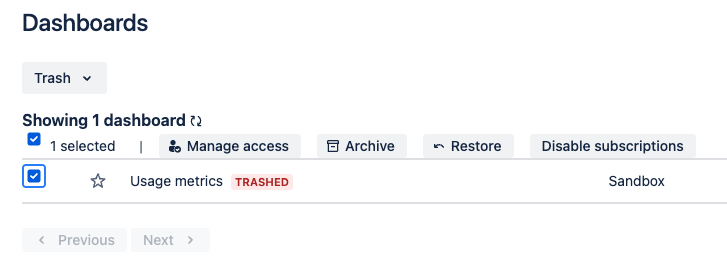 |
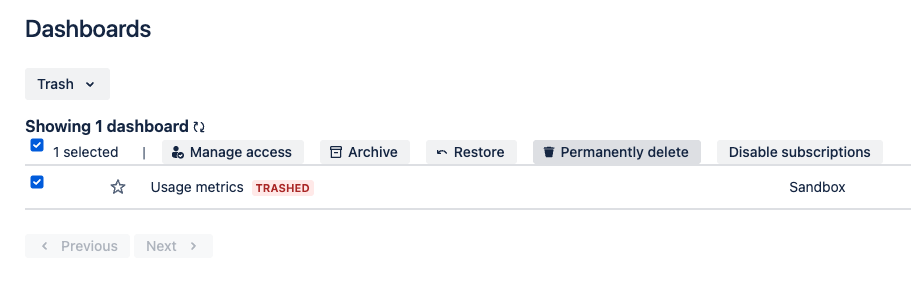 |
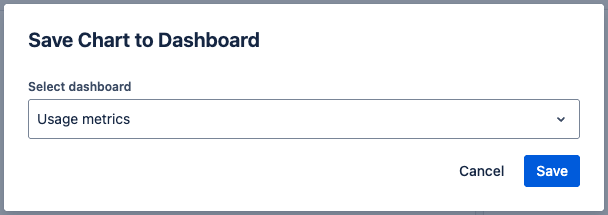
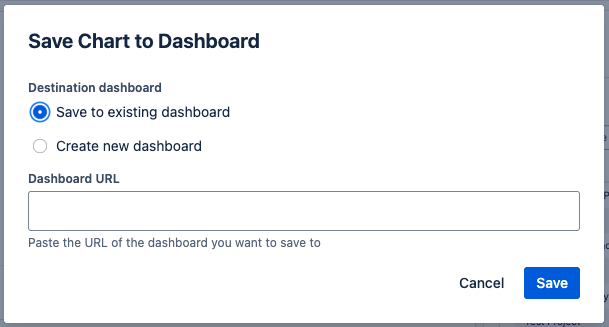
Dashboard selection in features is replaced with a text input where you can provide a URL to an existing dashboard (for example, when creating a new chart or making a copy of the chart).
| Example scenario |
Without data residency or BYOK enabled |
With data residency or BYOK enabled |
| Creating a chart from a template |
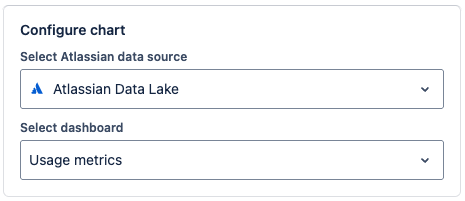 |
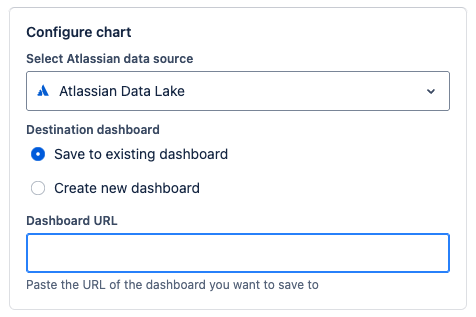 |
| Creating a custom chart |
 |
 |
Important note: Once you’ve pinned your Analytics data to a region and the move is completed, we will clean up your data from any other regions. After this has been completed, you won’t be able to re-enable these features on your Analytics instance.
How to get started
Before you can start using Analytics in a HIPAA-compliant way, you’ll need to take the required steps outlined in our support documentation.
You can enable data residency or BYOK using the typical processes defined in our support documentation:
Send us your feedback
Comment below or contact support if you have any questions or concerns. Thanks!

