I was testing to see if the Trello Desktop version (rather than in-browser) was suitable for me.
A bug that I noticed was that Labels cannot display any colours.
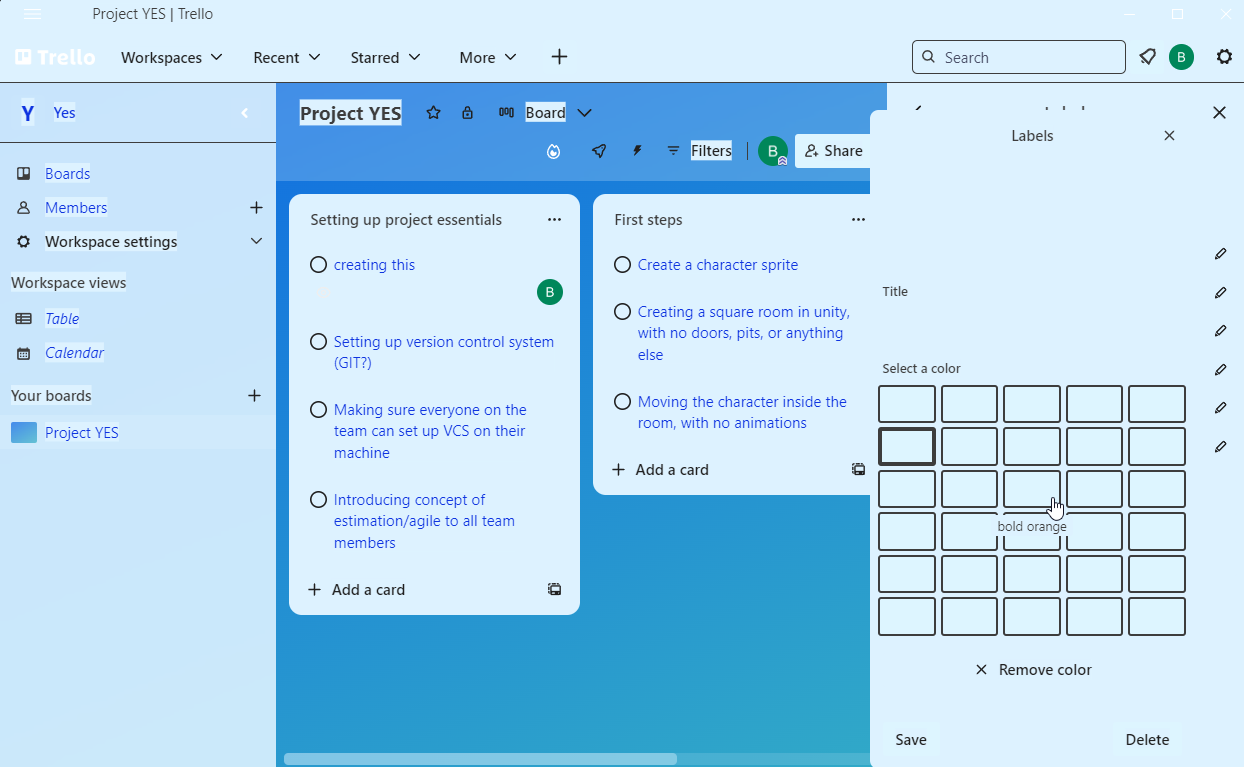
This is probably because the desktop app is based on Chromium - as similar things have plagued the League of Legends, Epic Game, and Steam clients at some point or another.
How to reproduce:
Have Win 11 (probably replicatable in 10) installed
Right Click on an empty patch of Desktop -> Personalize
Themes
Contrast Themes
Enable one of them.
Run the Trello Desktop app/program
Open a board, and then click the triple dot (menu) button in the top right
Click Labels == {you can't see any colours}
Click any label, or create == {you still can't see any colours, even with a full table of them. which looks sort of silly.}
I just wanted to report in case you didn't know.
For now, I'll say the Trello Desktop app is not for me.

