
📖 8–10 min read · 🎬 5 min video
How I use Jira Product Discovery to collect, compare, and choose things for my home — from floor tiles to furniture and everything in between.
Read the article, watch the quick video walkthrough below, or explore both—whichever works best for you.
A new home, a lot of decisions
I recently had the opportunity to present my personal use case of Jira Product Discovery (JPD) at one of our local Atlassian events. I've been meaning to share this personal project for some time now, but… well, I’ve been a bit busy with other things, as you’ll see below.
A quick intro – I’m Tomislav, the short, English version is Tom or Tommy Tobi. I hail from Croatia 🇭🇷 and have been working with Atlassian tools for approximately 5 years. To be honest, the first time I saw Jira (Software), I was like, "Erm… why do I need this?!" The first site I worked on was a mess with too many unnecessary fields and complicated workflows. However, within a few months, the instance was ‘cleaned’ and I was tracking almost everything through Jira and documenting stuff in Confluence. Initially, it was all work-related, but soon I thought, why not create a personal Atlassian site to track my personal stuff too?
By 2022, I was planning to move from renting to owning my own place. If you’ve ever gone through the process of buying or building a home, you know there are a ton of new terms and tasks to handle before you can actually move in. Up to that point, I’d been using a private Jira site for some time, so I thought it’d be a good idea to track everything I needed to do in one Jira project. I divided tasks into different groups/epics and used standard fields like start and due dates to keep track of deadlines. By the time I moved in, I had a great visualization of when things were done and how long they took.
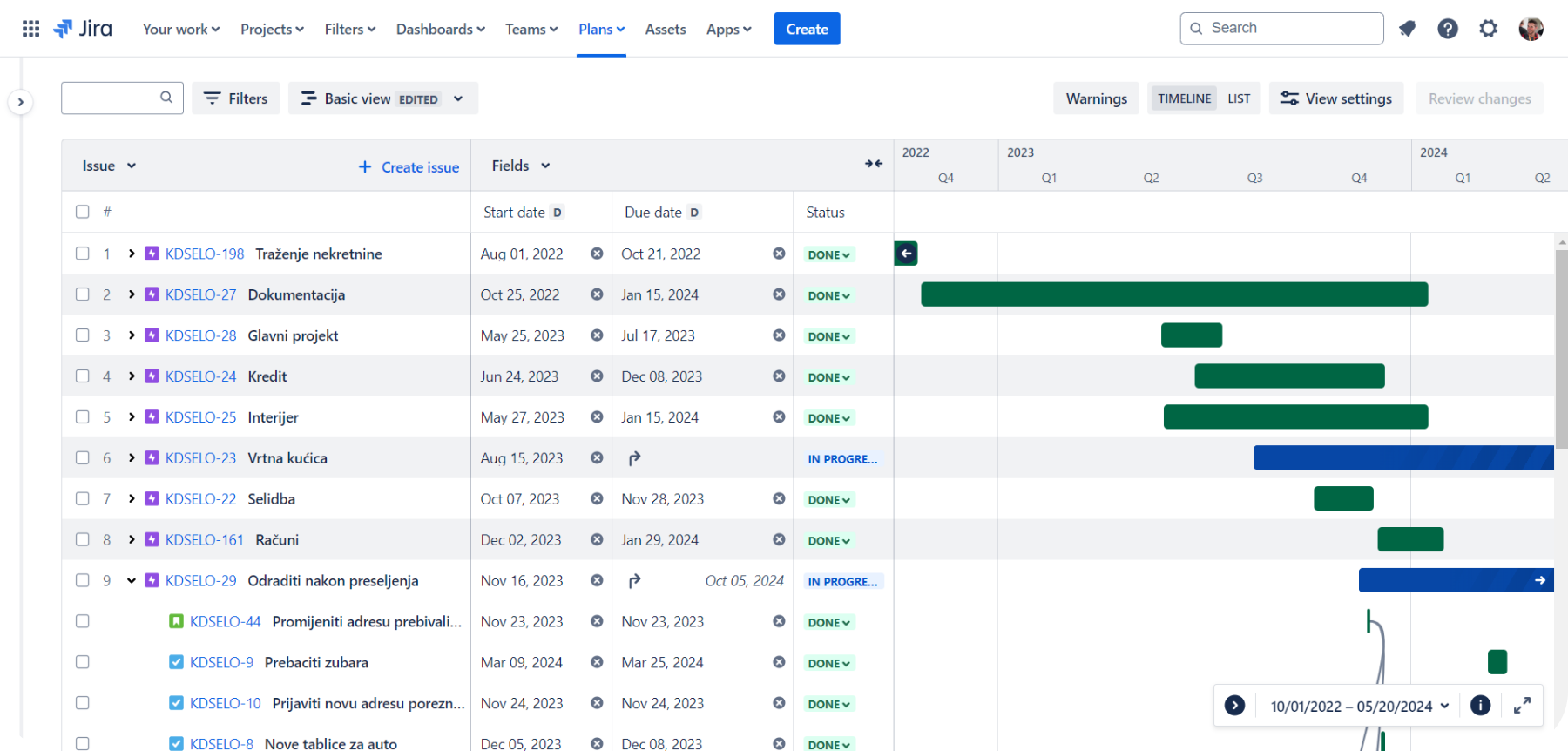
Throughout the home-buying process, I had to prep some things so I could move in once the place was built and the paperwork was finalized. The first step was choosing floors and tiles for the whole house and bathrooms. Living in a consumer society means there are tons of options – different manufacturers, models, and styles. It’s like going grocery shopping for pasta – there are countless types, packages, and sizes. Fortunately, the investors mostly worked with one company, so I started there. Even with that filter, I still had to decide which types of floors and tiles to use in each room. 🥴
How it all started
The idea was to somehow filter all the available items and find the ‘final one’ to buy. Sure, web stores have filters, but that means bookmarking items you like and reviewing them later. Then I thought, why not put these favorite items into the Jira project I was already using? That way, I’d have a handy list to review and make a decision.
At first, I considered creating a new issue type and a few custom fields. But the more I thought about it, the less I liked the idea. Mixing these ‘ideas’ with actual tasks I needed to do and adding complexity to the project didn’t seem appealing. After a few days of pondering, I concluded that the existing software project just wouldn’t cut it. 😕
I started testing JPD back in 2021 when it was still called ‘Polaris’. During beta (or even alpha) testing, we presented it to product managers, and they instantly embraced it. So, by the time I got to this personal house project, I was already familiar with the product. Once I decided not to use Jira (Software), I thought - maybe I’ll try JPD and see if it fits my needs.
As pretty much every Jira admin knows, the ‘hardest’ thing when creating a new project is designing the actual process - creating workflows, fields, and so on. The same was true here. The plus side was that JPD projects are team-managed and it’s really easy to create new fields without cluttering your admin section and configs. After a few days of playing around, I created fields and views that were relevant to me. Some of the custom fields included:
Link to a webshop item (URL field)
Item ID - internal ID/code specific for that article in the selected store
Store - single-select field where stores are manually added
Rating - used for personal rating of the product (JPD ‘system’ field)
Price (EUR) - price of a single unit in Euros
Price (HRK) - price of a single unit in Croatian Kunas (HRK)
Labels - used for grouping/sorting/filtering items
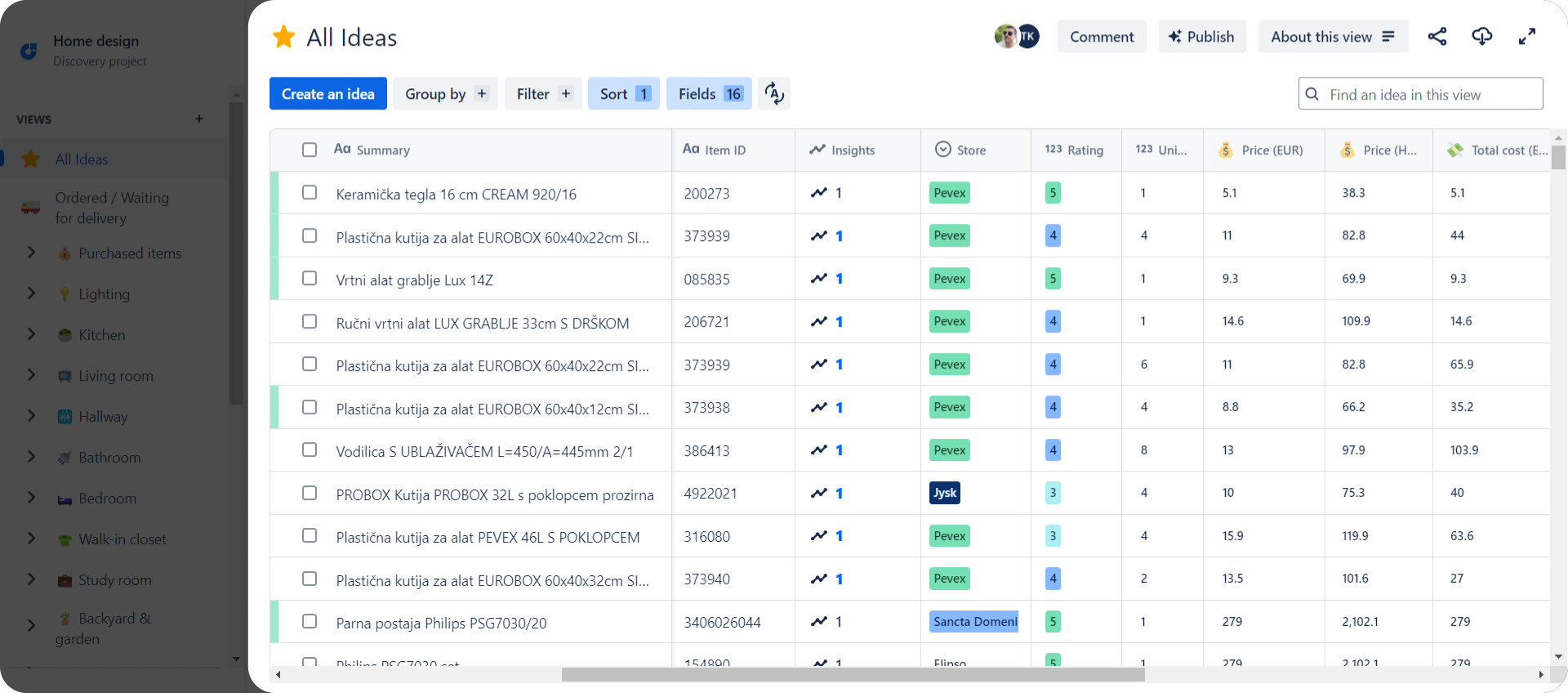
Regarding the ‘Item ID’ field, at first I wasn’t sure if I needed this value or not. But, going back to those floors and tiles, once I found a couple of items I liked (via webshop), I decided to go to the store to take a closer look. Once I got to the store, I opened my JPD view, filtered the tiles/ideas I had marked as ‘favorites’ (I had an additional custom field for that), and said to the saleswoman - “Could you please show me items number 150826, 204632…?”. She immediately typed them into their computer, and a few minutes later, she returned with those different tiles I wanted to check out. Quite ‘crazy’, I know! I actually got the idea for tracking internal item codes/ID from asking staff in IKEA about specific items. They usually asked to see the item ID to check internally, so I thought that value might be useful at some point. And as you can see, it kinda did. 😅
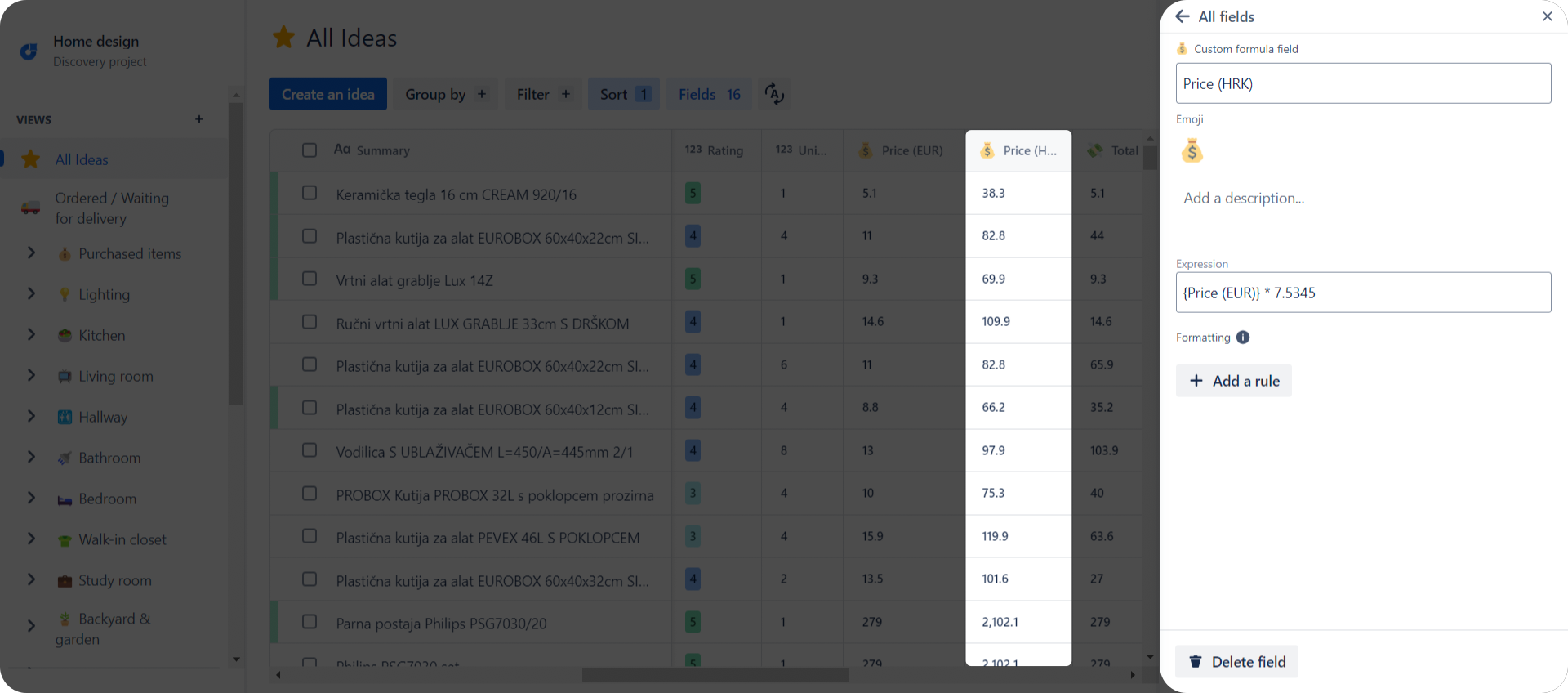
Another interesting thing was the price in HRK (Croatian Kuna). As of 1st of January 2023, Croatia has officially switched from HRK to Euro. Everyone I’ve talked to said they don’t have the actual ‘feeling’ of how expensive or cheap something is since we converted to Euro. For those who don’t know, 1 EUR = 7.5435 HRK. Essentially, people knew that 1 EUR isn’t 1 HRK, that it’s more expensive, but you couldn’t tell ‘how much’. That’s why I created an additional formula field (thanks JPD team! 😍) which calculated the value from EUR (manually entered) to HRK using the simple formula Price (EUR) * 7.5435. This way I could easily sense if something was expensive or not.
The power of sections
One of the cool features of JPD is the ability to create sections. Initially, my idea was to create different views for ideas per room. This meant that each room would have its own list view of ideas, and that would be it. Then I realized I could filter out those ideas per room, put them in new views, and group those views into sections. That’s when sections came in handy and I started using them. Of course, in the beginning, it wasn’t as sorted and grouped as it is now, but once I created views and sections, they became a solid base for upcoming changes and updates.
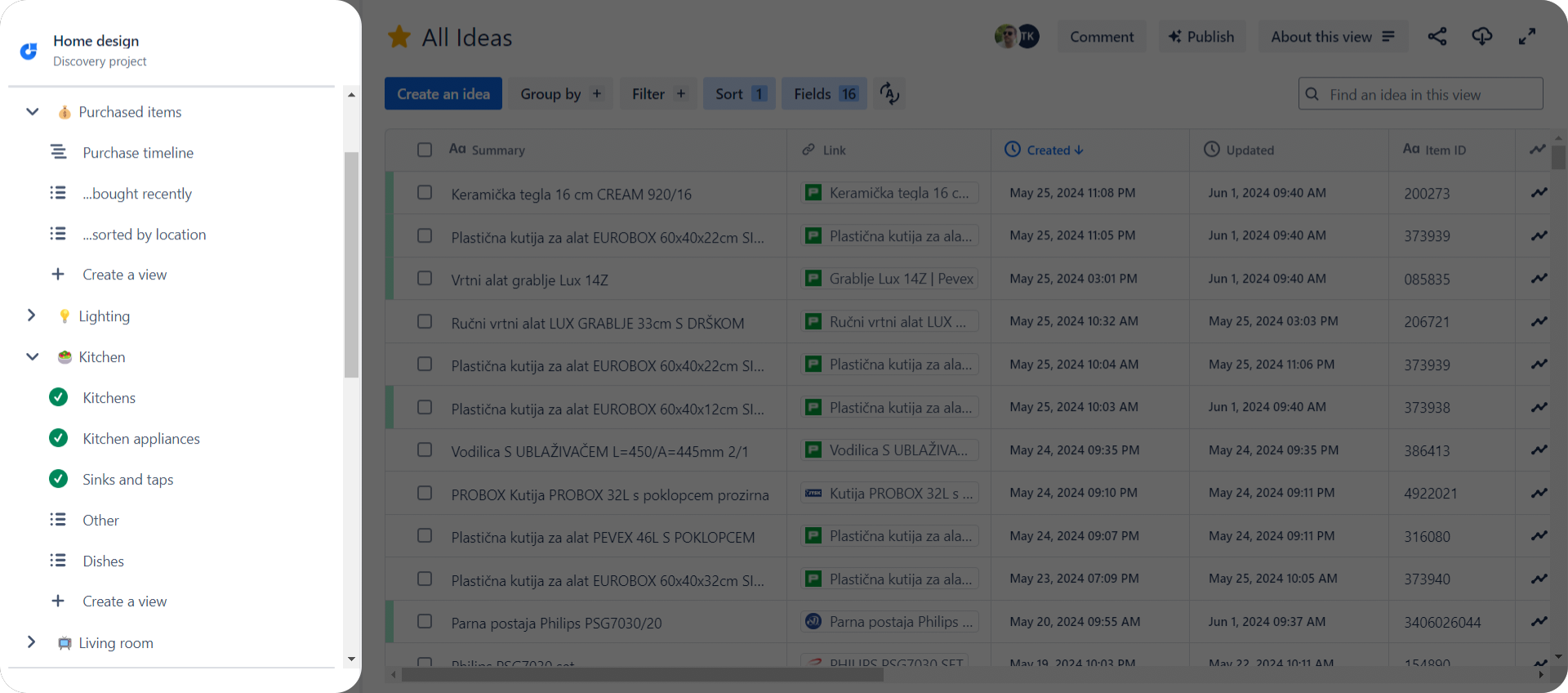
Another thing I just love about JPD is that you can add emojis to pretty much anything, plus you can customize the color of number fields or select lists however you like. Everyone who contacts me through Slack or any other messaging tool will likely notice my emoji obsession 😄
Exploring 'Reports' in JPD
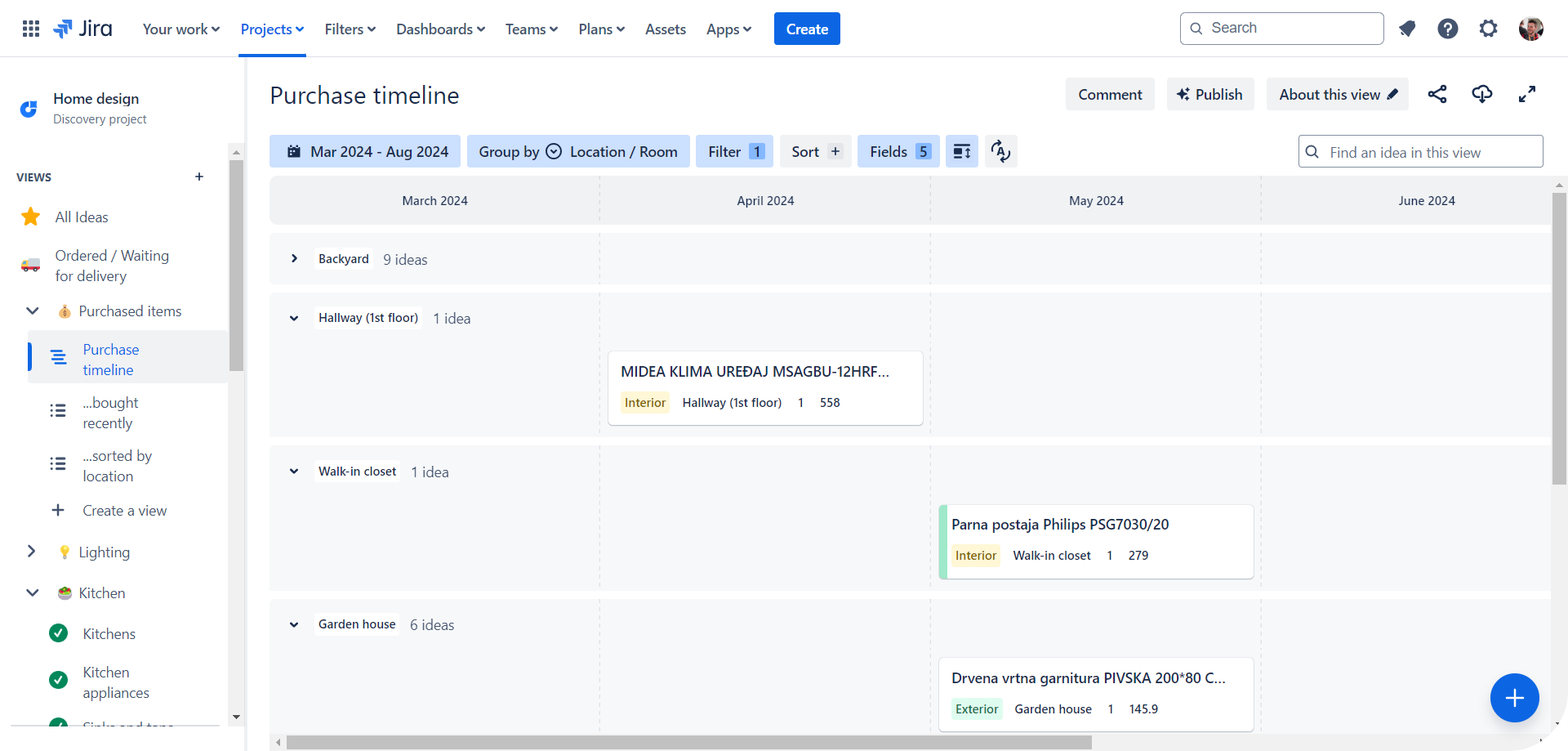
When it comes to reports, I’m still exploring this part. I’ve experimented with various views, including matrix and board, but the best I’ve got so far is the timeline view for ideas/items I’ve purchased. Another brilliant JPD feature is ability to group ideas based on specific parameters or values, which I frequently use to group ideas by location/room or other fields such as Labels.
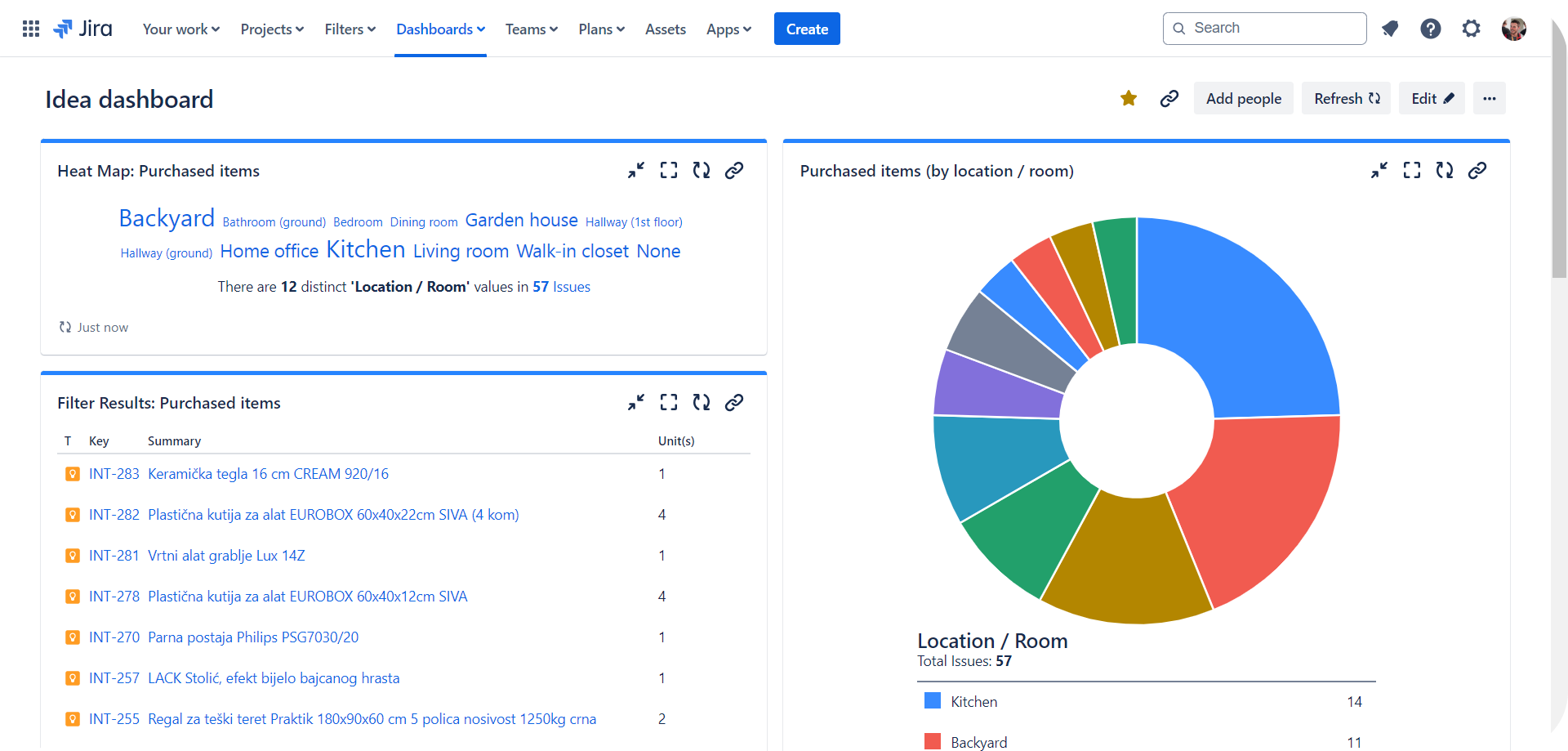
Also, since ideas are essentially Jira issues, I’ve created a simple Jira Dashboard to view some metrics using gadgets like issue heatmaps, pie charts, and issue statistics. Nothing too fancy, but those visualizations give me a quick overview of data such as which room/location has the most realized ideas or in which store I’ve purchased the most items (though, it might be better not to look at that too closely 😅).
Integrating Jira (ex. Software) & Excel with JPD
For years now, I’ve been tracking all my expenses and income using Excel worksheets. As I mentioned earlier, I’ve been using a Jira (Software) project for tracking tasks related to the real estate, like paperwork and other smaller to-do tasks. Then, the idea came to mind: why not track all expenses for the house in Jira too? So, I created an issue type called “Payment” to document the total amount and due date for each specific payment. These were usually payments for legal docs and some additional works that had to be done during the construction process.
Back in 2020, I stumbled upon the Jira Cloud for Excel app, which proved to be useful more than once. This led me to think—if I could track expenses in Jira, I could pull those issues and data (number of units, total amount, etc.) to Excel and sync that to the main budget/expense workbook. Once I started using JPD, I created an automation that, upon the idea being moved to a specific status, would create a “Payment” issue in the software project and pull the data and values from initial idea issue. Next, I could simply extract the data from the software project to Excel and get all the values there, which I could then manipulate further.
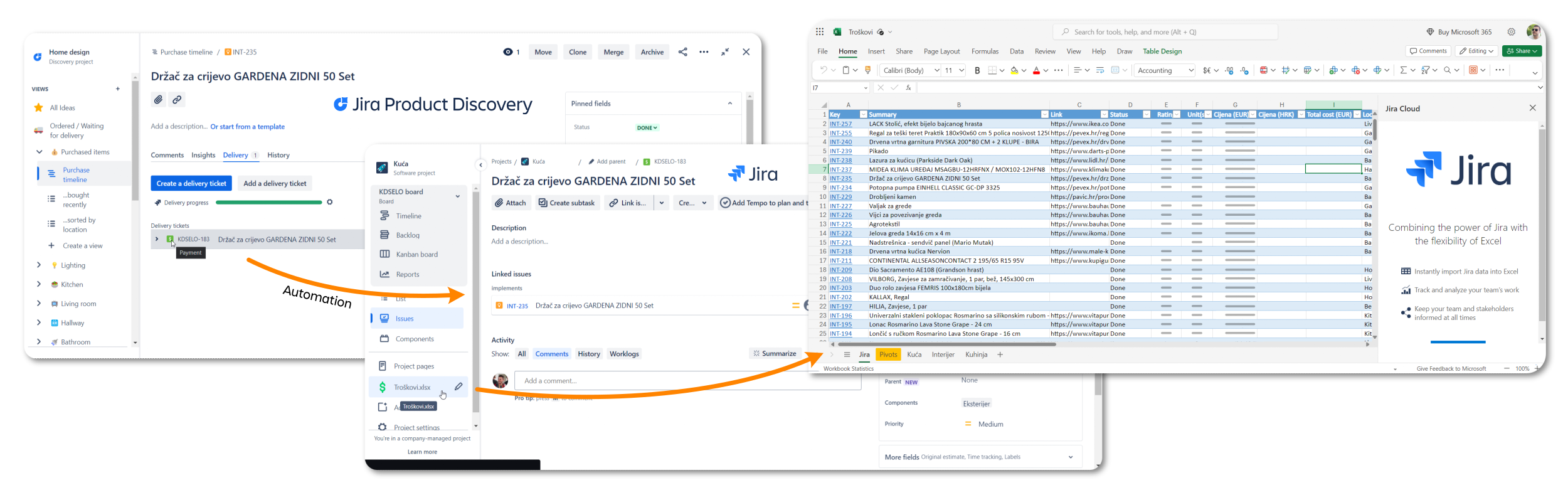
Recently, I’ve realized I could extract data directly from JPD to Excel, although there are some limitations, such as data from calculated/formula fields not being pulled into the Excel table (cells with values will be empty). I’d say this is still a work in progress, and there is also an idea of moving expense/budget tracking from Excel to Atlassian. 🤔 Time will tell…
Using Chrome extension for Insights
Gathering insights is a breeze with the JPD Chrome extension (I use it on Brave, and it works flawlessly)! I keep a webstore opened on one screen, and I go through the items listed there. Once I find something I like, I create an idea with the extension—by copying the item name into the idea summary and taking a screenshot (I’m not entirely sure why, but I think it’s because the idea looks better once you open it and there is an image attached 😆).
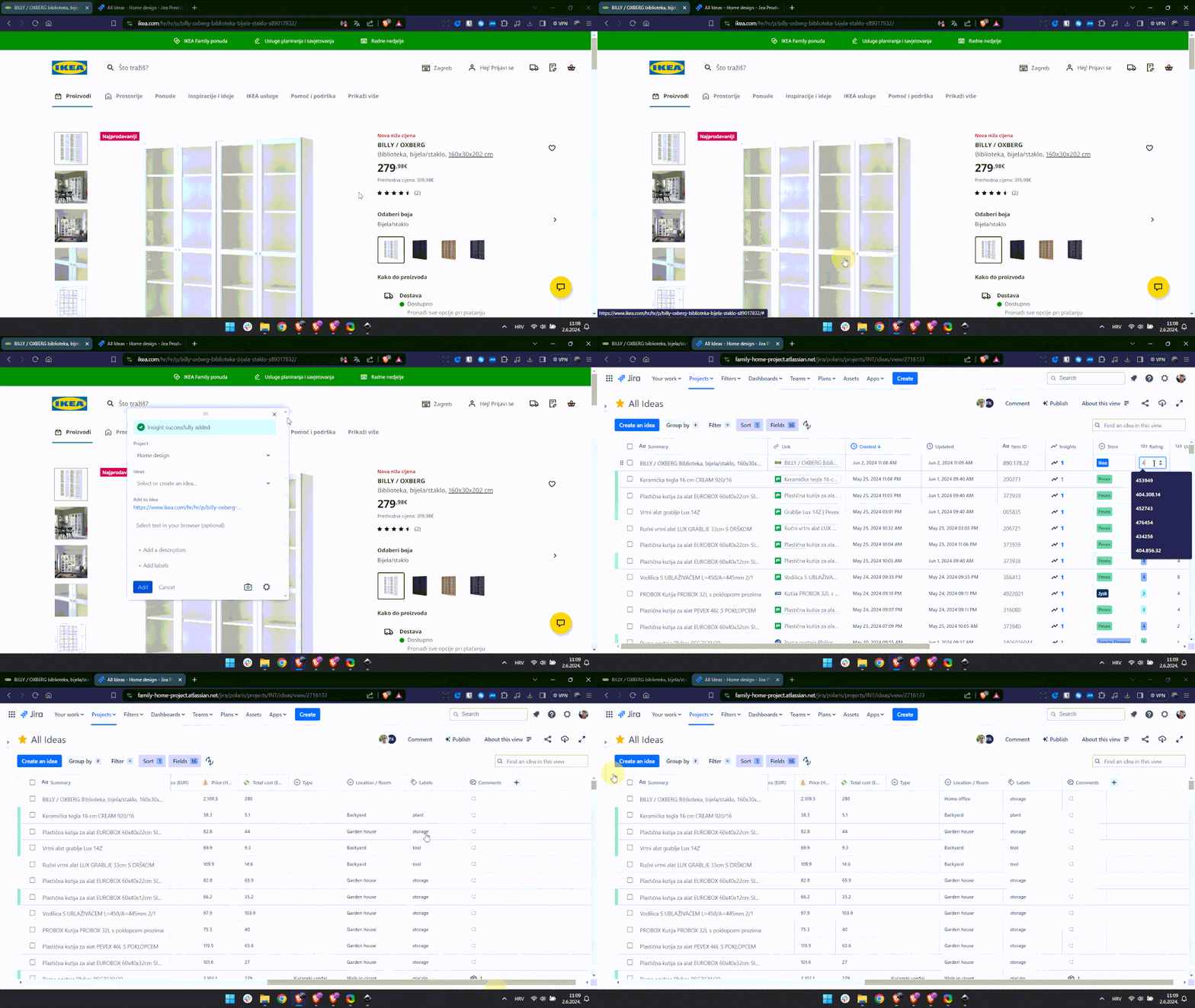
Usually, I have the JPD project opened on another screen. As soon as a new idea is created, I fill all required fields by copying values from the website. It would probably be great if I could also enter all those values directly via the extension (@JPD team - here’s something to think about 💡).
At one point, I usually go through all gathered ideas for a specific item I wish to purchase and make a decision among those. I find it much easier to decide between 5 to 10 items that I like (based on criteria such as personal rating and price) than going through a gazillion items listed on the Internet. Plus, this way, I can easily find where, when, and how much I’ve paid for something.
It's brilliant tool I keep on using!
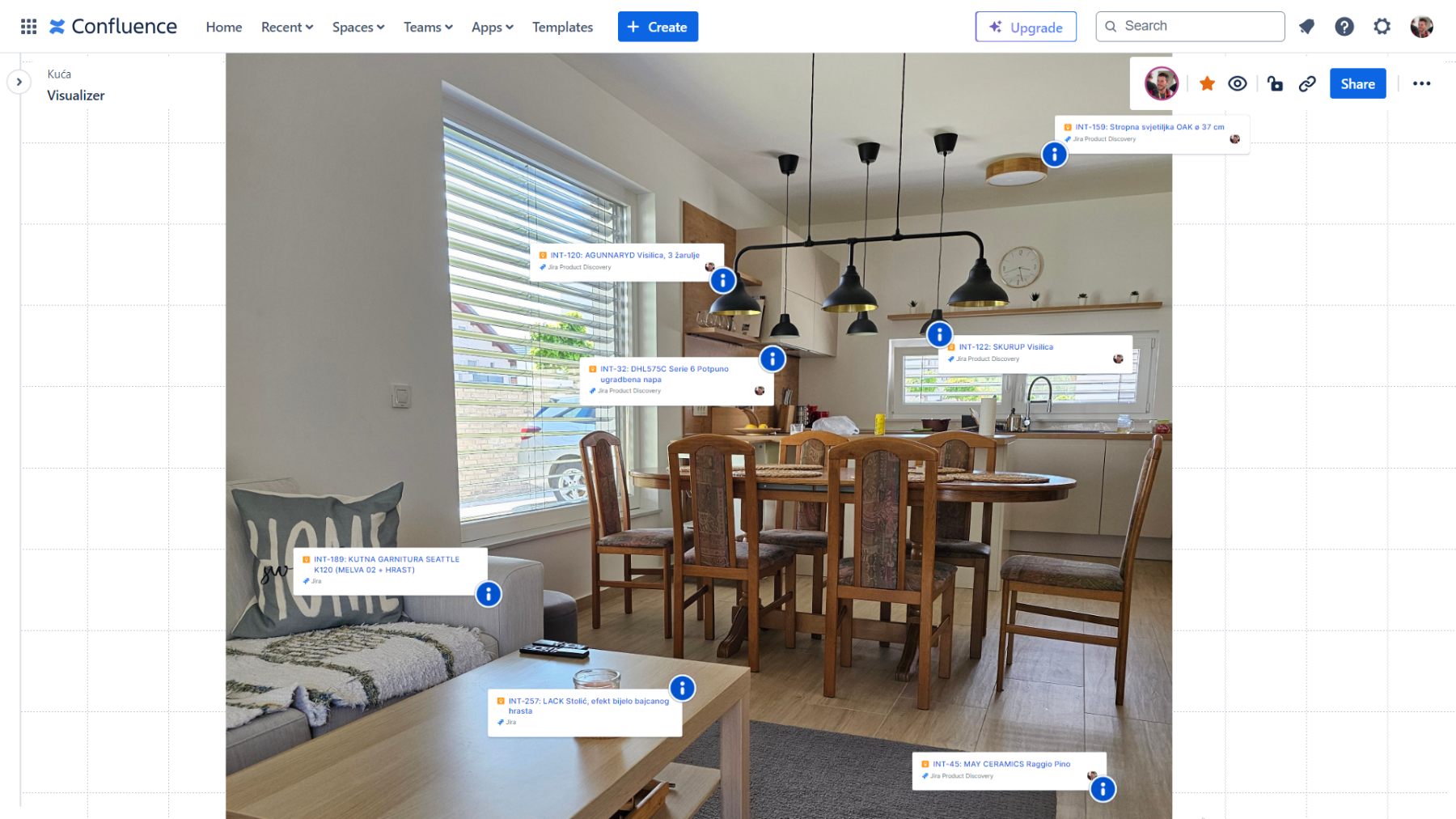
I have to confess that when I first created this JPD project, I didn’t think I would use it at all after moving into the house. However, it’s been more than half a year now, and I love it so much that everything that isn’t groceries and such goes through JPD first before purchasing these in stores. It has become a real lifesaver and probably a money-saver too. And also, in the end, I could maybe make a virtual walkthrough of the house and catalogue all the items visible there by linking JPD ideas from which these were originated. Here’s a quick glimpse of one area of the house where, pretty much everything you see in the photo is actually an idea that came from JPD.
Lastly, if you got up to this point, I would like to thank you for taking the time to read through all of this. I hope this use case has sparked some ideas for you as well. 😊
So, what would you use Jira Product Discovery for outside of work? I’m curious to hear your ideas!
← Previous article ㅤSeries HubㅤNext article: 5 November


