Unending email chains. Missed deadlines. Frustrated team members. Unhappy clients. Goosh, the classic signs of insufficient marketing project management. We know them all too well. You may be a part of a small startup or a large enterprise the challenges still remain the same that involves grappling with scattered tasks and fragmented communication channels. That's where Jira comes into picture- a robust project management tool that redefines collaboration, organization, and progress tracking. In this article I will take you through my journey of using Jira in project management for managing marketing tasks.
Understanding the power of Jira:
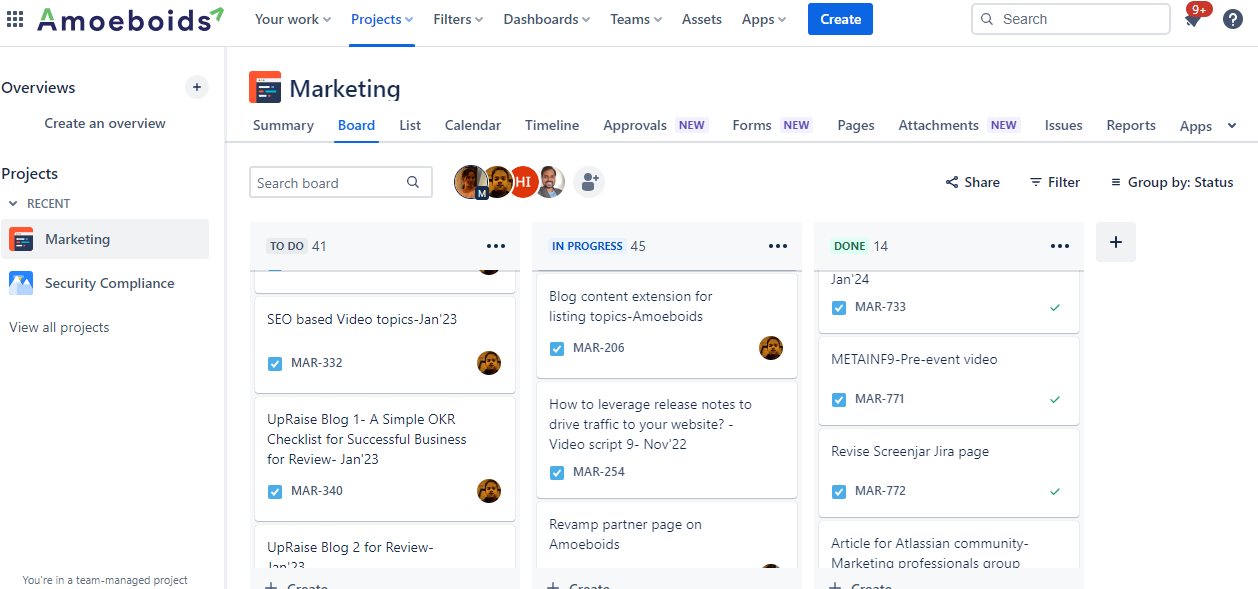
Initially project management for me involved multiple tasks piled up everywhere in the excel sheets which caused chaos and inefficiency. Managing projects consisted of using multiple platforms which caused confusion and led to missing of project deadlines. When I joined Amoeboids I was introduced to Jira. For me it was a totally different learning experience. The entire process was changed and everything—from task creation to progress tracking—was centralized in the Jira marketing project.
Simple Collaboration with Confluence
One of Jira's features is its smooth integration with Confluence. As a marketing manager, leveraging Confluence alongside Jira proved valuable. From developing complete marketing strategies to outlining content calendars and marketing campaign plans, Confluence served as a digital whiteboard. The capability to create parent pages across the board campaigns and arranging child pages for unique tasks helped me streamline collaboration and keep the team members aligned.
Productive Task Management
Jira's intuitive interface changed the complete challenge management procedure inside our marketing projects. In just a few clicks, I could create specific tickets with titles, descriptions, assignees, due dates and priority levels. Also, since it was integrated with Confluence; it helped me to attach relevant files and give links to other pages through which communication was done smoothly and also references were cleared. This entire process ultimately helped in improving team productivity and accountability by ensuring that all are aimed at achieving the defined marketing objectives.
Key Takeaways
Throughout my journey with Jira, I encountered diverse mastering opportunities and here are some takeaways:
- One stop solution to manage tasks and workflows.
- Enhanced and improved collaboration wherein team members assign tasks, comment etc.
- Seamless integration with other tools improves the entire process avoiding manual intervention.
- It is easily scalable and can accommodate larger team size projects too
- Provides robust reporting capabilities to gain visibility in the project progress.
As a marketing manager Jira as a tool has helped me manage projects by keeping all information in one place so that everyone has visibility over the progress of each task, including access to all assets. It has truly changed the way I handle my work responsibilities. By following best practices and tailoring Jira to your project’s specific needs, you can harness its power to drive project success.
Did you have a similar experience like mine with Jira? Share your thoughts in the comments below.


